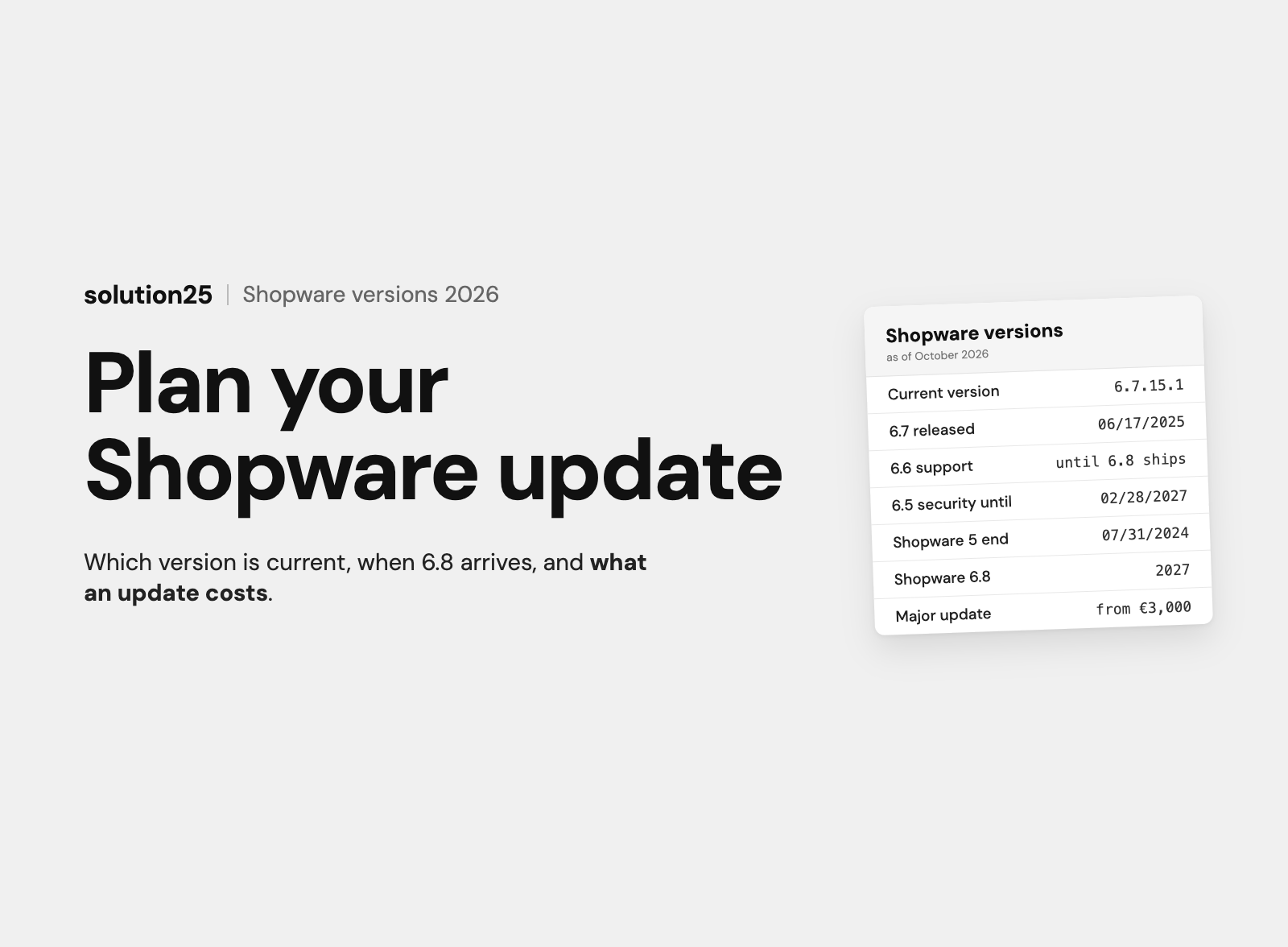

Shopware 6.7 is current, 6.8 has been pushed to 2027, and no Shopware 7 has been announced. Every version with its end of support, the update process in eight steps, common mistakes and the cost per update for UK merchants.
The current Shopware version is 6.7, released on 17 June 2025, most recently updated to 6.7.15.1 on 7 October 2026. Shopware 6.6 is in extended support, 6.5 only receives security updates until 28 February 2027, and Shopware 5 has been discontinued since 31 July 2024.
The next major version is called 6.8 and is planned for 2027. Shopware pushed it back by a year in November 2025. A “Shopware 7” has not been announced; everything you read about it online is speculation.
A safe Shopware update needs staging, a backup, and a plugin check, not just a click in the Administration. Professionally run stores update via Composer or the Shopware CLI. With an agency, a minor update costs £500 to £2,000 and a major update £3,000 to £15,000.
Before founding solution25, we ran our own online store and know what a failed update on a Monday morning means. Since 2017 we have been supporting Shopware stores in day-to-day operations, and updates are among the tasks we handle most often.
A store that keeps putting off updates first loses security support and then plugin compatibility, and every skipped major version makes the next step more expensive. This article is for store owners and ecommerce leads running their own Shopware store who want to check their version and plan the next update.
After reading it, you’ll be able to assess your version, determine the deadline for your next update, and plan an update with process, budget, and test plan yourself, or brief your agency precisely. You’ll also learn what is confirmed about 6.8 and a possible Shopware 7. The article is written for merchants running Shopware in the UK. All prices as of October 2026, excl. VAT.
Shopware maintains several version lines in parallel. The following table summarises the status as of 28 October 2026; the data comes from Shopware’s release calendar, endoflife.date, and the official changelog.
| Version | Released | Status in October 2026 | Security updates until | What to do |
|---|---|---|---|---|
| Shopware 6.7 | 17 June 2025 | Current major version, monthly minor releases, latest 6.7.15.1 | Open, at least until 6.8 is released (endoflife.date tentatively lists 28 February 2028) | Install minor updates regularly |
| Shopware 6.6 | 21 March 2024 | Extended support with direct patches (6.6.10.x, latest 6.6.10.30) | According to Shopware, until 6.8 is available; endoflife.date lists February 28, 2028 | Plan the update to 6.7 within the next twelve months |
| Shopware 6.5 | 3 May 2023 | Security updates only, via the Security Plugin | 28 February 2027 | Complete the update to 6.6 and 6.7 by early 2027 |
| Shopware 6.4 | 4 May 2021 | End of support | 14 May 2025 | Update immediately, via 6.5 and 6.6 to 6.7 |
| Shopware 5 (5.7) | 26 May 2021 | Discontinued | 31 July 2024 | Migrate to Shopware 6, which is a project in its own right |
If you’re on 6.7, install the monthly releases. If you’re on 6.6 or 6.5, you have a major update ahead of you, and for 6.5 it gets serious in early 2027.
Since February 2024, a new release policy has applied: Shopware publishes one major version per year. The last minor version of the previous major gets direct patch updates with selected bug fixes and security updates for one year, until the next major version replaces it.
After that comes another year in which only security vulnerabilities are fixed, through the free Shopware Security Plugin rather than new versions. Together that adds up to two years of support per major version. The plugin comes in the 4.x line for 6.7, 3.x for 6.6, and 2.x for 6.5; the 1.x line for 6.4 is no longer maintained.
Because Shopware 6.8 was pushed to 2027, Shopware extended the extended support for 6.6 until 6.8 is available. You can see it in the changelog: on 16 September 2026, security updates 6.7.14.1 and 6.6.10.25 were released on the same day.
Shopware 6 uses four digits: the 6 stands for the product generation, followed by major, minor, and patch. 6.7.0.0 was the major release, 6.7.1.0 the first minor release, and 6.7.14.1 a patch. The release type follows from which position holds the zero.
According to the release policy, a major comes out once a year, a minor on the first Monday of every month, and a patch as needed, for example for security vulnerabilities. About two months before each major there is a release candidate, meaning a preview version for testing, and Shopware SaaS is updated weekly. Our article on the Shopware changelog explains how to read the entries and which details matter.
Important for planning: minor and patch releases are built so that extensions keep working without changes. Shopware promises this in its Backward Compatibility Promise. Anything that breaks code is saved for major releases and deprecated in advance with a note on the target version.
Shopware itself says that major versions aren’t feature bundles but lay the technical foundation for the following year’s minor releases. That was especially true for 6.7 from 17 June 2025, because the rebuild mainly affected the Administration, caching, and accessibility.
System requirements for 6.7 according to Shopware: PHP 8.2 to 8.4, Node.js 20 or later, MySQL 8.0.17 or later or MariaDB 10.11 or later, and optionally Redis 7.0 or later. Our article on Shopware hosting helps you check whether your server meets them.
The features then arrived monthly: 6.7.1 in July 2025 with expanded B2B Components and units of measure per sales channel, 6.7.2 in September with performance and SEO improvements, 6.7.4 in November with expanded subscriptions, 6.7.5 in December with more flexible SEO control, and 6.7.7 in February 2026 with a redesigned cookie consent and better GA4 integration.
As of October 2026, the line is at 6.7.15.1. So if you haven’t updated since summer 2025, you’re missing more than a year of features, bug fixes, and security updates, even though the version is still “6.7”.
On 12 November 2025, Shopware announced that the next major version, 6.8, will be released in 2027 instead of 2026. Shopware cites the balance between progress, stability, and developer experience as the reason, and notes that the minor releases have been delivering the key innovations anyway.
Until then, Shopware is focusing on three areas: stability, performance, and security of the platform; better documentation and developer experience; and new features for agentic AI, meaning AI agents that carry out tasks on their own. At the same time, extended support for 6.6 was extended until 6.8 is available.
What 6.8 will remove is already marked in the code today: deprecated features carry the target version 6.8.0, such as the admin translation function $tc. The feature flags, meaning switches for innovations you can use early, for the cache rebuild and the redesigned webhooks are optional in 6.7 and become the default with 6.8. If you run custom plugins, work through these deprecations now, and the 2027 major update will be a small step.
As of 28 October 2026, there is no announcement of a “Shopware 7” on shopware.com, in the developer documentation, or in the release calendar. The latest official statement about the next major version concerns 6.8. The agency pages that rank on Google for the term confirm this too: they describe expectations, not facts.
The versioning logic also argues against a 7 coming soon: the leading 6 stands for the platform generation based on Symfony and Vue, and the major versions count up behind it. A real generational change like Shopware 5 to 6 wouldn’t be an update but a migration, and there is currently no sign of that.
The process is the same for minor and major updates; only the scope and depth of testing differ. It combines Shopware’s guide and the notes on hosting and deployment with our own practice.
Shopware itself advises in its guide: “Only start an update if you have the relevant experience”; otherwise, your partner agency should run the update.
Which of the three routes fits depends on the size of the store and whether someone works with shell access and Git.
| Method | Best for | Process | Limitations |
|---|---|---|---|
| Web updater in the Administration | Small stores without developers, few extensions | Settings, System, Shopware Update: check requirements and extensions, confirm the backup, install. Maintenance mode, download, and migrations run automatically | Shopware only recommends it for small instances: browser timeouts, memory limits, no version history in Git |
| Composer, manual | All professionally run stores, possible since 6.3 | Set the target version in composer.json, composer update, composer recipes:update, commit, deploy, then system:update:finish on the server | Requires shell access, Git, and someone who can read dependency conflicts |
| Shopware CLI (project upgrade) | Agencies, teams with CI/CD, stores with many extensions | An assistant checks readiness, sorts extensions into ready, update needed, check manually, or blocked, runs the Composer update, and writes a report | All extensions must be managed via Composer, locally stored plugins block the check |
The Composer route makes every update traceable: composer.json and composer.lock live in Git, every change has a commit, and rolling back the code takes one command. Shopware’s own guide describes this route as more stable because it doesn’t cause timeouts. Our article on Composer for Shopware explains exactly what Composer does here.
The shopware-cli project upgrade assistant goes one step further. With the --dry-run parameter, it only checks and writes a report to .shopware-cli/upgrade/report.md, containing the target version, PHP requirements, planned package changes, and the status of every extension. If a step fails, the assistant restores composer.json and composer.lock.
On rollbacks: blue-green deployments, which switch between two parallel environments, let you return to the old version without a database restore, but only if nothing but Shopware was updated. As soon as extensions have run their own migrations, the backup is the only way back.
The Shopware software itself is rarely the problem. In our projects, updates almost always go wrong in the same places.
If you develop your own plugins, Rector for Shopware and the codemods for the Administration save a lot of manual work. Both tools rewrite deprecated code, but the results need to be reviewed. We describe how to make custom plugin development update-proof from the start separately.
For Optimizely, we develop and maintain plugins that run on Shopware 5 and 6, WooCommerce, Magento, and Shopify. The shared logic sits in a core, and platform-specific adaptations live in separate extensions.
The plugins stay update-proof thanks to a fixed maintenance process: automated tests against new platform versions, patch releases, and monitoring that surfaces regressions, meaning bugs in previously working flows, early. According to the project report, the plugins run stably even through platform updates, emergency fixes are rarer, and Optimizely’s teams have fewer platform-specific escalations.
For your store, this means: the more custom plugins you run, the more an automated test that checks every new Shopware version before it goes live pays off.
The following ranges are based on experience from our projects, not quotes. They assume the code lives in Git and the store is updated via Composer. If you need to clean up first, that effort comes on top as a one-time cost.
| Update type | Example | Cost with an agency | Duration |
|---|---|---|---|
| Patch or security update | 6.7.14.0 to 6.7.14.1 | Usually included in the maintenance contract, £150 to £500 on its own | 1 to 3 hours including staging test |
| Minor update | 6.7.12 to 6.7.15 | £500 to £2,000 | Half a day to two days |
| Major update | 6.6 to 6.7 | £3,000 to £15,000 | 2 to 10 business days, more with many custom admin modules |
| Two major updates in a row | 6.5 to 6.7 | £5,000 to £25,000 | 2 to 4 weeks |
| Migration from Shopware 5 to 6 | 5.7 to 6.7 | From £20,000, mid-market £40,000 to £120,000 | 6 weeks to 6 months |
The range for a major update is explained almost entirely by the extensions. A store with ten Store plugins and a customised standard theme sits at the low end. A store with five custom plugins, two of them with admin modules, a custom theme, and an ERP integration sits at the high end.
For ongoing operations, our article on Shopware pricing lists £400 to £2,500 per month for maintenance, monitoring, and updates. That includes patch and minor updates; a major update is usually quoted separately. The rule of thumb stands: 10 to 20% of the original project cost per year for maintenance and expansion.
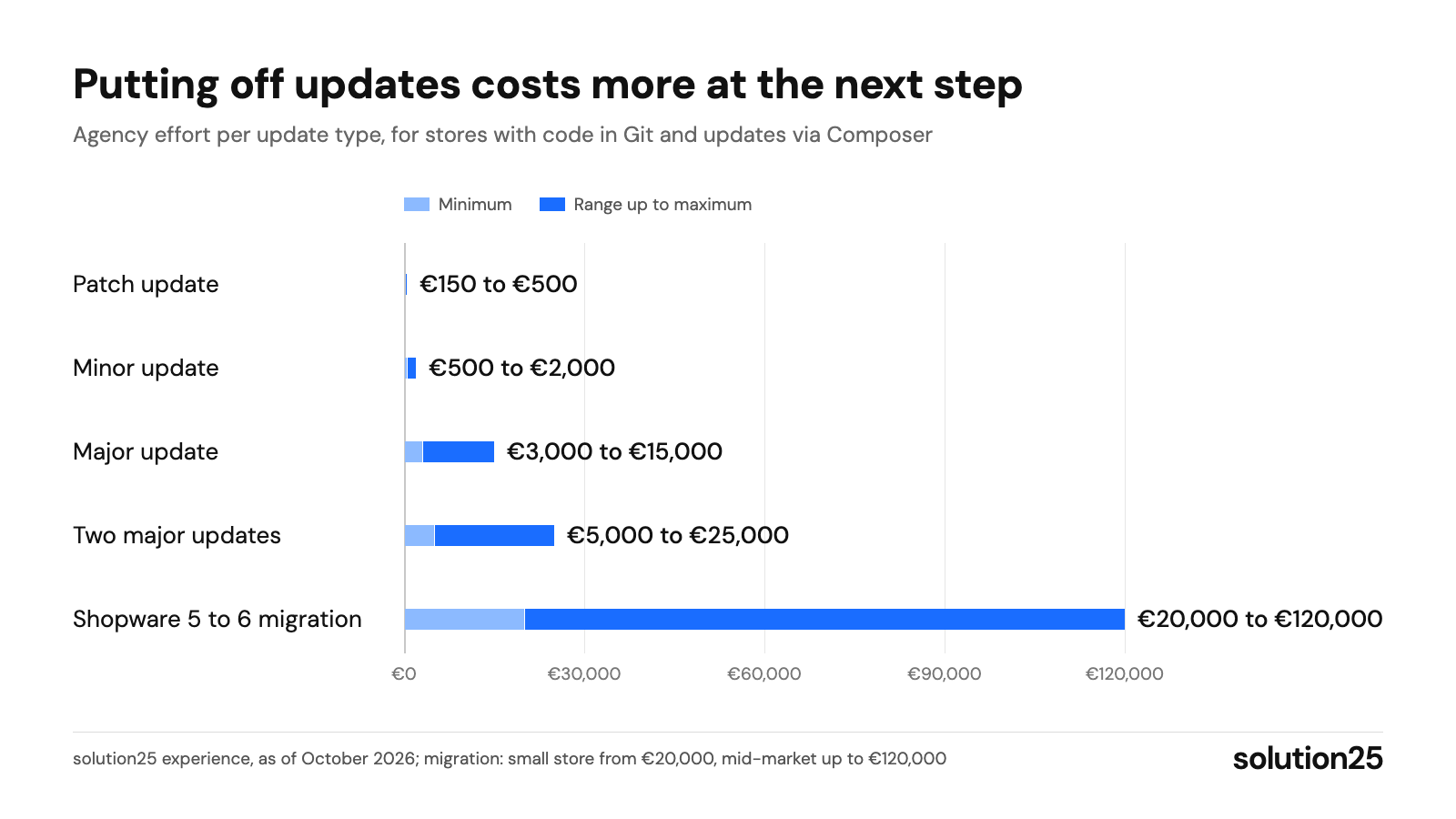
Figure: A patch costs a few hundred pounds, two postponed major versions up to £25,000; regular updates are the cheapest strategy. solution25 experience, as of October 2026; migration: small store from £20,000, mid-market up to £120,000
Shopware 5 has not been developed further since the end of July 2024, as stated in the end-of-life documentation. Since then there have been no proactive security updates; Shopware only responds to reported vulnerabilities. So if you search for “Shopware 5 update”, you won’t find a new version, you’ll find a decision.
The path to Shopware 6 isn’t an update but a migration: data comes over via the migration assistant, the theme and plugins are rebuilt or replaced, and the SEO structure needs redirects.
As a stopgap, the safefive initiative, an alliance of agencies without involvement from Shopware AG, offers paid bug fixes for Shopware 5. That buys time but doesn’t replace the migration. Our page on migrating from Shopware 5 to 6 explains how we approach it and what the migration costs.
Store on 6.7 with a maintenance contract: You’re on the right track. Check whether your agency actually installs the minor releases and whether Security Plugin 4.x is active. Start working through the 6.8 deprecations in your custom plugins.
Store on 6.6 or 6.5 without regular support: For 6.5, security support ends on 28 February 2027, and for 6.6 it only runs until 6.8 is released. Plan the major update to 6.7 for the first half of 2027 with a budget of £3,000 to £15,000, and for 6.5 with an intermediate step via 6.6.
Store on Shopware 5: Every month without security updates increases the risk, and the migration takes six to ten weeks for a small store and three to six months for a mid-sized store. Start with an inventory of plugins and data, not with the search for a theme.
Our take: We recommend installing minor releases bundled every one to three months and never putting off major updates until just before end of support. Small, regular steps cost less over the year than one big jump, because bugs can be traced to a specific version and plugins catch up gradually. If you’re still on 6.5, prepare the step to 6.6 on staging now and take it live right after peak season in January, so that security support doesn’t end on 28 February 2027 in the middle of the project.
After every update, monitor the first 48 hours closely and check your version status once a month.
| Metric | Tool | Benchmark |
|---|---|---|
| Version gap | Administration, changelog | No more than three minor releases behind the current version |
| Security updates | Changelog, Security Plugin | Installed within a few days of release |
| Errors after the update | Logs under var/log, monitoring | No new errors in the first 48 hours |
| Orders and conversion rate | Order overview, Google Analytics 4 | At the level of the same weekdays before the update |
| Load time | PageSpeed Insights | LCP (load time) up to 2.5 seconds, INP (responsiveness) up to 200 milliseconds |
Adjust course if updates regularly take longer than planned, the store falls more than one major version behind, or the same plugins repeatedly cause errors. In that case, a plugin audit, replacing problematic extensions, or automated tests help. The benchmarks are based on experience from our projects; the load time thresholds come from Google.
The current version is Shopware 6.7.15.1 from 7 October 2026. The 6.7 major version has been available since 17 June 2025 and receives monthly minor releases. The next major version, 6.8, has been announced for 2027.
The supported versions are 6.7 (current), 6.6 (extended support until 6.8 is released), and 6.5 (security updates only until 28 February 2027). Versions 6.1 to 6.4 are out of support, 6.4 since 14 May 2025. These are separate from the Community Edition, Rise, Evolve, and Beyond plans, which describe the licence and feature scope, not the software version.
In the Administration under Settings, System, Shopware Update, the installed version is displayed. On the server, the command bin/console --version returns the version number; alternatively, it’s listed in composer.lock under the shopware/core package.
Small stores use the web updater in the Administration, which checks extensions and system requirements and installs the update after you confirm the backup. For all other stores, Shopware recommends the Composer route or the shopware-cli project upgrade assistant. Either way, a staging test and a backup come before the update.
Technically, Shopware 5 keeps running, and according to Shopware existing contracts remain in place. But since the end of July 2024 there have been no regular security updates, only reactive fixes for reported vulnerabilities. For a store that processes customer data and payments, that’s not a long-term state.
Shopware 6 is a complete rebuild based on Symfony and Vue with an API-first architecture, Store API and Admin API, Rule Builder, Flow Builder, and Shopping Experiences. The plugin system isn’t compatible, which is why there is no update path, only migration with the migration assistant. Shopware 6 is also offered in three operating models: self-hosting, PaaS, and SaaS.
No. Shopware has not announced a version 7; the next major version is 6.8 in 2027. Articles that give a release date for Shopware 7 are based on guesswork.
The most common causes are a deactivated or incompatible extension, database migrations that weren’t run (system:update:finish is missing), an uncompiled theme, a stale cache, or a PHP version that doesn’t match the target version. The error message is in the logs under var/log or in the Administration under Settings, System, Logs. If the cause can’t be fixed within the agreed time, restore the backup.
Not sure which version your store is running, which plugins are blocking an update, or what the jump to 6.7 would cost? Get in touch: we’ll review your version, extensions, and system environment and give you a number you can plan with. We support UK merchants remotely from Bremen and Prishtina.
Already running a store? Besides technology and version status, our free store audit also shows where your store is leaving revenue on the table today.

Besnik Bilalli is the founder and CEO of solution25, the Shopware agency from Bremen. Before founding the agency in 2017, he built his own online store and grew it to more than 500 orders a day. Since then he has been helping merchants with Shopware projects, from the first budget to ongoing operations. He’s happy to answer questions about this article personally: get in touch.
Responsible for content and updates: Besnik Bilalli. Last updated: October 2026. Next content review: January 2027.