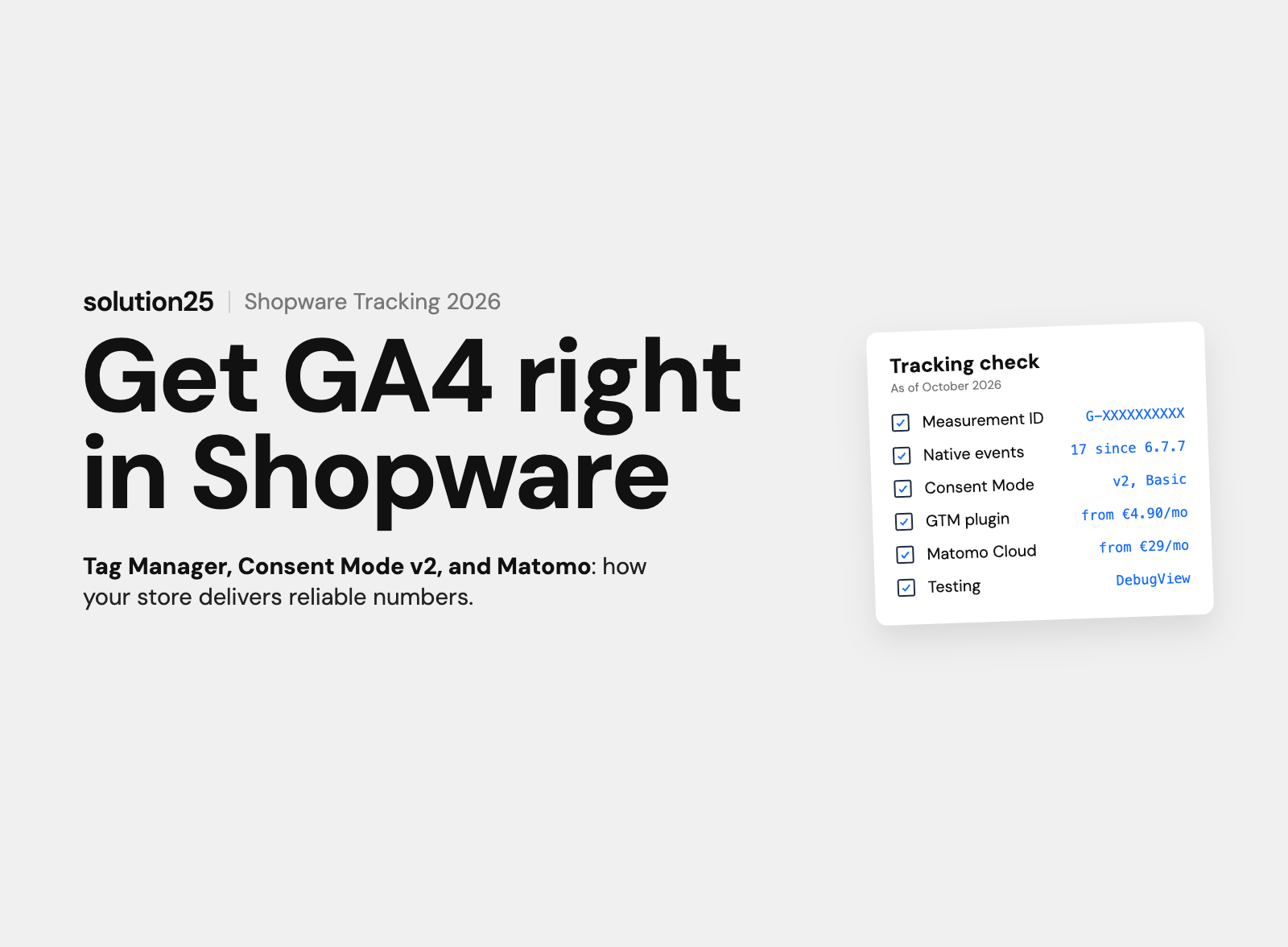

Shopware 6 ships with GA4 and has sent seventeen e-commerce events since 6.7.7, but UK shops need consent under PECR and Consent Mode v2. This guide covers the built-in features, Tag Manager, Matomo and the most common mistakes.
Shopware 6 already ships with Google Analytics 4. Enter the measurement ID in the sales channel under “Analytics,” enable Google Analytics, and check your cookie banner. Since Shopware 6.7.7, the store sends 17 events out of the box, including view_item, add_to_cart, begin_checkout, and purchase.
If you need Google Ads, Meta, or server-side tagging, use Google Tag Manager. A GTM plugin from the Shopware Store costs €4.90 to €19.99 per month (according to the provider) and provides a documented dataLayer for GA4, Google Ads, and other tags.
No consent, no tracking. In the UK, PECR requires consent before analytics cookies are set, unless your set-up meets the narrow statistical-purposes exception added by the Data (Use and Access) Act 2025, and Google requires Consent Mode v2 for advertising features in the UK and the EEA. Matomo is the alternative with a server location of your choice, but it also needs either consent or a set-up that meets that exception.
Before founding solution25, we grew our own online store to more than 500 orders a day, and that would not have been possible without reliable tracking data. Since 2017, we have been setting up Analytics and Tag Manager in Shopware projects, from the Community Edition to B2B stores with multiple sales channels.
If you steer your ad budget and store changes based on GA4, you need numbers you can trust: double-counted or missing orders lead straight to bad decisions. This article is for shop owners and e-commerce and marketing leads in the UK running a Shopware 6 store who want to set up GA4 or audit their existing tracking.
After reading, you will be able to decide whether built-in features, Tag Manager, or Matomo fit your store, set up GA4 step by step, and verify that your tracking counts every order exactly once and only with consent. All prices as of October 2026, plus VAT; Store prices in euros according to the provider. This article is not legal advice.
GA4 shows which channels bring visitors in, at which step of the purchase funnel they drop off, and how much revenue each channel generates. Technically, the store sends an event with product and order data to Google for every action, and in Shopware’s default setup only after consent.
There are three ways to connect Google Analytics 4 to Shopware 6. They differ less in initial setup effort than in what you can measure with them later.
| Option | Setup | Ecommerce events | Other tags | Cost | Best for |
|---|---|---|---|---|---|
| Shopware built-in (gtag.js) | Measurement ID in the sales channel, about 15 minutes | 17 standard events from 6.7.7, not customisable | Only Enhanced Conversions for Google Ads | €0 | Stores that only need GA4 |
| Google Tag Manager via plugin | Container, plugin, tags, 1 to 2 days | Documented dataLayer, extensible | As many as you like, without changing the store | €4.90 to €19.99 per month | Stores using Google Ads, Meta, Microsoft Ads, or server-side tagging |
| Manual theme integration | Template extension, custom-coded events | Only what you build yourself | Possible, but every change is a deployment | Developer hours | Headless frontends and edge cases |
Our take: We recommend the built-in features as long as GA4 is your only tracking tool. As soon as Google Ads conversion tracking or a second pixel comes into play, Tag Manager is worth it. Running both at the same time is the most common mistake we find in store audits: GA4 then counts every order twice.
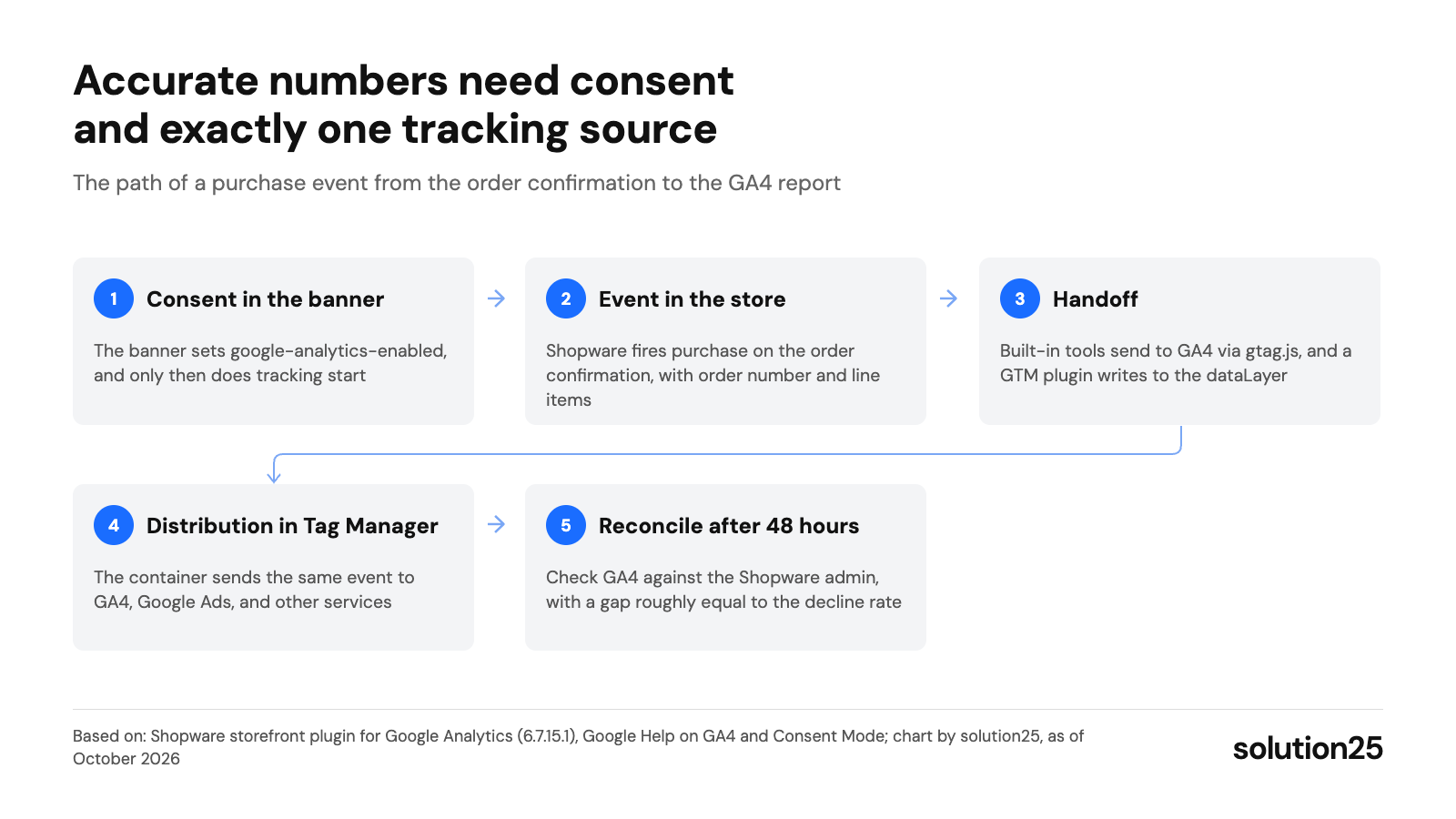
Figure: The graphic shows where numbers get lost or duplicated: without consent, with two parallel tracking sources, and without reconciling against the admin. Sources: Shopware storefront plugin for Google Analytics (6.7.15.1), Google Help on GA4 and Consent Mode; chart by solution25, as of October 2026
Universal Analytics stopped processing data on July 1, 2023, and since July 2024 the old properties and their data have been deleted. If your Shopware admin still shows an ID with the prefix “UA-“, your tracking has been going nowhere for over three years.
To get started, you need a Google account with Editor rights in Analytics, admin access to Shopware, and an active cookie banner.
Create the property before your first test. GA4 does not backfill data, and a new filter takes 24 to 36 hours to take effect.
Shopware 6 has its own Google Analytics integration in the storefront. It loads gtag.js and sends the most important ecommerce events without any plugin.
In the admin, open the sales channel and switch to the “Analytics” tab. The six fields are described in the Shopware documentation.
| Field | Function | Our recommendation |
|---|---|---|
| Tracking ID | The GA4 measurement ID (format G-XXXXXXXXXX) | Enter the matching ID for each sales channel |
| Enable Google Analytics | Turns on tracking for this sales channel | Only enable once the cookie banner is in place |
| IP anonymization | Sets the anonymize_ip parameter in the gtag call | Enable. According to Google, GA4 does not store IP addresses anyway, so the switch does no harm |
| Track orders | Sends the purchase event with order value and line items | Enable, otherwise revenue is missing |
| Enhanced Conversions | Sends the hashed email address to Google Ads after purchase | Only with marketing consent and a notice in the privacy policy |
| Track off-canvas cart | Also fires view_cart when the side cart opens | Turn off if the cart opens automatically after every “Add to cart,” otherwise every view is counted twice |
After saving, clear the cache and open the storefront in a private window. The script only loads once the cookie banner has saved consent for statistics or marketing.
With version 6.7.7.0, released February 2, 2026, Shopware expanded its GA4 integration. The storefront now registers 17 event classes, up from 13. The release notes list the new events, and the storefront plugin’s source code confirms the list.
This covers Google’s recommended ecommerce events, which GA4 uses to populate the purchase funnel and product reports. Stores on 6.6 or on 6.7 versions before 6.7.7 send neither view_cart nor the shipping and payment steps.
The Shopware integration sends data to GA4 only. You cannot connect Google Ads conversions, the Meta Pixel, Microsoft Ads, or a server container with it, and you cannot change or extend the events without custom development. For custom events, the Shopware documentation explicitly points to extensions from the Store.
Google Tag Manager separates tracking from the store code. The store provides a dataLayer with product, cart, and order data, and in GTM you decide which tag sends which data where. For an explanation of tags, triggers, and variables, see our article on Google Tag Manager in Shopware.
Shopware has no ecommerce dataLayer for Tag Manager. That comes from plugins that embed the container, output events as dataLayer pushes, and pass consent on to Consent Mode. Here are four established extensions compared, with prices from the Shopware Store:
| Extension | Vendor | Price (net) | Compatible with | Highlights |
|---|---|---|---|---|
| GA4, Google & ChatGPT Ads with Google Tag Manager & Server-Side Tagging | MISSION OM GmbH | €19.99 per month or €215.99 per year | 6.1 to 6.7.15.1 | Consent Mode v2 including Advanced, server-side tagging, templates for ten consent tools, 94 reviews at 5.0 stars |
| Google Tag Manager, GA4 & Google Ads (including server-side tracking) | Biloba IT | €14.99 per month or €149 per year | 6.0 to 6.7.15.1 | Ready-made container import, Consent Mode v2 with optional Advanced mode, eight consent tools, 16 reviews at 5.0 stars |
| Google Tag Manager + GA4 + Remarketing | codiverse | €9.99 per month or €99.99 per year | 6.1 to 6.7.15.1 | Quick-start container, server-side purchase tracking via Measurement Protocol, 19 reviews at 4.8 stars |
| Google Tag Manager GA4 + GAds + Server-Side Tracking + Enhanced Conversions | ACRIS E-Commerce GmbH | €4.90 per month or €49.90 per year | 6.4.18 to 6.7.15.1 | Two container templates, Consent Mode Basic and Advanced, built to work with ACRIS EU Cookie Policy Pro, 10 reviews at 4.9 stars |
All four offer a free trial month and run on the current version 6.7.15.1. The price differences come mainly from server-side features and the number of supported ad channels. For how subscription licences like these fit into your overall budget, see our article on Shopware pricing.
Server-side tagging, meaning your own GTM server container on your domain, extends cookie lifetimes and gets around some ad blockers. It does not replace consent and only pays off with a significant ad budget, since hosting and maintenance come on top.
The same container will later hold the Meta Pixel, Microsoft Ads, or affiliate tags. That is exactly what Tag Manager is for: one event from the store, as many recipients as you need.
The third option, adding the snippet yourself via a template extension, delivers no ecommerce data without a plugin and has to be updated with every theme update. For standard storefronts it does not pay off; for headless frontends it is the only way.
GA4 has a fixed list of recommended events for online retail. The “Ecommerce purchases” report and the purchase funnel only fill up if event names and parameters match exactly. The requirements are in the GA4 developer documentation.
| Event | When it fires | Core parameters | Common source of errors in Shopware |
|---|---|---|---|
| view_item_list | Category, search, and cross-selling lists | item_list_id, item_list_name, items | A missing item_list_name makes lists indistinguishable in the report |
| view_item | Product detail page view | currency, value, items with item_id or item_name | item_id differs from the ID in the Merchant Centre feed |
| add_to_cart | Click on “Add to cart”, from lists and off-canvas | currency, value, items with quantity | Depending on the plugin, a quantity change in the cart counts as a new add_to_cart |
| begin_checkout | Click on “Proceed to checkout” | currency, value, coupon, items | Custom theme buttons often lack the selector, so the event never fires |
| add_shipping_info, add_payment_info | Selecting shipping and payment method | shipping_tier, payment_type, items | Only available from Shopware 6.7.7 or via plugin |
| purchase | Order confirmation (checkout/finish) | transaction_id, value, tax, shipping, currency, items | Reloading the order confirmation or returning from the payment provider sends purchase again |
For every element in the items array, Google requires at least item_id or item_name, and recommends both. Whenever you send value, currency must be in the event too, otherwise GA4 calculates revenue incorrectly or not at all. An event can contain up to 200 items.
A simplified purchase event from a Shopware store looks like this: transaction_id “10042” (the order number), value 189.90, tax 31.65, shipping 4.90, currency “GBP”, and two items with item_id (product number), item_name, item_brand, item_category, price, and quantity. Decide up front whether value is sent gross or net, otherwise month-over-month comparisons are worthless.
The transaction ID is your key for reconciling with the Shopware admin. Check whether your plugin catches a reload of the order confirmation page, otherwise the same order number will show up in GA4 multiple times.
Google Analytics stores cookies in the browser and reads them. In the UK, regulation 6 of PECR requires consent for this, based on clear and comprehensive information. Exceptions apply to what is strictly necessary to provide a service the user has requested and, since the Data (Use and Access) Act 2025, to analytics used solely to improve your site, provided visitors are informed and can object easily. According to the ICO, that exception only covers third-party tools that act purely on your behalf, so GA4 in its usual configuration with Google signals and advertising links still needs consent. Germany handles this even more strictly under § 25 (1) TDDDG.
Under UK GDPR and ICO guidance, pre-ticked boxes, continuing to browse or a plain “OK” button do not count as consent, rejecting must be as easy as accepting, and withdrawal must not be hidden in the privacy policy. Germany’s Data Protection Conference takes the same line in its guidance for providers of digital services.
Then there is Google’s side: Google requires advertisers with users in the EEA and the UK to use Consent Mode v2 to keep using measurement, personalised ads, and remarketing, and has enforced this since March 2024. Without the signals, a Google Ads account loses audiences and conversion modelling, even if users have consented.
In Basic mode, Google tags stay blocked until consent is given, and no data flows to Google. In Advanced mode, the tags load immediately and send cookieless pings without consent, which Google uses to model missing conversions. Basic is the right choice for most stores; Advanced is controversial in the UK and the EU because data goes to Google even without consent.
The default banner is enabled under Settings, Basic information, “Legal and privacy” with the option “Use default cookie notification.” The “Accept all cookies” button is optional; without it, visitors have to choose each cookie group individually.
Technically, when consent is given, the banner sets the cookies google-analytics-enabled (Statistics group) and google-ads-enabled (Marketing group). Shopware’s analytics script only starts once one of these cookies has the value 1, sets the four consent signals to denied by default, and updates them when the visitor clicks in the banner. That corresponds to Basic mode in Consent Mode v2.
If you use an external consent tool, it must set exactly these two cookies, otherwise Shopware’s tracking stays silent or, in the worst case, runs without consent. Since version 6.7.3, Shopware also shows the banner again whenever the cookie configuration changes, for example after adding a new tag.
What matters is not the tool itself but that it sets the Shopware cookies, supports Consent Mode v2, and offers rejecting on equal footing. Every new tag in GTM is also a new purpose that must appear in the banner and in the privacy policy.
Matomo is the most widely used open-source alternative to Google Analytics. According to its pricing page, the on-premise version is free, with unlimited users and hits, and runs on your own server or with your hosting provider in the UK or the EU. Matomo Cloud starts at €29 per month (net, according to the provider) for 50,000 hits, data is stored in Frankfurt, and the trial lasts 21 days.
The Shopware integration runs through Store plugins, such as Matomo (Piwik) Tracking and Matomo (Piwik) E-Commerce by Martin Eisenführer (from €2.91 and €3.33 per month according to the provider) or Matomo Tracking and Ecommerce by Campit (from €5.00 per month according to the provider). They send product views, cart, and orders to the ecommerce module.
The common belief that Matomo always runs without a cookie banner does not hold. For Germany, Matomo’s own FAQ recommends treating JavaScript tracking as requiring consent. In the UK, a self-hosted Matomo used only to improve your site may fall under the PECR statistical-purposes exception, provided visitors are informed and can object easily; server-side log analytics is clearly out of scope.
On top of that, Google Ads and conversion modelling only work with Google signals. Stores selling through Google Merchant Centre and Performance Max campaigns cannot avoid Google Ads tags in Tag Manager.
For detailed setup instructions, see our article on Econda and Matomo for Shopware.
No setup goes live untested. GA4 includes DebugView, a tool that shows every event from a single device in real time with all its parameters.
Test on your staging environment with a separate GA4 property. Every test order in the live property permanently skews revenue.
The limits of measurement are part of the analysis: GA4 only counts visitors who have consented, and ad blockers drop additional events. The Shopware admin remains the source of truth for revenue and orders; GA4 shows channels, trends, and funnel drop-off.
At the beauty and skincare brand HelloBody, tracking was fragmented before the Shopware storefront rebuild and did not show how users interacted with the content. In the project, we restructured the events, improved purchase funnel visibility, and set up monitoring.
According to the project report, HelloBody gained precise insights into user behaviour as a result. The team was able to prioritise changes by their impact on conversion rate, evaluate campaigns more accurately, and plan demand and inventory more reliably. For your setup, this means: only once events and funnels are cleanly defined can you rank initiatives by their impact on revenue.
Three questions are enough to decide.
In the admin, open the sales channel, go to the “Analytics” tab, enter the GA4 measurement ID (format G-XXXXXXXXXX), turn on “Enable Google Analytics” and “Track orders,” and clear the cache. The cookie banner must be active, otherwise the script will not load.
Since version 6.7.7, there are 17 events, including view_item_list, view_item, add_to_cart, remove_from_cart, view_cart, begin_checkout, add_shipping_info, add_payment_info, purchase, and add_to_wishlist. Earlier versions send 13 events, without view_cart and without the shipping and payment steps.
Not for GA4 alone. As soon as Google Ads conversions, the Meta Pixel, Microsoft Ads, or server-side tagging come into play, Tag Manager saves you from making any further changes to the store. The matching plugins cost €4.90 to €19.99 per month and come with ready-made container templates.
With prior consent, a banner with an equally prominent reject button, Consent Mode v2, and a complete privacy policy, GA4 can be used in the UK. Google states that GA4 does not log or store IP addresses. Whether that is sufficient in your case is something to clarify with your data protection officer.
Consent Mode passes the user’s choice to Google in four signals: analytics_storage, ad_storage, ad_user_data, and ad_personalization. Google requires it from advertisers with users in the UK and the EEA to keep using remarketing, audiences, and conversion modelling. Shopware’s own integration sets the signals anyway; plugins have to do the same.
Because GA4 only counts buyers who accepted in the banner, and because ad blockers and browser privacy features drop additional events. A gap equal to the rejection rate is normal. Larger discrepancies point to missing consent linkage, duplicate events, or payment providers as referrers.
Matomo offers full data ownership and a server location of your choice, and the on-premise version costs nothing. But it does not replace Google Ads signals, and Matomo itself recommends consent for JavaScript tracking in Germany, and in the UK you need either consent or a set-up that meets the PECR statistical-purposes exception. For stores with a meaningful Google Ads budget, combining Matomo and GA4 via Tag Manager is usually the better solution.
GA4 and Google Tag Manager are free. You pay for the GTM plugin (€4.90 to €19.99 per month according to the provider), a consent tool (€0 to around €10 per month for Store plugins), and setup, for which we estimate one to two agency days with GTM, Consent Mode, and Google Ads conversions.
Running a Shopware shop in the UK and not sure whether it is double counting, losing orders, or tracking without consent? Get in touch and we will review your GA4 and GTM setup, implement Consent Mode v2, and document the dataLayer for your marketing team. You can find more integrations under Shopware marketing integrations.
Already running a Shopware store? Our free store audit checks conversion flow, load time, and SEO and shows you within two working days where your store is losing revenue. We review your tracking setup separately on request.
Learn more about how we work, our certifications, and our locations on the Shopware agency solution25 page.
Besar Bilalli is co-founder and Co-CEO of solution25, the Shopware agency based in Bremen. Before founding the agency in 2017, he and Besnik Bilalli built their own online store without any startup capital and grew it to more than 500 orders a day. Since then, he has supported merchants on Shopware projects, from platform selection to ongoing operations. He is happy to answer questions about this article personally: get in touch.
Responsible for content and updates: Besar Bilalli. Last updated: October 2026. Next content review: January 2027.
