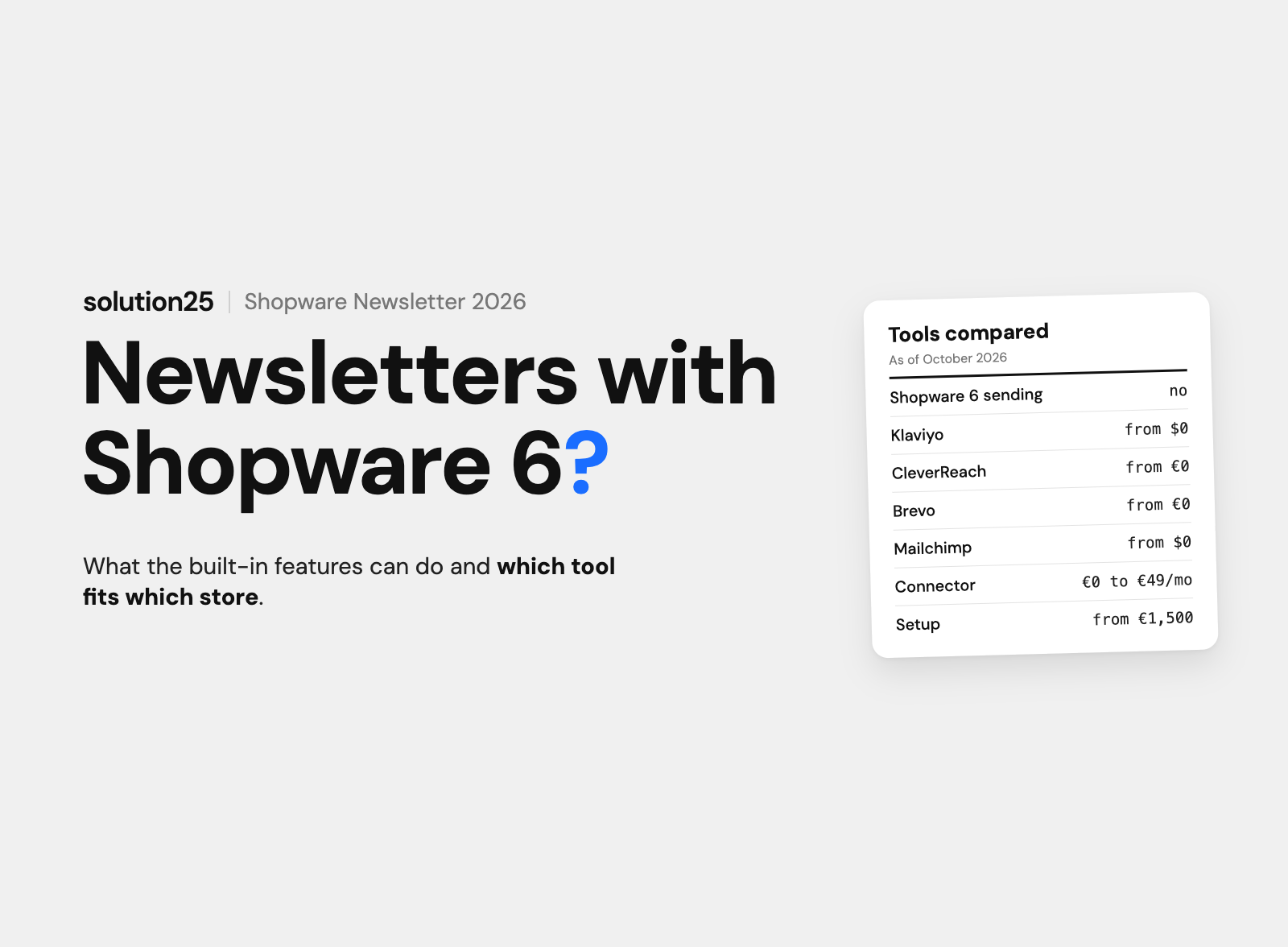

Shopware 6 collects newsletter recipients, but it doesn’t send campaigns. Which tools are worth it for UK shops, what connectors and setup cost, and which five automations drive revenue.
Shopware 6 manages newsletter recipients and double opt-in, but it doesn’t send newsletters. Shopware’s documentation says so explicitly: there’s no built-in function for sending newsletters, and the recipient module hands the addresses over to a sending tool.
For campaigns and automations, you need an external tool. Klaviyo, CleverReach, Brevo, and rapidmail offer free official extensions in the Shopware Store. Mailchimp, ActiveCampaign, and GetResponse connect via third-party extensions for €10 to €49 a month, according to the providers.
Tool costs start at zero. Free plans are enough for 250 recipients. In our experience, mid-sized shops budget £100 to £400 a month for the tool and a one-time £4,000 to £8,000 for setup with connector, templates, and the first automations.
If you only look at the built-in features, you often only realise after launch that Shopware doesn’t send campaigns and that consents have to be synced between two systems. This article is for UK shop owners and marketing managers running their own Shopware 6 store who want to choose, switch, or properly connect a newsletter tool.
After reading it, you’ll be able to choose the right tool for your list size, estimate first-year costs, and plan the rollout in seven steps without losing any consents.
Before founding solution25, we grew our own online store to more than 500 orders a day, and the newsletter was one of the cheapest revenue channels from day one. Since 2017, we’ve been connecting email marketing tools to Shopware, including our own extension for Listrak in the Shopware Store. All prices as of October 2026, excluding VAT. Our own estimates are given in pounds sterling; prices of Shopware, extensions and email tools are shown in the providers’ currencies, according to the providers.
Shopware 6 takes care of consent, not sending: according to the newsletter documentation, a module transfers the recipients to a sending tool via an interface.
| Feature | Included in Shopware 6 | Details |
|---|---|---|
| Newsletter recipients | Yes | List under Marketing, filters by status, language, and sales channel, tags, editing and deleting individual entries |
| Double opt-in | Yes | Configurable per sales channel, separate option for registered customers, custom confirmation domain, confirmation link with no expiration |
| Signup form | Yes | Newsletter form block in Shopping Experiences, signup in the customer account, link in the footer or service menu |
| Email templates | Yes | Templates for signup and double opt-in, Twig variables, header and footer per sales channel, test send |
| Flow Builder | Yes | Triggers for signup, confirmation, and unsubscribe, actions such as send email, add tag, assign customer group |
| Newsletter sending | No | No campaigns, no editor, no send scheduling |
| Analytics and A/B tests | No | No open or click rates, no revenue per email |
| Abandoned cart emails | No | No trigger in the Flow Builder, delayed actions only in the Beyond plan |
Under Marketing, Content, Newsletter recipients, Shopware keeps every address with a status. The documentation lists four values; technically, they’re called notSet, direct, optIn, and optOut.
If you transfer the list to a tool, you have to bring the status along. An import that creates all addresses as active turns pending and unsubscribed addresses into marketing recipients without consent. We describe how the list is structured under newsletter recipients in Shopware 6.
The settings are under Settings, Content, Newsletter, either for all sales channels or for individual ones. There are two separate switches: double opt-in for signup via the form, and double opt-in for registered customers who activate the newsletter in their customer account. Make sure both are enabled.
According to the documentation, the activation link doesn’t expire, so unconfirmed entries should be cleaned up regularly.
The form is created in Shopping Experiences: create a layout for a store page, add a newsletter form block, and assign the layout to a category in the service or footer menu. A checkbox in the registration form or the checkout isn’t part of the standard; for that, there are extensions like Newsletter signup at registration and checkout from ACRIS for €4.90 a month, compatible up to Shopware 6.7.15.1. Pop-ups with a signup coupon cost between €4 and €17 a month in the Store.
The Flow Builder has three newsletter triggers: newsletter.register on signup, newsletter.confirm on confirmation, and newsletter.unsubscribe on unsubscribe. Available actions include send email, add or remove tag, and assign customer group.
A typical flow: on newsletter.confirm, the customer gets the tag “Newsletter active” and a welcome email with a coupon code. Our guide to the Shopware 6 Flow Builder shows how to create and test flows.
The limits aren’t a flaw but a deliberate choice by Shopware: the platform stores data and consents, and sending is left to specialised tools. Besides the missing campaign sending and analytics from the table, you should know three things.
If you still want to send from within Shopware, the Store has the Newsletter extension from webpiloten for €39.95 a month or €399.50 a year, compatible up to 6.7.13.1. It builds recipient groups via the Rule Builder, sends via the message queue (the queue for background tasks), and keeps the data in the store. The vendor itself points out that many hosting providers limit emails per hour, so beyond a few thousand recipients, a sending service is the safer choice.
Marketing automation means an event triggers a sequence of messages, delayed, personalised, and with exit conditions. Shopware supplies the events and the data for this; the sequence itself usually runs in the email tool.
Anything with a timeline and behavioural data: welcome series over several days, abandoned cart reminders, repeat purchase, re-engagement of inactive customers, send time optimisation, and A/B tests. The tools come with templates for this, and Shopware supplies orders, products, and cart events via the connector.
The separation stays clean if Shopware is the system of record for master data and consents, and the tool is the system for campaigns and sequences.
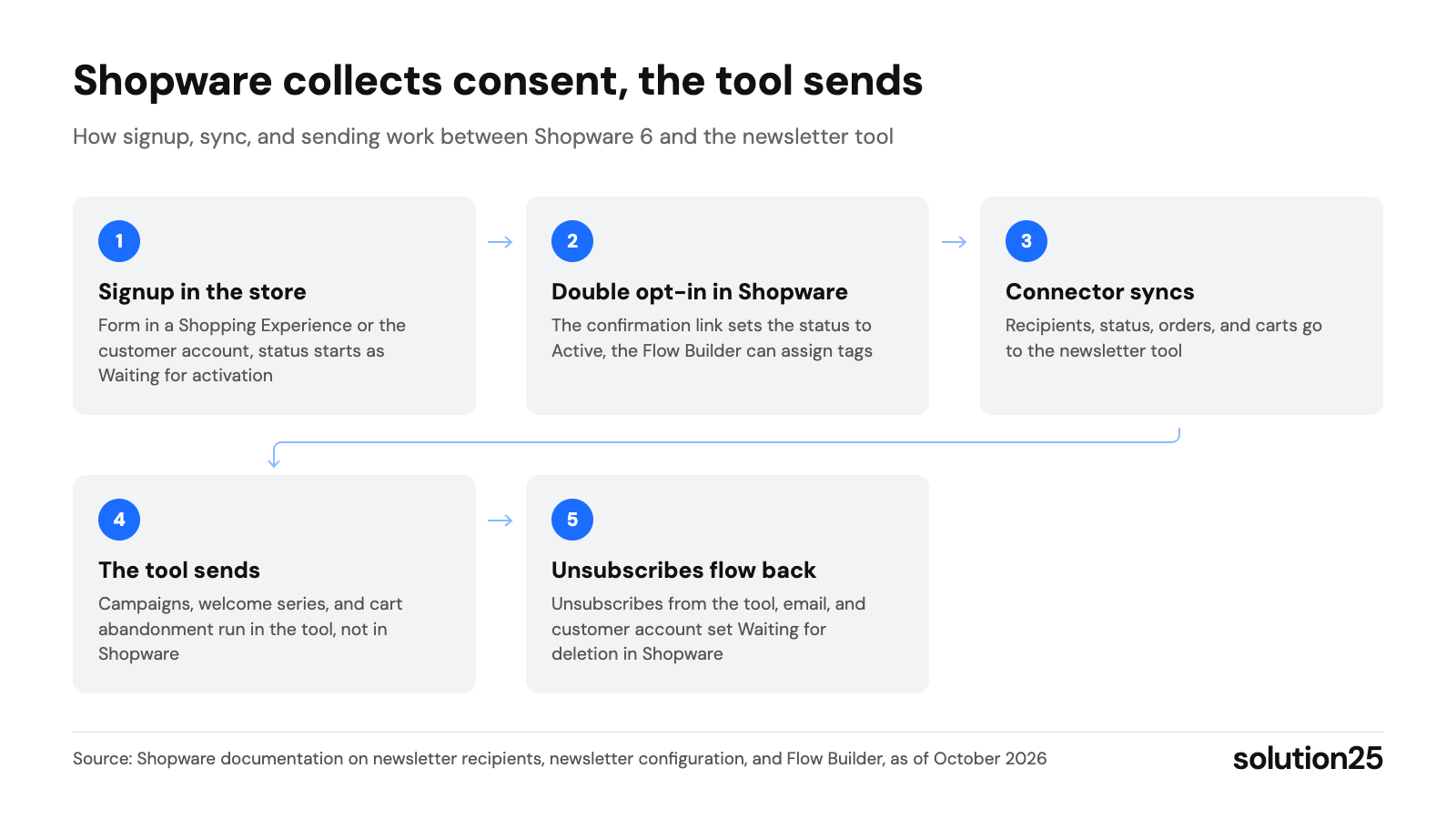
Figure: The chart shows the division of labour: consent and status live in Shopware, sending and sequences in the tool, and every unsubscribe has to flow back via the connector. Source: Shopware documentation on newsletter recipients, newsletter configuration, and Flow Builder, as of October 2026
The information comes from the product pages in the Shopware Store and the vendors’ pricing pages, as of October 28, 2026. The compatibility column shows the highest supported Shopware version; the current one is 6.7.15.1.
| Tool | Connection to Shopware 6 | Compatible up to, downloads | Tool pricing (entry level) | Data storage |
|---|---|---|---|---|
| Klaviyo | Official extension from Klaviyo, free | 6.7.15.1, 556 downloads | Free up to 250 profiles and 500 emails a month, then priced by active profiles via a calculator in US dollars | US vendor, check Data Privacy Framework |
| CleverReach | Official extension from CleverReach, free | 6.7.14.2, 2,860 downloads | Lite €0 (250 recipients, 1,000 emails a month), Basic €15 and Pro €18 a month up to 500 recipients with annual billing, Enterprise from €499 | Servers in Germany and the EU (vendor information) |
| Brevo | Official extension from Brevo, free | 6.7.15.1, 4,012 downloads | Free up to 300 emails a day, priced by sending volume, automations from the Standard plan | EU vendor, hosting in Germany according to the Store page |
| rapidmail | Official extension from rapidmail, free | 6.7.15.1, 1,237 downloads | Priced by number of recipients or per send, only via calculator | Servers exclusively in Germany (vendor information) |
| Mailchimp | No official extension; Mailchimp Newsletter Synchronisation (€29 a month) and Mailchimp e-Commerce Synchronisation (€49 a month) from Tschechne und Evers, Mailchimp Sync from Memo (€10 a month) | 6.7.15.1 and 6.7.14.1 respectively, 253 and 187 downloads | Free up to 250 contacts and 500 emails a month, Essentials $13 and Standard $20 a month for 500 contacts, Premium $350 for 10,000 contacts | US vendor, pricing page in US dollars |
| ActiveCampaign | No official extension; Automation People (€39 a month) and Mothership (€39.99 a month) | 6.7.15.1, under 50 downloads each | Pricing page only shows amounts in the calculator; bookable via the Store extension: Plus with ecommerce for 10,000 contacts €170 a month | US vendor |
| GetResponse | No official extension; GetResponse Newsletter Connector from Kuhlware (€40 a month) | 6.7.15.1, under 10 downloads | Starter $19, Marketer $59, Creator $69 a month, abandoned cart only from the Marketer plan | EU vendor, pricing page in US dollars |
| Listrak | Extension from solution25, free | 6.7.3.0, under 10 downloads | Enterprise platform, price on request | US vendor |
Klaviyo has had its own extension for Shopware 6 since 2022. It transfers customers and orders including history, delivers the events Added to Cart, Checkout Started, and Back in Stock, respects Shopware’s double opt-in setting, and works with Cookiebot, Usercentrics, and consentmanager.
Pricing is based on active profiles and is only shown on the pricing page in a calculator in US dollars. In our experience, stores with 10,000 to 20,000 active profiles pay in the low to mid hundreds of dollars per month, and that includes abandoned cart, repeat purchase, and product recommendations. Our Klaviyo integration guide for Shopware 6 describes the setup.
CleverReach has been a Shopware technology partner since 2014. The free extension syncs at intervals from five seconds to daily, transfers birthday and order data, generates forms with double opt-in, and shows cart abandoners under Orders. The THEA automation module lets you build welcome series and abandoned cart emails.
The prices are in euros. In the Store, the rating is mixed at 2.4 out of 5 stars from 18 votes, with sync problems being the main criticism; in our projects, a sync interval of 15 minutes instead of five seconds has proven reliable. More under connecting CleverReach to Shopware 6.
Mailchimp doesn’t have its own extension for Shopware 6. Mailchimp Newsletter Synchronisation from Torben Tschechne and Jan Evers syncs subscribers in both directions, with double opt-in in either Shopware or Mailchimp, for €29 a month or €269 a year. The ecommerce version also transfers customers, orders, products, and carts for €49 a month or €499 a year.
Mailchimp, whose German pricing page is in US dollars, is a good fit if your team already knows the tool. If you’re starting fresh, Klaviyo or CleverReach give you a tighter integration without paying monthly for a connector. Details under connecting Mailchimp to Shopware 6.
With 4,012 downloads, Brevo (formerly Sendinblue) is the most downloaded extension in the category, rated 3.8 stars from 39 votes, with ready-made workflows for welcome, abandoned cart, and birthday. rapidmail says it runs its servers exclusively in Germany; the Store page doesn’t mention abandoned cart. Two of the six reviews complain that the first sync transfers all customers without any selection, so check this beforehand with test data.
ActiveCampaign is more of a CRM than a newsletter tool and pays off when sales and marketing work on the same contacts, for example in B2B. Two extensions connect it to Shopware 6: the one from Automation People for €39 a month or €359 a year, and the one from Mothership for €39.99 a month; order data only reaches the tool with a plan that includes ecommerce features. The setup is described in integrating ActiveCampaign with Shopware 6.
GetResponse doesn’t have its own Shopware integration; the GetResponse Newsletter Connector from Kuhlware only transfers subscribers for €40 a month, and according to the pricing page, abandoned cart is only available from the Marketer plan. GetResponse email automation with Shopware 6 shows API-based alternatives.
Listrak targets large B2C merchants with a focus on the US. Because there was no vendor integration, we developed our own Listrak extension, which transfers carts, customers, and orders in near real time and provides a Flow Builder action for sending Listrak emails; details under Listrak plugin for Shopware 6.
There are four cost blocks: the tool, the connector, setup, and ongoing support. Tool and connector prices come from the providers’ pricing pages and are shown in euros; all other amounts are based on experience from our projects, are shown in pounds sterling and aren’t quotes.
For setup, we estimate £1,500 to £3,000 for the connector, consent sync, templates in your store’s design, and a welcome email, and £4,000 to £8,000 if three automations, segments, coordination with the consent tool, and a test run are added. Ongoing support with campaigns, reporting, and sequence maintenance runs £300 to £1,500 a month, unless it’s handled by your own team.
| Item | Small shop (up to 2,500 recipients) | Mid-market (10,000 to 25,000 recipients) | Large B2C shop (50,000+ recipients) |
|---|---|---|---|
| Tool per year (according to the providers) | €0 to €600 | €1,200 to €4,800 | €6,000 and up |
| Connector per year (according to the providers) | €0 to €350 | €0 to €600 | €0 to €600 |
| Setup, one-time | £1,500 to £3,000 | £4,000 to £8,000 | £8,000 to £15,000 |
| Support per year | in-house | £3,600 to £12,000 | £12,000 to £24,000 |
| First year total | £1,500 to £3,000 plus €0 to €950 | £7,600 to £20,000 plus €1,200 to €5,400 | £20,000 and up plus €6,000 and up |
For context: in our overview of Shopware pricing, we estimate £100 to £300 a month for newsletter tool, consent management, and review tool combined. That holds for shops with up to about 10,000 recipients; above that, the email tool becomes a cost block of its own that has to be measured against the orders generated by emails.
A merchant with 15,000 recipients falls into the mid-market column and pays £7,600 to £20,000 for setup and support in the first year, roughly £633 to £1,667 a month, plus €1,200 to €5,400 for the tool and connector according to the providers’ pricing. With an assumed basket value of £80 and a 30 per cent contribution margin, each order brings in £24.
To cover setup and support alone, the shop needs 27 to 70 additional orders a month from emails, which is 0.2 to 0.5 per cent of the list; covering the tool and connector takes a few more. The costs are based on experience from the table; basket value and contribution margin are assumptions, so plug in your own numbers.
The following points summarise what UK law and the Information Commissioner’s Office (ICO) require for email marketing. They don’t replace legal advice; when in doubt, a solicitor should review the consent texts and the contracts with the provider.
The timings are based on project experience, not study data, and should be tested for your product range.
With every connector, the technical connection takes a few hours; the data logic around it is what takes time. This order has proven effective:
Common mistakes happen at the handoffs: an import that creates all addresses as active, double opt-in in two systems at the same time, and unsubscribes that don’t flow back to Shopware. That’s why double opt-in belongs in exactly one system.
To get started, you need a connector that’s compatible with your Shopware version and a data processing agreement with the vendor.
Review deliverability and engagement after every email, revenue and list quality monthly, and the automations once a quarter.
If the spam rate rises above 0.1 per cent, shrink your list to active recipients and check SPF, DKIM, and DMARC. If revenue from emails stays below the costs, the biggest lever is usually the welcome series and abandoned cart.
The decision depends less on features than on list size, data protection requirements, and the team responsible for campaigns.
Our take: When in doubt, we start with CleverReach or Brevo and the free connector, because getting started, the data protection review, and costs are lowest there, which lets you prove revenue from emails first. We recommend Klaviyo once automations like abandoned cart and repeat purchase are meant to carry most of your email revenue. Either way, a working return channel for unsubscribes matters more than the tool.
No. Shopware 6 stores recipients with a status and manages double opt-in, but according to the documentation it has no function for sending newsletters. You install the extension for the tool you want from the Store, connect it to your account, and create the emails in the tool, while Shopware continuously supplies signups, unsubscribes, and order data.
Remove the form block from the Shopping Experience or deactivate the category in the footer or service menu, and there’s no way to sign up anymore. The option in the customer account stays visible by default; for that, the Store has extensions like “Deactivate newsletter” for under €3 a month, or your agency can hide the section in the theme.
With the vendors’ free plans: CleverReach Lite up to 250 recipients and 1,000 emails a month, Mailchimp Free and Klaviyo Free up to 250 contacts and 500 emails a month, Brevo up to 300 emails a day. The connectors from CleverReach, Klaviyo, Brevo, and rapidmail are free in the Shopware Store; costs only come with list size.
There’s no best tool, only the right one: Klaviyo for revenue-driven B2C automations, CleverReach or Brevo for mid-sized businesses with EU data storage, ActiveCampaign for B2B with CRM needs. What matters is an extension that’s compatible with the current Shopware version and writes unsubscribes back to the store.
Yes, especially for online stores. The merchant owns the address, sending costs a fraction of a cent per email, and reach doesn’t depend on ad prices or platform algorithms. In our projects, welcome series and abandoned cart emails are consistently among the measures with the lowest cost per order.
Want to know whether Klaviyo, CleverReach, or another tool fits your product range and your list, or do you already have a tool and unsubscribes aren’t reaching the store? Get in touch: we’ll review the connector, consent status, and flows, and tell you the effort and cost of implementation. We work with Shopware merchants across the UK. The integrations we build are listed under Shopware marketing integrations.
Already running a Shopware store? Our free store audit shows where your store is leaving revenue on the table, from the product page to the newsletter signup.
Learn more about how we work, our certifications, and our locations on the solution25 Shopware agency page.
Besar Bilalli is co-founder and Co-CEO of solution25, the Shopware agency based in Bremen. Before founding the agency in 2017, he and Besnik Bilalli built their own online store without any startup capital and grew it to more than 500 orders a day. Since then, he has guided merchants through Shopware projects, from platform selection to day-to-day operations. He’s happy to answer questions about this article personally: get in touch.
Responsible for content and updates: Besar Bilalli. Last updated: October 2026. Next content review: January 2027.
