Logo Dark
  • Ecommerce

    See where your store can improve.

    Get Your Free Audit
    Frame 1321315514

    Shopware

    Platinum Partner, now in the US

    Mehr
    Shopware Core Concepts Arrow Up Right Who Uses Shopware? Arrow Up Right Become a Good Shopware Partner Arrow Up Right Shopware Hosting Arrow Up Right Shopware Pre Go-Live Checklist Arrow Up Right Why Shopware in 2025? Arrow Up Right B2B on Shopware Arrow Up Right B2C on Shopware Arrow Up Right Shopware Performance Arrow Up Right Shopware Paas on Platform.sh Arrow Up Right Shopware for the U.S Market Arrow Up Right Shopware Seo Guide Arrow Up Right
    Frame 1321315514 1

    Shopify

    Fast to launch, built to scale

    Mehr
    What is Shopify? Arrow Up Right Who should use Shopify? Arrow Up Right What can you do with Shopify? Arrow Up Right How much does Shopify cost? Arrow Up Right How do you choose your Shopify theme? Arrow Up Right Can you connect Amazon to Shopify? Arrow Up Right Who Owns Shopify? Arrow Up Right Shopify Disadvantages Arrow Up Right Benefits of Shopify Arrow Up Right
    Frame 1321315514 19

    Magento

    Complex catalogs and B2B

    Coming soon
    Frame 1321315514 18

    WooCommerce

    Flexible commerce for growing businesses

    Coming soon
    Frame 1321315514 2

    Migrations

    Move platforms without disrupting revenue

    Mehr
    Shopware 5 to Shopware 6 Arrow Up Right Shopify to Shopware 6 Arrow Up Right Magento to Shopware 6 Arrow Up Right Oxid to Shopware 6 Arrow Up Right Migrations Arrow Up Right Prep for Shopware Platform Migrations Arrow Up Right Our Shopware Process Arrow Up Right Painful Shopware 6 Migrations if Done Wrong Arrow Up Right Shopware Prep: Historical Order Data Arrow Up Right Shopware Data Ready Arrow Up Right Shopware Content Migrations Arrow Up Right SEO Considerations in Platform Migrations Arrow Up Right
    Frame 1321315514 3

    Integrations

    Payments, tax, fulfillment, marketing

    Mehr
    Shopware 5 Optimizely Campaign Arrow Up Right Shopware 6 Optimizely Campaign Arrow Up Right Shopware 6 PayTrace Payment Arrow Up Right Shopware 6 NMI Payment Arrow Up Right Shopware 6 MaxMind Fraud Prevention Arrow Up Right Shopware 6 Quotes & Customer-Specific Pricing Arrow Up Right Shopware 6 Subscription Arrow Up Right Shopware 6 Listrak Arrow Up Right Shopware 6 Multi Channel Arrow Up Right Shopware 6 Partial Delivery Arrow Up Right Shopware 6 AgeChecker.net Arrow Up Right Shopware 6 Pudo Point Arrow Up Right Why API First Opens Doors? Arrow Up Right Reduce the cost of ERP integrations Arrow Up Right PyPal Payment Provider Arrow Up Right Klaviyo Integration Guide for Shopware 6 Arrow Up Right Klaviyo - Email Marketing Integration Arrow Up Right Reviews.io Integration Guide for Shopware 6 Arrow Up Right Hubspot - Integration for Shopware 6 Arrow Up Right Mailchimp - Email Marketing Integration Arrow Up Right Google Analytics - Integration Guide Arrow Up Right Integrate Zapier with Shopware 6 Arrow Up Right Shopware 6 BlueSnap Arrow Up Right Shopware 6 Cybersource Arrow Up Right Shopware 6 Abandoned Cart Saver Arrow Up Right Shopware 6 Store Credit Arrow Up Right
    Frame 1618873659

    Start your Shopware migration with us.

    Learn more
    Shopware – Übersicht Shopware Core Concepts Arrow Up Right Who Uses Shopware? Arrow Up Right Become a Good Shopware Partner Arrow Up Right Shopware Hosting Arrow Up Right Shopware Pre Go-Live Checklist Arrow Up Right Why Shopware in 2025? Arrow Up Right B2B on Shopware Arrow Up Right B2C on Shopware Arrow Up Right Shopware Performance Arrow Up Right Shopware Paas on Platform.sh Arrow Up Right Shopware for the U.S Market Arrow Up Right Shopware Seo Guide Arrow Up Right
    Shopify – Übersicht What is Shopify? Arrow Up Right Who should use Shopify? Arrow Up Right What can you do with Shopify? Arrow Up Right How much does Shopify cost? Arrow Up Right How do you choose your Shopify theme? Arrow Up Right Can you connect Amazon to Shopify? Arrow Up Right Who Owns Shopify? Arrow Up Right Shopify Disadvantages Arrow Up Right Benefits of Shopify Arrow Up Right
    Migrations – Übersicht Shopware 5 to Shopware 6 Arrow Up Right Shopify to Shopware 6 Arrow Up Right Magento to Shopware 6 Arrow Up Right Oxid to Shopware 6 Arrow Up Right Migrations Arrow Up Right Prep for Shopware Platform Migrations Arrow Up Right Our Shopware Process Arrow Up Right Painful Shopware 6 Migrations if Done Wrong Arrow Up Right Shopware Prep: Historical Order Data Arrow Up Right Shopware Data Ready Arrow Up Right Shopware Content Migrations Arrow Up Right SEO Considerations in Platform Migrations Arrow Up Right
    Integrations – Übersicht Shopware 5 Optimizely Campaign Arrow Up Right Shopware 6 Optimizely Campaign Arrow Up Right Shopware 6 PayTrace Payment Arrow Up Right Shopware 6 NMI Payment Arrow Up Right Shopware 6 MaxMind Fraud Prevention Arrow Up Right Shopware 6 Quotes & Customer-Specific Pricing Arrow Up Right Shopware 6 Subscription Arrow Up Right Shopware 6 Listrak Arrow Up Right Shopware 6 Multi Channel Arrow Up Right Shopware 6 Partial Delivery Arrow Up Right Shopware 6 AgeChecker.net Arrow Up Right Shopware 6 Pudo Point Arrow Up Right Why API First Opens Doors? Arrow Up Right Reduce the cost of ERP integrations Arrow Up Right PyPal Payment Provider Arrow Up Right Klaviyo Integration Guide for Shopware 6 Arrow Up Right Klaviyo - Email Marketing Integration Arrow Up Right Reviews.io Integration Guide for Shopware 6 Arrow Up Right Hubspot - Integration for Shopware 6 Arrow Up Right Mailchimp - Email Marketing Integration Arrow Up Right Google Analytics - Integration Guide Arrow Up Right Integrate Zapier with Shopware 6 Arrow Up Right Shopware 6 BlueSnap Arrow Up Right Shopware 6 Cybersource Arrow Up Right Shopware 6 Abandoned Cart Saver Arrow Up Right Shopware 6 Store Credit Arrow Up Right
  • Software & AI

    See where your store can improve.

    Get Your Free Audit
    Frame 1321315514 4

    Software Development

    Platforms and portals, systems connected

    Coming soon
    Frame 1321315514 5

    App Development

    Web and mobile apps, API-first

    Coming soon
    Frame 1321315514 6

    AI Development

    Models connected, data enriched, assistants

    Coming soon
    Frame 1321315514 7

    Replatforming

    Switch platforms without losing revenue

    Mehr
    Frame 1321315514 8

    All Integrations

    Payments, tax, fulfillment, marketing

    Mehr
    Frame 1618873659 1

    Discover our latest Shopware plugin. MCP Connector.

    Explore the plugin
  • Solutions

    See where your store can improve.

    Get Your Free Audit

    Further links

    Frame 1321315514 16 GitHub Arrow Up Right Frame 1321315514 17 Shopware Store Arrow Up Right
    Frame 1321315514 10

    Shopware Plugins

    Extensions built by our team

    Mehr
    Frame 1321315514 11

    Optimizely Integrationen

    Campaigns, automation and customer engagement

    Mehr
    Frame 1321315514 12

    Lavet

    Migration and integration platform

    Mehr
    Frame 1321315514 13

    StatHubs

    All store metrics in one dashboard

    Coming soon
    Frame 1321315514 21

    Pathway

    By Boldest, in partnership with solution25

    Mehr
    Frame 1618873659 2

    Discover our Optimizely Campaign plugin.

    Explore the plugin
  • Company

    See where your store can improve.

    Get Your Free Audit

    About

    Events & Summit

    Resources

    Careers

    Frame 1618873659 3

    Built by people who know commerce.

    Chevron Right White
  • Blog
  • Contact
  • Sprache: UK

    Sprache auswählen

    • DE
    • EN
    • AT
    • CH
    • NL
    • UK
    • IT
  • DE
  • EN
  • AT
  • CH
  • NL
  • IT
  1. Home /
  2. Listrak Integration for Shopware 6 | UK
Github

Listrak

437436448 B0a01c49 1dcf 4a71 Bcb3 63b39e1d7d84
Teilen

Inhaltsverzeichnis

Kostenlose 15-minütige Erstberatung direkt mit unseren Experten.

Kostenlose Beratung +49 421 438 1919-0
Teilen

Introduction

The Listrak plugin integrates your Shopware 6 store with Listrak’s marketing platform bringing advanced features like abandoned cart recovery, customer data sync, and storefront tracking to help you grow your business, whether you sell only in the UK or across Europe. For UK merchants, remember that email and SMS marketing is governed by PECR alongside UK GDPR: sync newsletter consent cleanly from Shopware so Listrak only targets contacts who have opted in or fall under the soft opt-in for existing customers.

Key Features

1.Customer Data Sync
Automatically send customer registrations and newsletter signups to Listrak.
2.Order Data Sync
Push order information to Listrak for personalised post-purchase campaigns.
3.Product Data Sync
Push product information to Listrak for personalised post-purchase campaigns.
4.Admin Panel Integration
Manage API credentials and feature toggles directly from the Shopware admin panel.
5.Abandoned Cart Recovery
Capture cart data and sync it with Listrak for automated follow-up campaigns.
6.Transactional Mails
Send Transactional Mails via Listrak.

Compatibility

  • ✅ Shopware 6.6.x

Get Started
Installation & Activation
1.Download

Git

  • Clone the Plugin Repository:

  • Open your terminal and run the following command in your Shopware 6 custom plugins directory (usually located at custom/plugins/):

git clone https://github.com/solution25com/listrak-shopware-6-solution25.git

Packagist

composer require solution25/listrak

2.Install the Plugin in Shopware 6

  • Log in to your Shopware 6 Administration panel.

  • Navigate to Extensions > My Extensions.

  • Locate the newly cloned plugin and click Install.

3.Activate the Plugin

  • After installation, click Activate to enable the plugin.

  • In your Shopware Admin, go to Settings > System > Plugins.

  • Upload or install the “Listrak” plugin.

  • Once installed, toggle the plugin to activate it.

4.Verify Installation

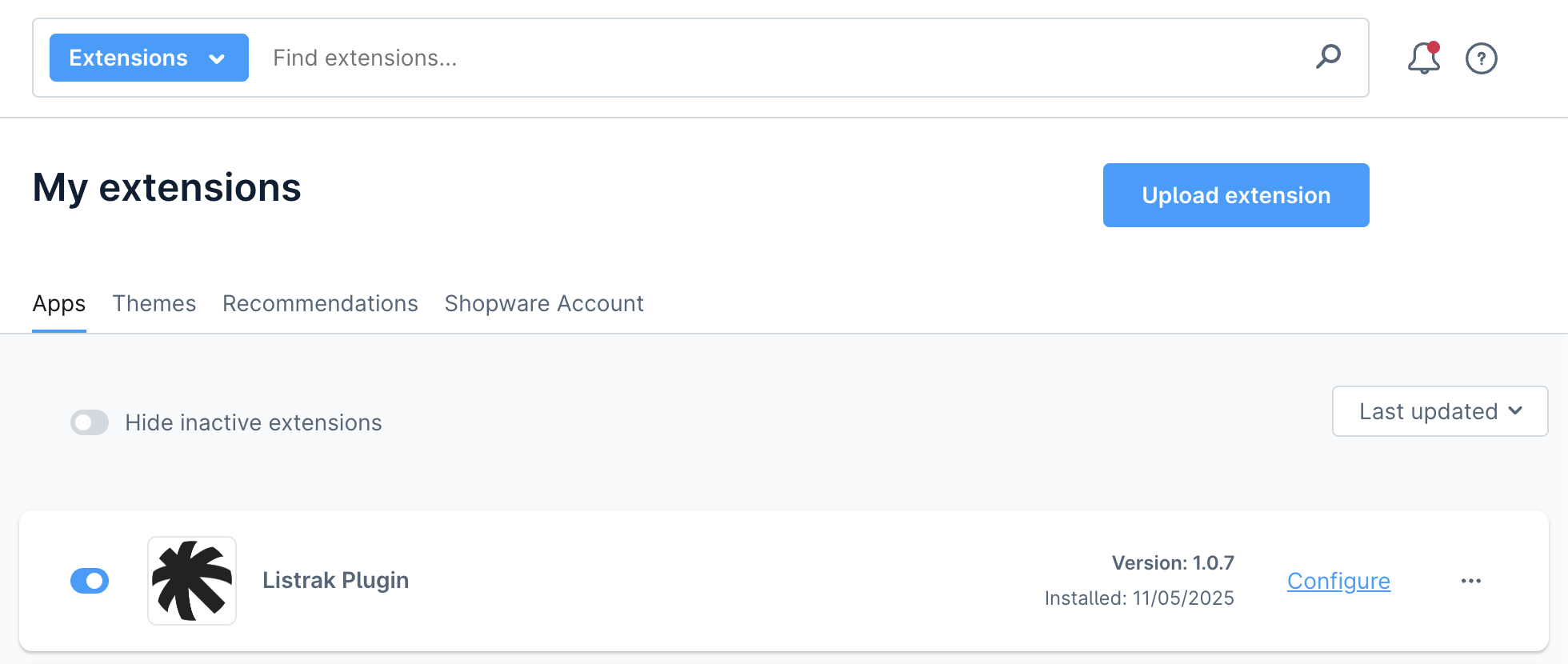
  • After activation, you will see Listrak in the list of installed plugins.

  • The plugin name, version, and installation date should appear as shown in the screenshot below.

442821698 8f7ef694 4282 46aa 8ec6 Aa35045d16c8

Plugin Configuration

1.Access Plugin Settings

  • Go to Settings > System > Plugins.

  • Locate Listrak and click the three dots (...) icon or the plugin name to open its settings.

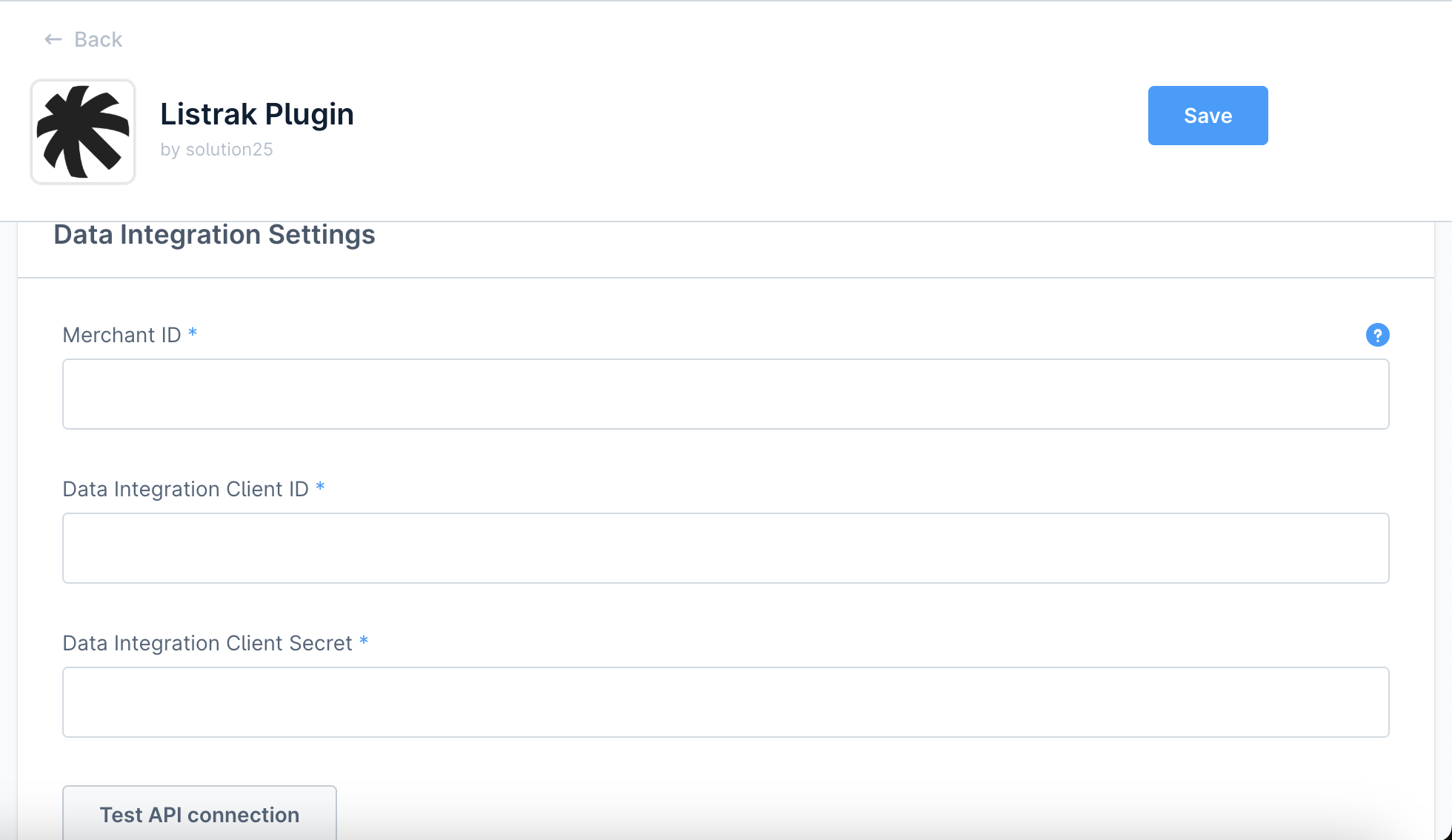
2.Data Integration Settings

Listrak Merchant ID
Enter the Merchant ID provided by Listrak.
Listrak Data Client ID
Enter the Client ID from your Listrak Data Integration.
Listrak Data Client Secret
Enter the Client Secret from your Listrak Data Integration.
Test API connection
Test Data API connection.

3.FTP Integration Settings

FTP Username

Enter the FTP Username from your Listrak FTP Integration.
FTP Password
Enter the FTP Password from your Listrak FTP Integration.
442821850 4ac4732c Da1d 4236 Aad0 2e76ffd530db

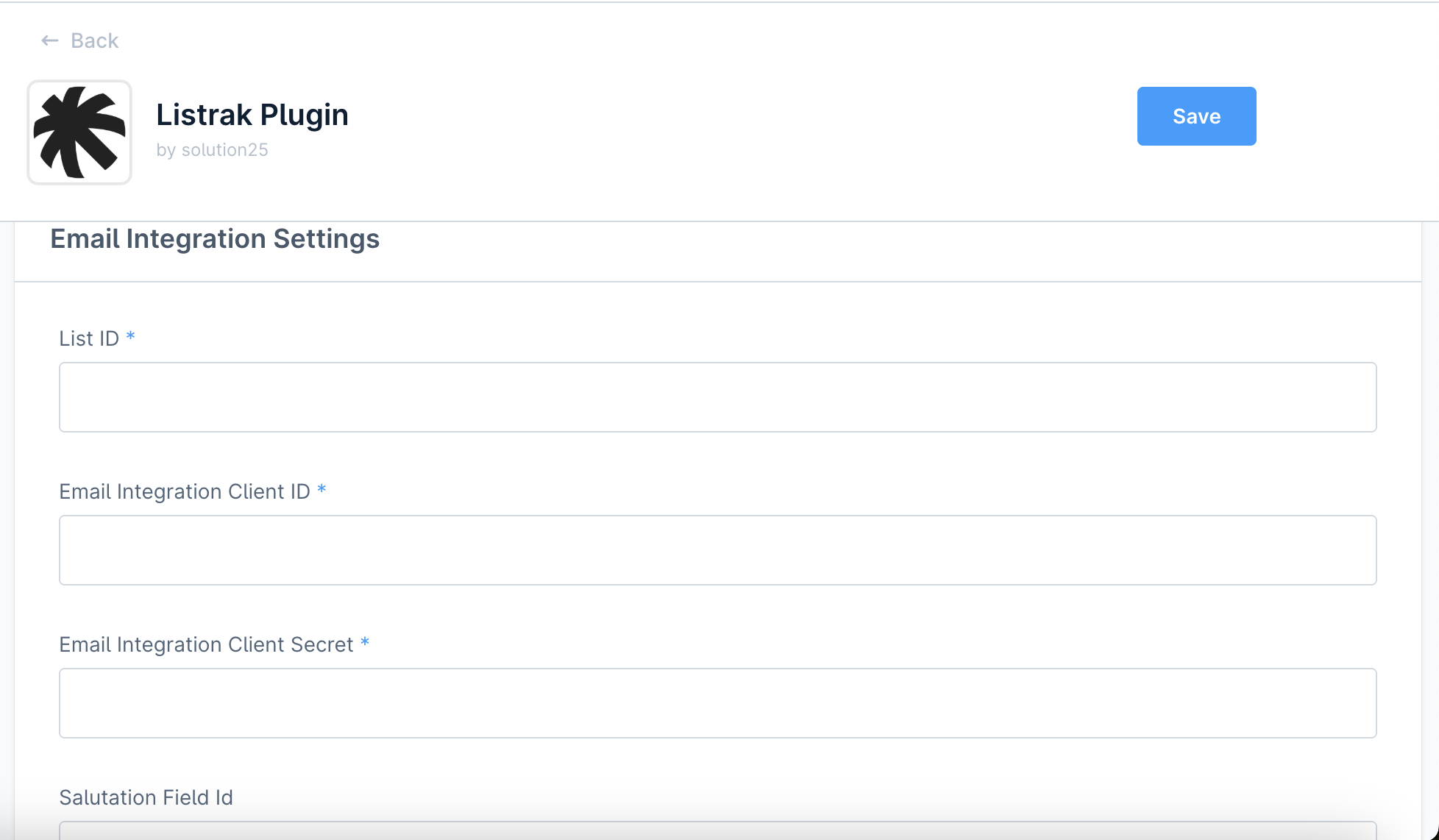
4.Email Integration Settings

Marketing List ID
Enter the List ID which you can find at Help & Support > API ID Information in the Listrak Admin.
Transactional List ID
Enter the List ID which you can find at Help & Support > API ID Information in the Listrak Admin.
Listrak Email Client ID
Enter the Client ID from your Listrak Email Integration.
Listrak Email Client Secret
Enter the Client Secret from your Listrak Email Integration.
Salutation Field Id
Optionally enter the Salutation field id from your Listrak Email Profile field, if it exists.
First Name Field Id
Optionally enter the first name field id from your Listrak Email Profile field, if it exists.
Last Name Field Id
Optionally enter the last name field id from your Listrak Email Profile field, if it exists.
Test API connection
Test Email API connection.
441230989 7b1dc3b6 572e 46d3 812b 85a15b070455

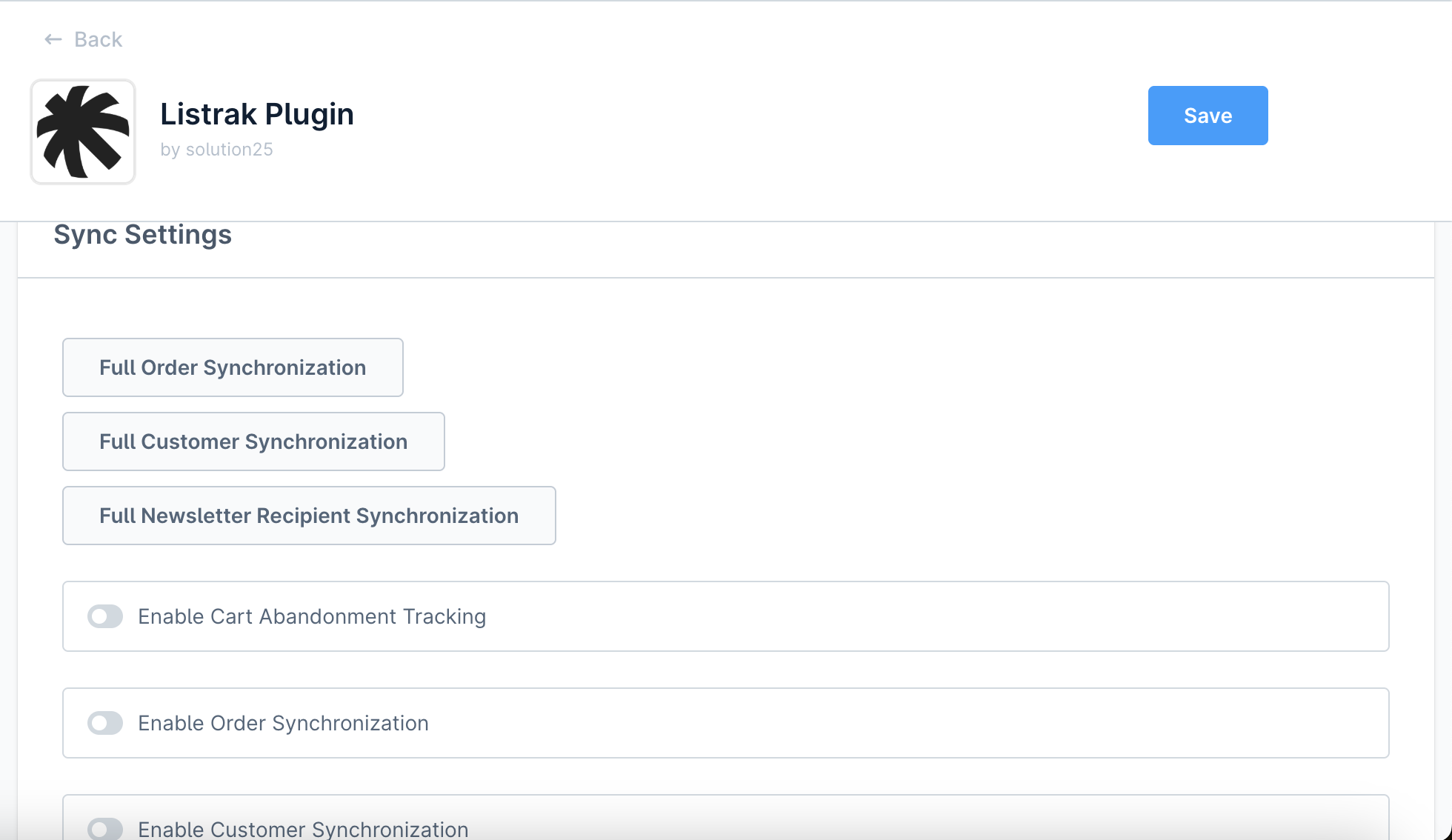
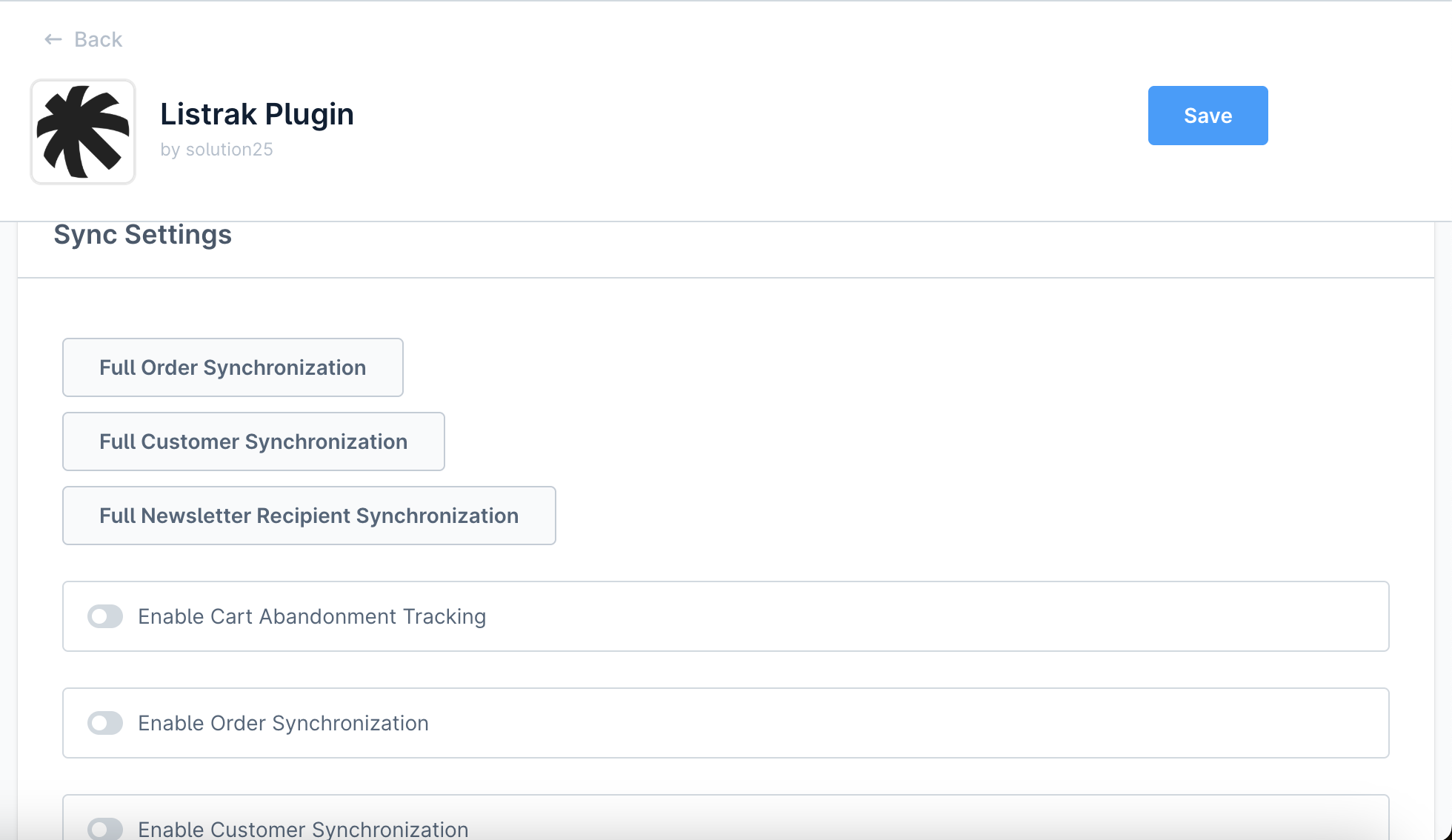
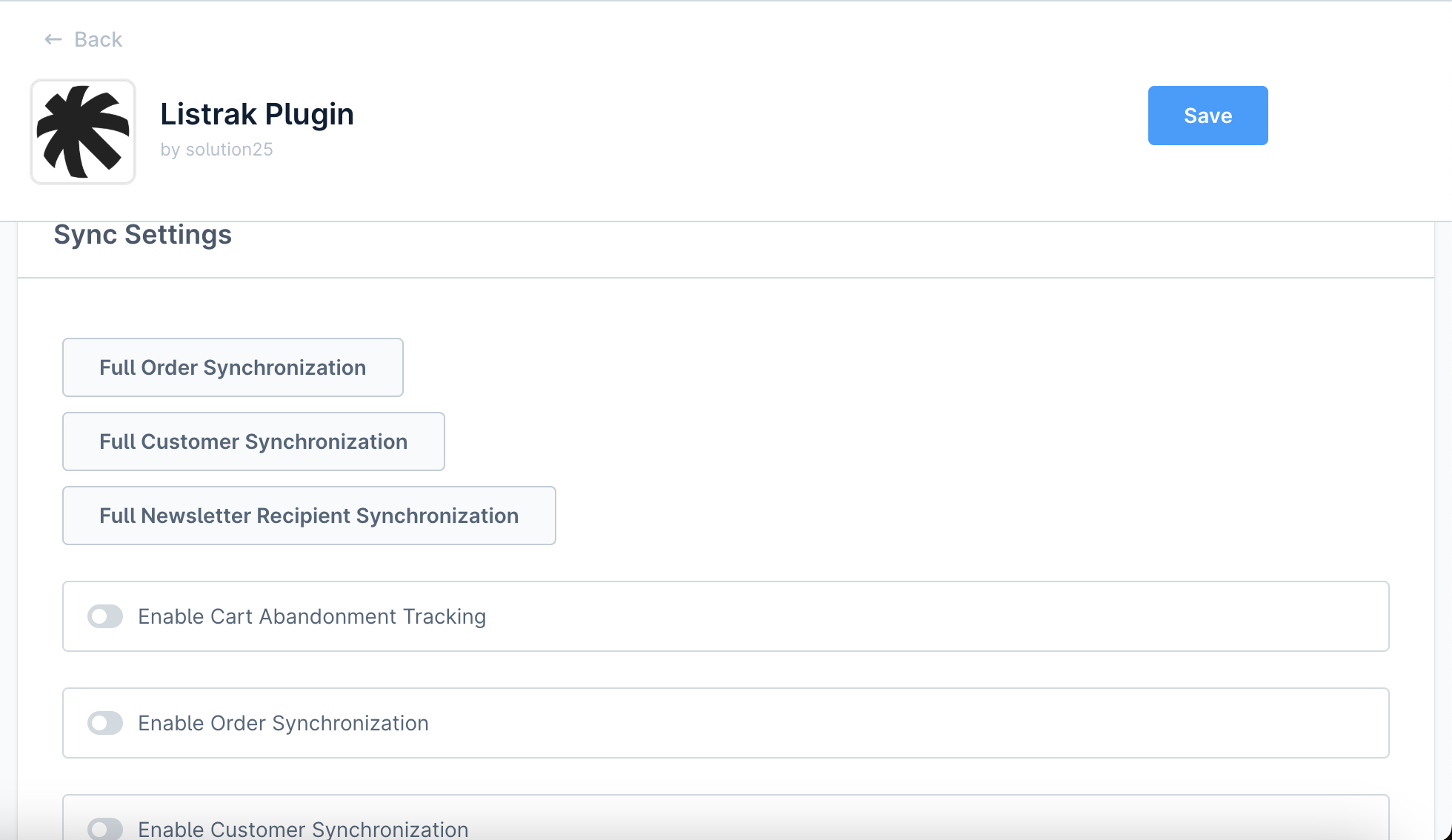
3.Sync Settings

  • Enable Listrak Browser Tracking by clicking on the toggle.

  • Enable Listrak Browser Order Tracking by clicking on the toggle.

  • Enable ongoing Customer Synchronization by clicking on the toggle.

  • Enable ongoing Order Synchronization by clicking on the toggle.

442821910 2d2b9cd1 46dc 4379 Ab76 10bcc0be1993

3.Save Configuration

  • Click Save in the top-right corner to store your settings.

Listrak Plugin - API Documentation

This document describes the custom Admin API endpoints provided by the Listrak Plugin for Shopware 6. These endpoints allow authorised users to trigger full data synchronisation tasks between Shopware and the Listrak system.

Data API Connection Test

Endpoint:

POST /api/_action/listrak/data-api/test

Description
Tests the Listrak Data API connection using provided dataClientId and dataClientSecret. Returns a valid access token on success.
Request Headers

Authorization: Bearer 
Content-Type: application/json

Example Request Body
Successful Response

"eyJhbGciOiJIUzI1NiIsInR5cCI6IkpXVCJ9..."

Example Error Response

{
  "errors": [
    {
      "status": "400",
      "detail": "Missing client ID and/or client Secret"
    }
  ]
}

Email API Connection Test

Endpoint

POST /api/_action/listrak/email-api/test

Description
Tests the Listrak Email API connection using provided emailClientId and emailClientSecret. Returns a valid access token on success.
Request Headers

Authorization: Bearer 
Content-Type: application/json

Example Request Body

{
  "Listrak.config.emailClientId": "your-email-client-id",
  "Listrak.config.emailClientSecret": "your-email-client-secret"
}

Successful Response

"eyJhbGciOiJIUzI1NiIsInR5cCI6IkpXVCJ9..."

Example Error Response

{
  "errors": [
    {
      "status": "401",
      "detail": "The provided API credentials are invalid."
    }
  ]
}

How It Works

Shopware Events

The plugin listens to key Shopware events like cart updates, customer registrations, and order placements.

Data sent to Listrak

Data is sent to Listrak automatically via secure API calls, including retries and error logging.

Transactional Mails

Add the Transactional List ID in the plugin configuration settings.
Navigate to the Flow Builder in the Settings section in Shopware admin.
Add a new flow.
Select an event for the trigger.
After selecting the event, select the ‘Send email with Listrak’ action.
442821910 2d2b9cd1 46dc 4379 Ab76 10bcc0be1993 1

vi. In the modal that has opened up, define the Recipient, Transactional Message ID, and any Listrak profile fields needed for the transactional mail.
442821910 2d2b9cd1 46dc 4379 Ab76 10bcc0be1993 2

vii.After making sure that you’ve specified the correct data and Shopware template variables for the transactional mail, click Add Action. You can use Twig syntax in the Field Value cell.
vii.Activate the flow and then save it.

CLI Commands

listrak:sync-products

`
Sync products to Listrak for the specified sales channel.

Arguments:

Name Description
sales-channel-id
Sales channel ID to filter products. (

Option Description
--limit=
Maximum number of products to export.
--local
Generate file locally instead of transferring via FTP.

)

Options:

listrak:sync-orders

Sync orders to Listrak for the specified sales channel.
Arguments:

Name Description
sales-channel-id
Sales channel ID to filter products. (required)

Options:

Option Description
--limit=
Maximum number of orders to export.
--offset=
Starting offset for export (for batching).
listrak:sync-newsletter-recipients

Sync newsletter-recipients to Listrak for the specified sales channel.
Arguments:

Name Description
sales-channel-id
Sales channel ID to filter products. (required)

Options:

Option Description
--limit=
Maximum number of newsletter recipients to export.
--offset=
Starting offset for export (for batching).
listrak:sync-customers

Sync customers to Listrak for the specified sales channel.

Name Description
sales-channel-id
Sales channel ID to filter products. (required)

Options:

Option Description
--limit=
Maximum number of customers to export.
--offset=
Starting offset for export (for batching).

FAQ

Is a Listrak account required?
Yes. You need an active Listrak account, a Data Integration and an Email Integration for syncing data.

What variables can I use in the Transactional Mails flow?

Depending on the type of event, you have access to different variables but some of the most commmon variables include:

order

{{ order.orderNumber }}

{{ order.orderDate|date(‘Y-m-d H:i’) }} (Date needs formatting)

{{ order.currency.isoCode }}

{{ order.lineItems }}

{{ order.deliveries }}

{{ order.transactions }}

{{ order.defaultBillingAddress.firstName }}

{{ order.defaultBillingAddress.lastName}}

{{ order.defaultBillingAddress.street}}

{{ order.defaultBillingAddress.zipcode}}

{{ order.defaultBillingAddress.city}}

{{ order.defaultBillingAddress.phoneNumber}}

etc.

salesChannel
{{ salesChannel.name }}

customer
{{ customer.firstName }}
{{ customer.lastName }}
{{ customer.email }}
etc.

Note: Data such as order line items or order transactions needs to be iterated over via Twig syntax.

Wiki Documentation

Read more about the plugin configuration on our WIKI.

Our drive.
Your growth.

The agency for e-commerce, software and AI.

Get free advice
Company
  • About Us
  • Events
  • Blog
  • Careers
Events
  • Shopware
  • Shopify
  • Integrations
  • Migration
Legal
  • Imprint & Legal Information
  • Privacy Policy
  • Shopware AI Data privacy
Location
Bremen Marcusallee 16, 28359 Bremen, Germany +49 421 438 1919-0 info@solution25.com
Group 1321315536 1
Group 1321315537 1

© 2026 solution25. All rights reserved

Linkedin Facebook Instagram