
How UK merchants create AI product descriptions that are accurate: data foundation, a complete prompt, fact checking with a banned word list, the four routes in Shopware and a cost calculation for 5,000 products.
AI writes good product descriptions when the facts come from your product data. The language model does the wording, while the data supplies dimensions, materials, what’s in the box, and benefits. Google explicitly advises manually reviewing every AI text for accuracy before publishing.
Model costs are the smallest line item. 5,000 product descriptions cost around $3.50 with Claude Haiku 5.5 or gpt-6-luna, and around $70 with Claude Sonnet 5.5. The real effort is in data maintenance and review.
Shopware offers four routes: the assistant and Copilot in the Administration, Store extensions from €5 per month, the Admin API, meaning the management programming interface, for bulk runs, and the MCP Server for tasks in a dialogue with an AI assistant.
Many stores show the same manufacturer text for thousands of products as their competitors, and AI copy without a data foundation invents properties that lead to returns or legal problems. This article is for store owners and ecommerce managers with their own Shopware store who want to create or revise product copy for more than a few hundred products with AI.
After reading it, you’ll be able to decide whether the description assistant, a Store extension, or your own pipeline fits your catalogue, and set up a first copy run with a prompt template, review process, and budget.
Before founding solution25, we built our own online store and grew it to more than 500 orders a day. Since 2017 we have been delivering Shopware projects for merchants and developing AI integrations for Shopware, including the AI Connect plugin for the MCP Server.
This guide is written for UK online retailers on Shopware. All prices as of October 2026, excl. VAT. AI vendor prices are in US dollars and Shopware and extension prices in euros, as listed on the providers’ pricing pages; our own service figures are in pounds.
A store with 3,000 products has 3,000 pages that can rank for specific search queries. Category and guide content from content management in Shopware matters, but usually only accounts for a few dozen pages.
Most stores take over their suppliers’ descriptions. The same paragraphs then appear at every retailer that carries the product.
In its self-assessment questions for helpful content, Google lists two checks that apply exactly here. The first is: “Does the content provide substantial value when compared to other pages in search results?”
The second: “Does the content provide substantial new information rather than simply copying or rewriting external sources?” A manufacturer text shown by many stores fails both questions, and so does one that a language model has merely reworded.
Value comes from information others don’t have: experience from customer advice and returns, your customers’ use cases, comparisons within your catalogue. If you want to optimise existing product descriptions with AI, give the model exactly this information.
Google doesn’t reject AI copy. According to its guidance on using generative AI (as of October 2026), generative AI can be “particularly useful when researching a topic and adding structure to original content”.
The caveat follows in the same document: generative models don’t retrieve facts but predict “a likely sequence of words”. That’s why all AI content should be manually checked for accuracy before publishing, including meta descriptions, structured data, and alt text.
The spam policies list “using generative AI tools or other similar tools to generate many pages” without value for users as scaled content abuse. For product copy, this means: volume is allowed, generic text isn’t.
According to Merchant Centre Help, AI-generated descriptions belong in the structured_description attribute instead of description, with the value trained_algorithmic_media. In the Shopware Product comparison sales channel, you adjust the export template for this.
A language model is a good copywriter and a poor product expert. It only knows your product from what you give it and fills gaps with what’s likely.
| Task | Suitability | What matters |
|---|---|---|
| Writing copy from attributes | very good | Complete, clean attributes per category |
| Creating variants for channels | very good | Fixed lengths for short text, bullet points, and meta description |
| Translating | good | Glossary for technical terms, spot check by native speakers |
| Filling in missing facts | unsuitable | Facts come from master data, PIM, or the data sheet |
| Mandatory information and advertising claims | unsuitable | Take health claims, environmental claims, and safety notices from verified sources |
Even Shopify warns in its Shopify Magic help that generated text may “include things like product benefits even if you didn’t explicitly list them”. Shopware writes about its description assistant that the text is “only a suggestion” and must be checked for legal compliance, validity, and completeness.
This leads to the most important rule for AI product descriptions: facts come from product data, never from the model.
TonerPartner runs a network of 32 online brands for printer supplies. According to our case study, we built a Shopware 6 system whose core logic all 32 brands inherit, plus custom logic that maps toner cartridges to the matching printers across hundreds of categories and SKUs; stock levels, product attributes, and order events run in real time via the Kafka streaming platform.
For the overall project, the case study cites 25% higher conversion rates; AI copy was not part of the project. But the case shows where the most important statement in a product text often comes from: with millions of product combinations, a sentence like “fits printer X” may only come from the mapping logic, never from a model’s guess.
The quality of an AI product text is decided before the first prompt. What isn’t in the data can’t be correct in the text.
For each category, define the minimum information a text needs. In Shopware, this data lives in several places:
If required attributes are missing, the product doesn’t belong in the copy run. A rule like “no material and dimensions, no text” prevents most invented information.
Manufacturer data describes the product but rarely why your customers buy it. Other sources provide that:
A model only writes consistently if the style is written down. A style guide fits on one page: form of address, sentence length, technical terms, a banned word list, and two or three approved sample texts from the same category, which have more impact than any style description.
The following prompt separates rules, product data, and output format. Replace values in square brackets once per store, and the PRODUCT DATA block per product. The sample data describes a fictional travel mug.
ROLE AND GOAL
You write product copy for the online store [store name] in [language]
Readers: [target audience] who want to know before buying whether the product fits their needs
Goal: inform and persuade without exaggerating
RULES FOR FACTS
Use only information from the PRODUCT DATA block
Do not invent dimensions, materials, certifications, test results, effects, or comparisons
Copy numbers and units exactly as they appear in the data
If a purchase-relevant detail is missing, write nothing about it and list it under OPEN QUESTIONS
STYLE
Address the reader as “you”, active sentences with no more than 20 words
For each feature, one concrete benefit in the target audience’s everyday life
Technical terms as in the glossary: [glossary]
No superlatives, no exclamation points, no words from the BANNED WORDS list
BANNED WORDS
unique, perfect, unbeatable, world first, test winner, healthy, cures, eco-friendly, climate neutral, sustainable, Made in Germany
Exception: the term appears verbatim in PRODUCT DATA and is backed by a source there
OUTPUT FORMAT
SHORT TEXT: two sentences, no more than 300 characters, main benefit first
LONG TEXT: 150 to 250 words in three paragraphs (use, features with benefits, what’s in the box and care)
BULLETS: five points, each no more than 80 characters, each with a fact from the data
META: 140 to 160 characters with product name and main benefit, no price
OPEN QUESTIONS: missing or contradictory information, otherwise “none”
SAMPLE TEXTS
[two approved product texts from the same category]
PRODUCT DATA
Name: Commuter Travel Mug 450 ml
Material: 18/8 stainless steel, double-walled vacuum insulation; lid made of polypropylene
Heat retention per manufacturer: 6 hours hot, 12 hours cold
Dimensions: height 19 cm, base diameter 7 cm, weight 310 g
Cleaning: mug dishwasher safe, lid hand wash only
Special feature: drinkable from all around the rim, lid twists closed to be leakproof
Most common customer question: Does the mug fit in a car cup holder?
In the box: mug, lid
When using the API, the sections from ROLE AND GOAL to SAMPLE TEXTS belong in the system prompt. It stays the same for all products and can therefore be cached cheaply.
From the same product data, a single run produces all the variants a store needs, each with its own placement and rules.
| Variant | Use in Shopware | Length | What to watch |
|---|---|---|---|
| Short text | Custom field, output by the theme in the listing or next to the buy button | up to 300 characters | Main benefit first |
| Long text | Description field in the general information | 150 to 250 words | Paragraphs, answers to customer questions, what’s in the box |
| Bullet points | List in the description, marketplaces, feeds | 5 points of up to 80 characters each | Each point with a fact from the data |
| Meta description | Meta description field in the SEO section | 140 to 160 characters | Product name and benefit, no prices that change |
| Feed description | Google Shopping via the Product comparison sales channel | 1 to 5,000 characters, key information in the first 160 to 500 | No promotional text, no company name, labelled as AI text |
According to the documentation, Shopware has only one free-text field in the general product information: the description. For a short text, create a custom field. You can leave the keywords field empty; Shopware doesn’t use it for ranking.
If the meta description is missing, Shopware uses the beginning of the product description, as our guide to Shopware SEO shows. The feed requirements come from the Merchant Centre specification.
Variants save you work: according to Shopware, variants inherit the name and description from the parent product by default. Separate variant texts are only worth it for real differences, such as in performance or what’s in the box.
An AI text is a draft until someone has approved it. Fact checking, style review, and the banned word list can largely be prepared by script, but approval remains a human’s job.
Every number, unit, and material in the text has to be found in the data block. A script extracts numbers with units from the text and compares them with the attributes.
A second model pass also flags statements without evidence. In the example above, that would be a sentence like “fits most cup holders”: the data only gives the diameter, not the fit.
The banned word list from the prompt applies again in the review, this time as a hard search in the finished text. Three areas never belong in the model’s free wording:
Our rule for all three areas: such information only appears if it’s in the data block with a source. That doesn’t replace legal advice, but it prevents “contains vitamin C” from turning into a healing promise.
Which route fits depends mainly on catalogue size and plan.
Shopware introduced an AI assistant for product descriptions in 2023 with version 6.4.20.0, back then under the name AI Copilot. According to the documentation, today it sits below the description: enter keywords, click “Generate”, accept the suggestion.
The assistant is available from a booked Rise plan. The documentation doesn’t describe settings for length or tone. According to Shopware, other AI features of the commercial plans include properties suggested from the product description, copy in Shopping Experiences, and review summaries.
The Copilot is the Administration’s chat assistant. According to Shopware, it has been available to all merchants since version 6.7.1.0, including in the Community Edition, and is in beta. As a sample task, Shopware lists “Fill all missing product descriptions”.
According to the documentation, the Copilot only carries out changes after confirmation, and executed actions can’t be undone. After a monthly free quota, it requires Shopware Intelligence+, which according to the pricing page costs €19 per month on the paid plans and €29 on the Community Edition.
The following four extensions from the Shopware Store work with your own API key, and the AI vendor’s costs come on top of the subscription.
| Extension | Vendor | Subscription | What it does |
|---|---|---|---|
| Produkt/Kategorie Beschreibung mit KI | Biloba IT | €14.99 per month, Prompts Plus €9.99 extra | Descriptions for products and categories, bulk editing per category, OpenAI, Gemini, Claude, or Mistral |
| AI Descriptions | Binary Hype | €5 per month or €50 per year | Descriptions and SEO metadata, five writing styles, preview before applying, OpenAI or Claude |
| Produktbeschreibungen mit KI zusammenfassen | ACRIS | €12.90 per month or €129.90 per year | Short versions of long descriptions, bulk run via cron job, OpenAI |
| Translation Pro KI | Biloba IT | €19.99 per month or €199 per year | Translates products and variants into the store languages, multiple AI vendors |
Before subscribing, check the supported Shopware version and whether the extension overwrites existing texts. The Store ratings for all four are based on at most two reviews and therefore say little.
From a few thousand products on, your own pipeline for generating product copy with AI pays off: read data via the Admin API, generate copy via the AI vendor’s API, review it, and write it back in bulk. That’s what the Sync API is for. For complex entities like products, the Shopware Academy recommends batches of 50 to 200 records.
Prompt, review steps, and approval are entirely in your hands, and the AI vendors’ batch pricing halves model costs. We describe what such an integration looks like under Shopware GPT integration.
According to the developer documentation, Shopware has shipped an MCP Server without a feature flag since version 6.7.14.0. Write tools run as a dry run by default, and changes are only saved after a preview.
This lets you handle tasks like “Fill in the missing English descriptions in the garden furniture category” from Claude or another MCP-capable assistant, as our article on the MCP Server for Shopware shows. Our plugin AI Connect adds permission management, approvals, and an audit log.
For bulk runs, the Sync API remains the better choice, because according to the configuration documentation, the Administration’s MCP endpoint is limited to 300 calls per minute and 1,000 per ten minutes.
Translations are easier for AI than new copy, because the reviewed source text already contains the facts. What matters is a glossary for technical terms and brand names and a spot check by native speakers.
Watch out for language inheritance: according to Shopware, a language without its own translation uses the texts of the language it inherits from. Gaps therefore don’t show up as empty fields but as text in the source language.
The calculation is based on deliberately generous assumptions: 2,000 input tokens per product for rules, style guide, sample texts, and product data, plus 1,000 output tokens for all four variants. For 5,000 products, that’s 10 million input and 5 million output tokens.
| Model | Price per 1M tokens (input / output) | 5,000 products | with batch pricing |
|---|---|---|---|
| Claude Haiku 5.5 | $0.10 / $0.50 | $3.50 | $1.75 |
| gpt-6-luna | $0.10 / $0.50 | $3.50 | $1.75 |
| gpt-6.1-terra | $1 / $5 | $35 | $17.50 |
| Claude Sonnet 5.5 | $2 / $10 | $70 | $35 |
| gpt-6.1-sol | $2 / $10 | $70 | $35 |
| Claude Opus 5.5 | $4 / $20 | $140 | $70 |
Prices according to Anthropic and OpenAI, as of October 2026. Anthropic gives a 50% discount with batch pricing, and OpenAI lists half prices in its Flex/Batch tier. Anthropic also notes that models from Claude 4.7 onward count about 30% more tokens for the same text.
Caching pays off for the unchanging system prompt: cached inputs cost $0.10 instead of $2 per million tokens with Claude Sonnet 5.5 and gpt-6.1-sol.
Even the top models Claude Fable 5.1 and gpt-6-astra ($10 input, $50 output per million tokens) would come to $350.
On top of that come Intelligence+ for the Copilot after the free quota (€19, or €29 per month on the Community Edition) and €5 to €20 per month per Store extension plus API costs. Chat subscriptions like Claude Pro ($20 per month according to Anthropic) or ChatGPT Plus (also $20 according to OpenAI) are only good for individual texts without a store integration.
Compared with working time, model costs are negligible. Assuming one to two minutes of review time per text, 5,000 products add up to around 85 to 170 hours, and significantly less with spot checks.
In our experience, an integrated pipeline with data export, prompt development, review scripts, and writing back via API costs £3,000 to £10,000 one-time, depending on languages, channels, and data sources. Our overview of Shopware pricing shows a store’s total costs.
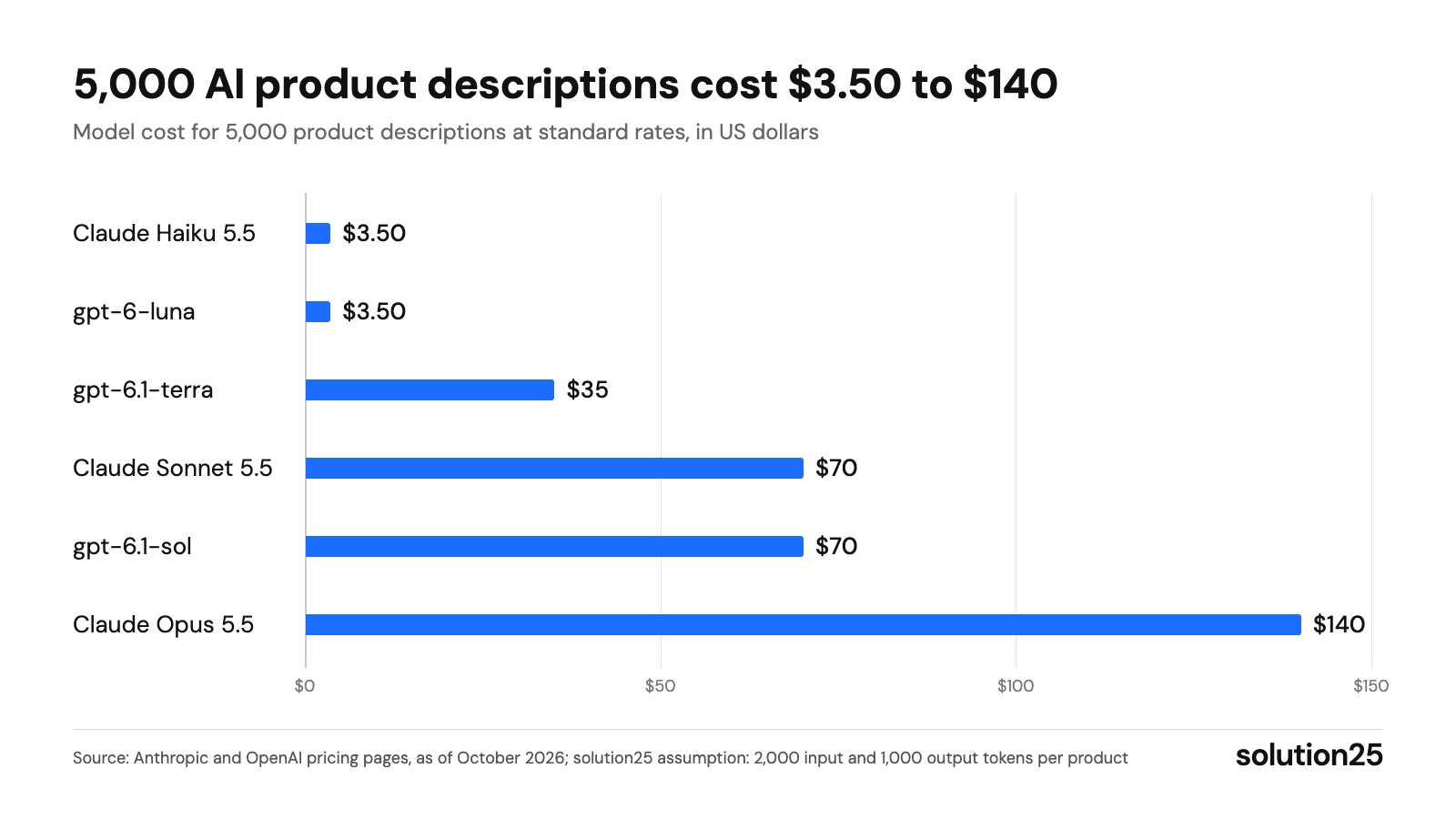
Figure: The chart shows that even the most expensive model stays under $150 for 5,000 texts: data maintenance and review time are what drive the budget. Source: Anthropic and OpenAI pricing pages, as of October 2026; solution25 assumption: 2,000 input and 1,000 output tokens per product
| Starting point | Recommendation | Running costs |
|---|---|---|
| Up to 200 products, Rise plan or higher | Description assistant or Copilot, every text reviewed by hand | Plan, Copilot with Intelligence+ after the free quota |
| Up to about 3,000 products, one or two languages | Store extension with your own API key, bulk editing per category, spot checks | €5 to €20 per month plus API costs |
| From 3,000 products, multiple languages or channels | Pipeline via Admin API and Sync API with fact check and approval | API costs and one-time setup |
| Targeted individual tasks | MCP Server with Claude or another MCP-capable assistant, approval per change | Chat subscription or API costs |
| Food, cosmetics, dietary supplements, toys | AI only for style and structure, mandatory information and claims from verified master data | as above plus legal review |
Our take: We recommend testing AI copy first in a pilot category with complete data and only rolling it out after measuring the impact. For regulated categories, we only use AI for structure and style, because a single invented claim can cost more than all model costs combined.
Prerequisites for getting started:
| Metric | Tool | Benchmark |
|---|---|---|
| Factual errors in review | Review script and manual approval | at most 1 in 50 texts, otherwise back to full review (based on experience) |
| Product page conversion rate | Google Analytics 4 or Shopware statistics, compared with a category without new texts | at least equal, target rising |
| Organic clicks and click-through rate | Search Console, filtered to product URLs | no decline after eight weeks |
| Returns due to inaccurate description | Return reasons in Shopware or the ERP | declining compared with the baseline |
| Rejections in the Shopping feed | Merchant Centre | no new rejections caused by the new texts |
Measure the error rate weekly during rollout and the impact after four and after eight weeks. If the error rate rises, returns with the reason “not as described” increase, or the click-through rate falls, check the category’s data and prompt first before switching models.
Give the model all the facts as a data block, a style guide, and two sample texts. Require a fixed format with short text, long text, bullet points, and meta description, and have missing information output as open questions. Then a human checks the facts against the data.
The current models from Anthropic, OpenAI, and Google are all suitable for product copy; what matters is the data and the prompt. Free chat versions are enough for individual texts. For hundreds of products, the API is cheaper: with small models, 5,000 descriptions cost around $3.50.
Not reliably. OpenAI shut down its detection tool in July 2023 due to low accuracy; on the test dataset, it only detected 26% of AI texts. And according to its spam policies, what counts for Google is the value for users, not how the content was created.
In our assessment, there is no general obligation in the store. Since August 2, 2026, Article 50(4) of the EU AI Act applies to AI texts intended to inform the public on matters of public interest, and doesn’t apply if there’s human review with editorial responsibility. In the Google Shopping feed, however, Merchant Centre requires the structured_description attribute; if in doubt, your legal counsel can clarify your specific case.
Yes. From the Rise plan on, the description assistant in the product form generates a text suggestion from keywords, and according to Shopware, the Copilot can fill in missing descriptions on all plans from 6.7.1.0, with the Intelligence+ subscription after the free quota.
Good SEO copy for product pages answers buyers’ questions with facts only you can provide. Include the main keyword in the product name, the first sentence, and the meta description, without stuffing it into the long text.
Running a shop in the UK and want to create product descriptions for your catalogue with AI and unsure whether a plugin, the Copilot, or your own pipeline fits? Get in touch: we’ll review the required attributes of a pilot category and tell you which route pays off for your catalogue and what setup costs.
Already running a store? Our free store audit shows where copy, data, or technology are costing you revenue today.
Learn more about how we work, our certifications, and our locations on the Shopware agency solution25 page.
Besar Bilalli is co-founder and Co-CEO of solution25, the Shopware agency from Bremen. Before founding the agency in 2017, he and Besnik Bilalli built their own online store without any startup capital and grew it to more than 500 orders a day. Since then he has been helping merchants with Shopware projects, from platform selection to ongoing operations. He’s happy to answer questions about this article personally: get in touch.
Responsible for content and updates: Besar Bilalli. Last updated: October 2026. Next content review: January 2027.
