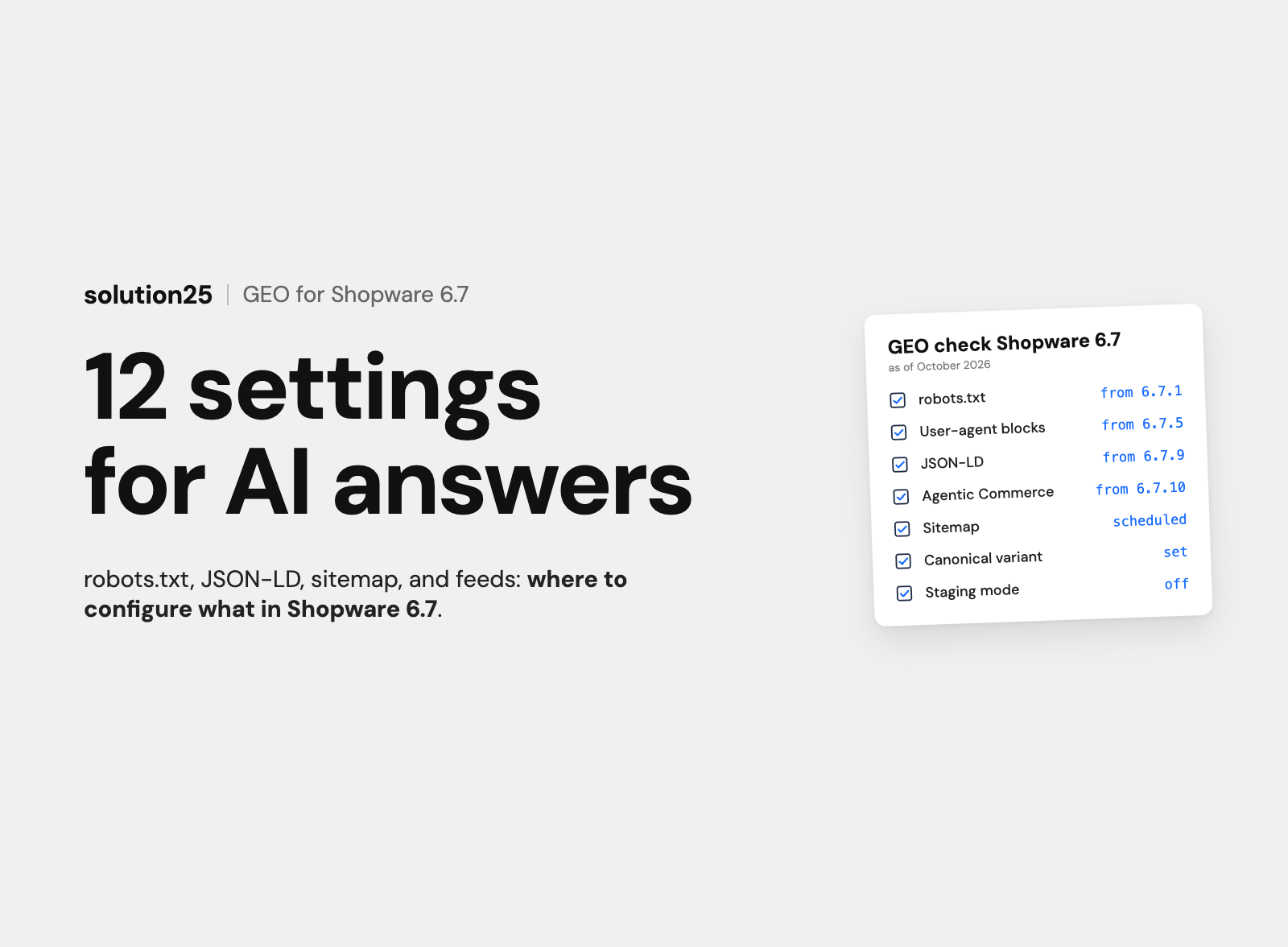

The technical guide for Shopware 6.7: twelve settings that let ChatGPT, Perplexity, Gemini, and Google AI Mode read and cite your store, with admin path, version, effort, and a measurement plan.
GEO for Shopware means: AI crawlers are allowed to read your store, find the facts in the HTML and in structured data, and also receive your products as a feed. Shopware 6.7 comes with the tools: robots.txt in the admin since 6.7.1, JSON-LD, meaning machine-readable product data in the page head, since 6.7.9, and the Agentic Commerce sales channel for the OpenAI feed since 6.7.10.
Twelve settings determine whether ChatGPT, Perplexity, Gemini, and Google AI Mode can cite your store. Three have the biggest impact: don’t lock out AI crawlers, including through staging mode or your hosting provider’s bot protection, turn on the JSON_LD_DATA feature flag, and set the sitemap to “Scheduled”.
The technical part takes three to six business days and, in our experience, costs €2,000 to €8,000. More effort usually goes into product data and copy. Whether the settings work shows up in the server logs after a few days and in the Search Console AI report after a few weeks.
When someone asks ChatGPT or Google AI Mode about a product, they get an answer with just a few sources. A store the crawler can’t read doesn’t appear in it, and the cause often lies in settings nobody associates with AI: sitemap strategy, canonical variants, staging configuration.
This article is for store owners and ecommerce managers with their own Shopware 6 store, and for the developers who implement the settings. After reading it, you’ll be able to check each of the twelve settings in your store, know the required Shopware version, and estimate the effort for your team or agency.
Before founding solution25, we grew our own online store to more than 500 orders a day, and since 2017 we have been delivering Shopware projects for merchants. The information comes from Shopware’s release notes and source code and from the documentation of OpenAI, Anthropic, Perplexity, Google, and Microsoft.
How AI systems choose their sources is explained in our article on GEO optimization, and how to write answer-ready copy in the guide AEO for Shopware. This article is about paths, versions, and configuration. All prices as of October 2026, excluding VAT.
AI answer engines reach a Shopware store in three ways, and each of the twelve settings serves at least one of them.
The benefit is twofold, because almost every setting also improves classic indexing. According to Google, there are no additional requirements and no special optimizations for AI Overviews and AI Mode, so it’s about complete, consistent data.
The prerequisite is Shopware 6.7, and at least 6.7.9 for JSON-LD; the current release is version 6.7.15.1 from October 7, 2026. You also need a staging environment, access to the server logs, and Google Search Console.
The table shows where each setting lives in Shopware 6.7, from which version it’s available, and how much time it takes. The effort figures are based on experience with a mid-sized store using a standard theme.
| Measure | Path or configuration | Version | Effort |
|---|---|---|---|
| 1. robots.txt for AI crawlers | Settings > General > Master data, card “robots.txt rules” | From 6.7.1, custom user-agent blocks from 6.7.5 | 1 to 2 hours |
| 2. Turn on JSON-LD | Feature flag JSON_LD_DATA, environment variable JSON_LD_DATA=1 | From 6.7.9, default from 6.8 | 4 to 8 hours, more with custom templates |
| 3. Sitemap and variant logic | Settings > Content > Sitemap | Core feature | 1 hour |
| 4. Canonicals | Catalogues > Products, SEO tab of the variant product | Core feature, page number in canonical from 6.7.13 | 2 to 6 hours |
| 5. SEO URL templates | Settings > Content > SEO | Regeneration after changes from 6.7.14 | 1 to 2 hours |
| 6. Answer copy in Shopping Experiences | Catalogues > Categories, Content > Shopping Experiences | Core feature | 1 to 3 hours per page |
| 7. Properties and variants | Catalogues > Properties, Product > Specifications | Core feature, dimensions in JSON-LD from 6.7.9 | 2 to 10 days, depending on catalog |
| 8. Reviews | Catalogues > Reviews, Settings > Commerce > Products | Individual reviews in JSON-LD from 6.7.9 | 2 to 4 hours, then ongoing |
| 9. Delivery times and returns | Settings > Commerce > Delivery times, returns page, Merchant Center | Delivery time in JSON-LD from 6.7.9 | 2 to 6 hours |
| 10. Product feeds | Sales channels of type Product comparison and Agentic Commerce | Agentic Commerce from 6.7.10, experimental | 1 to 2 days |
| 11. Rendering | Theme, plugins, apps, headless frontend | Storefront renders server-side | 2 to 4 hours for spot checks |
| 12. Monitoring | Server logs, Search Console, Bing Webmaster Tools | Search Console AI report since August 31, 2026 | 2 to 4 hours, then 1 to 2 hours per month |
The menu paths follow the Shopware 6.7 documentation. In Shopware 6.6, many settings are under Settings > Shop, and robots.txt is a file in the public folder.
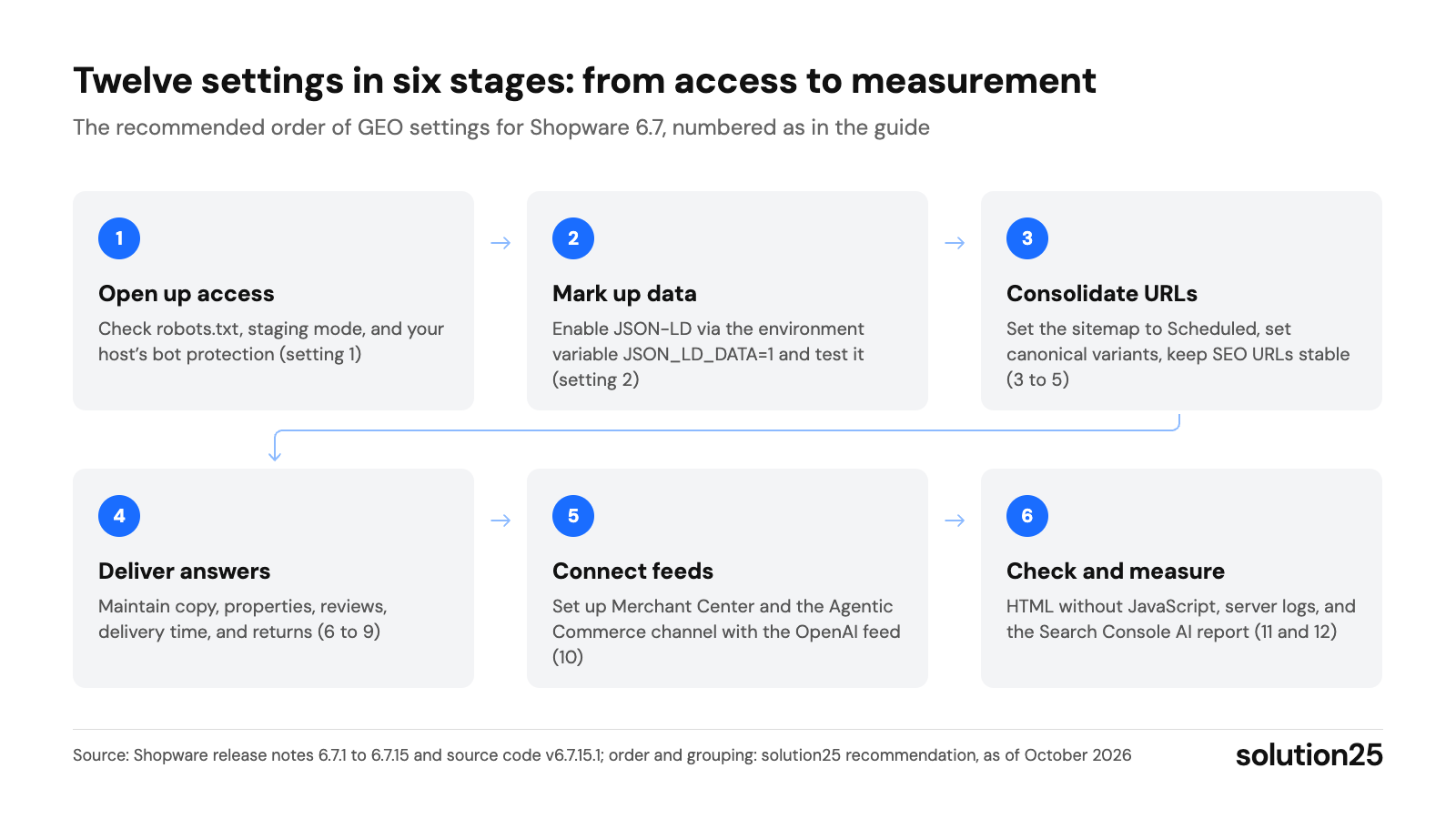
Figure: The chart groups the twelve settings into six stages: copy and feeds only work once crawlers have access and clean data. Source: Shopware Release Notes 6.7.1 to 6.7.15 and source code v6.7.15.1; order and grouping: solution25 recommendation, as of October 2026
The order follows the path of the data: first access, then structure and URLs, then content, feeds, and measurement. It’s best to implement steps 1 to 5 on a staging copy first.
Besides crawlers and feeds, Shopware offers two entry points for AI agents. According to the release notes, the MCP server at /store-api/_mcp has been reachable without a feature flag since 6.7.14 and remains experimental until 6.8. The Agentic Commerce (Beta) extension provides catalog, cart, and checkout for shopping agents via the Universal Commerce Protocol.
Since 6.7.12, every sales channel can optionally serve an /llms.txt and an /AGENTS.md, enabled in the sales channel details. According to its own documentation, Google doesn’t need such files, and an effect on citations hasn’t been proven; for visibility in answers, the twelve settings take priority.
The vendors separate crawlers for search, training, and fetches on user request. For answers, the search crawlers are what count; training crawlers can be blocked without your store dropping out of search answers.
According to the template in the Shopware source code, Shopware 6.7.15 outputs the following without custom rules, plus one sitemap line per domain:
User-agent: *
Allow: /
Disallow: /*?
Allow: /*referringSalesChannel=
Allow: /*theme/
Allow: /media/*?ts=
Allow: /thumbnail/*?ts=
Sitemap: https://your-domain.com/sitemap.xml
The allow rule for feed landing pages came with 6.7.13, and the one for thumbnails with version 6.7.15; in older 6.7 versions, add both lines yourself. The “Disable default robots.txt rules” option removes all default lines, while your own rules remain.
If staging mode is active, the file only outputs User-agent: * and Disallow: /. The mode is set via the core.staging configuration by the system:setup:staging command, which according to Shopware has existed since 6.6.1.0.
A crawler only follows the group that most specifically matches its name. According to Google, specific groups and the group for * are not combined, and the RFC 9309 standard says the same. So a User-agent: GPTBot block with Allow: / lifts the Disallow: /*? for GPTBot, and the bot crawls filter and sort URLs.
That’s why you don’t need a separate group to allow bots; custom blocks are only worth it for blocking training crawlers. According to the help text, user-agent blocks from the admin field apply to all domains:
User-agent: GPTBot
Disallow: /
User-agent: ClaudeBot
Disallow: /
OAI-SearchBot, Claude-SearchBot, PerplexityBot, Googlebot, and Bingbot keep following the default group. Blocking Google-Extended, on the other hand, also affects grounding in the Gemini app and can therefore cost you visibility in Gemini answers.
This scenario summarizes typical findings from our projects and doesn’t describe a single client; all figures are based on experience. Starting point: a garden equipment retailer with 2,700 products without variants and 300 parent products with 2,400 variants, Shopware 6.7.8, a custom theme, and a third-party review plugin.
The effort: six business days for technology and data, not counting the update itself, around €6,000, plus 20 category texts for around €5,000. The search crawlers typically start coming regularly one to two weeks after access is opened. Whether the store gets mentioned more often only shows up in the prompt set after two to three months.
Our project for TonerPartner shows how much work goes into structured product data. For 32 online brands on a shared Shopware 6 foundation, we built plugins for mapping cartridges to printers, brand-specific filters, and rules for SEO categories, among other things. This mapping answers exactly the question customers also ask an AI assistant: which cartridge fits my printer?
Our take: Many of the Shopware stores we audit don’t fail at AI visibility because of missing files like llms.txt, but because of bot protection, sitemap strategy, and missing canonical variants. We always check these three points first, because they can be fixed in a few hours and make any later copywriting measurable in the first place.
The logs are the first place to see whether a setting works: which bot comes, which URLs it fetches, and which status code it gets. For an overview, a filter on the server is enough:
grep -oE “GPTBot|OAI-SearchBot|ChatGPT-User|ClaudeBot|Claude-SearchBot|Claude-User|PerplexityBot|Perplexity-User|bingbot|Googlebot” access.log | sort | uniq -c
User agents can be spoofed, which is why OpenAI and Perplexity publish their IP ranges as JSON files for verification. Google-Extended never shows up in the logs because it doesn’t have its own user agent.
Since August 31, 2026, the generative AI report in Search Console has counted worldwide how often links to your website appeared in AI Overviews and AI Mode, by page, country, date, and device; clicks are not included yet. Since February 2026, Bing Webmaster Tools has shown citations in Copilot in the AI Performance report.
You can identify AI visits in GA4 by referral sources like chatgpt.com (GA4 guide for Shopware 6), and a monthly prompt set with 20 to 30 customer questions complements the numbers.
| Metric | Tool | Benchmark | Frequency |
|---|---|---|---|
| Search crawler fetches | Server logs | Every search crawler at least weekly, over 95% with status 200 | Weekly for the first four weeks, then monthly |
| Parameter URLs in bot fetches | Server logs | Under 5% of fetches | Monthly |
| Product URLs in the sitemap | Search Console, Sitemaps report | Matches visible products plus canonical variants | Monthly and after imports |
| Errors in structured data | Rich Results Test, Search Console | No errors in product snippets and merchant listings | After every update |
| Rejected items in the feed | Merchant Center | Under 2% of items | Weekly |
| Impressions in AI Overviews and AI Mode | Search Console, generative AI report | Upward trend over three months | Monthly |
| Mentions in the prompt set | ChatGPT, Perplexity, Gemini, AI Mode | Rising share over three to six months | Monthly |
The benchmarks are based on experience from our projects. Adjust course if a search crawler is missing two weeks after you’ve opened access, bots mainly fetch parameter or 404 URLs, or the sitemap jumps in size after an import.
The prerequisite for all twelve settings is a store that Google and Bing already index cleanly; our guide to Shopware SEO describes the foundation for that.
GEO has limits in two places: no setting guarantees a mention, because the platform alone chooses its sources. And according to the specification, the OpenAI feed is aimed at the US market so far.
The ranges are based on experience from our projects at hourly rates of €100 to €180, not list prices. They’re consistent with our articles on GEO and AEO; what a Shopware project costs overall is covered under Shopware pricing.
| Item | Scope | Cost |
|---|---|---|
| Quick check | Settings 1, 3, and 12: robots.txt, bot protection, sitemap, server logs for the last 30 days | €300 to €700, one-time |
| Technical foundation | Implement settings 1 to 5 and 8 to 12 on staging, test, and go live | €2,000 to €8,000, one-time |
| Product data | Setting 7 plus the data for 8 and 9: properties, variants, GTIN, delivery times | €2,000 to €10,000, one-time |
| Answer copy | Setting 6: category and product copy in Shopping Experiences | €150 to €400 per page |
| Ongoing support | Logs, Search Console, prompt set, checks after updates | €800 to €3,000 per month |
An update from 6.7.8 or older isn’t included; its effort depends on the theme and plugins. For a small store with a standard theme, the quick check, JSON-LD, and ten category texts are often enough, together around €2,500 to €6,000.
If you can only invest one day, handle settings 1, 2, and 3. They determine whether AI crawlers can read the store, whether they find complete product data, and whether new products appear in the sitemap within a day.
GEO stands for Generative Engine Optimization, meaning measures that get AI systems to cite a store as a source. In Shopware, this mainly involves robots.txt, JSON-LD, sitemap, canonicals, product data, and feeds. GEO has nothing to do with AI-powered product search in your own store; our article on Shopware AI covers that.
The technical foundations are publicly documented, because OpenAI, Anthropic, Perplexity, Google, and Microsoft describe their crawlers and how to control them. Promises of guaranteed mentions are not legitimate; you can recognize serious work by metrics from logs, Search Console, and prompt tests.
It doesn’t matter for search answers, because GPTBot and ClaudeBot collect training data, while search runs through OAI-SearchBot and Claude-SearchBot. Whether you allow training is a business decision. Only block Google-Extended if you can do without visibility in the Gemini app.
Open your-domain.com/robots.txt in the browser, and if you have several domains, check each one. If it only says Disallow: /, staging mode is active. If your rules from the admin are missing, the web server is often still serving an old static file from the public folder.
The current version is Shopware 6.7.15.1 from October 7, 2026. All twelve settings can be implemented from 6.7.10; before 6.7.13 and 6.7.15 respectively, add the allow rules for feed landing pages and thumbnails yourself. With Shopware 6.8, JSON-LD becomes the default.
Not for the twelve settings; Shopware 6.7 includes them in the core. Before installing extensions that generate llms.txt files, Markdown versions, or their own JSON-LD, check them for overlaps with JSON_LD_DATA. According to its documentation, Google needs neither AI text files nor special markup.
Not yet if you’re a merchant based in Germany: according to Shopware, registration for the ChatGPT marketplace is only possible in the US so far, and the standard upload of the OpenAI feed is aimed at the US market. Our article on Agentic Commerce describes what agent purchases mean for merchants.
According to OpenAI and Perplexity, changes to robots.txt are picked up within about 24 hours. According to Google’s documentation, recrawling can take anywhere from a few days to several months. In our experience, new copy shows up in answers after two to eight weeks.
Want to know whether AI crawlers can reach your store and which of the twelve settings has the biggest impact for you? Get in touch: we’ll implement the technical foundation on your staging environment, test JSON-LD, sitemap, and feeds, and hand over a measurement plan with baselines.
Already running a Shopware store? The free store audit checks canonicals and structured data, among other things, and uses live queries to check visibility in ChatGPT, Perplexity, Gemini, and AI Mode. You usually receive the results as a PDF within two business days.

Besnik Bilalli is the founder and CEO of solution25, the Shopware agency from Bremen. Before founding the agency in 2017, he built his own online store and grew it to more than 500 orders a day. Since then he has been helping merchants with Shopware projects, from the first budget to ongoing operations. He’s happy to answer questions about this article personally: get in touch.
Responsible for content and updates: Besnik Bilalli. Last updated: October 2026. Next content review: January 2027.
