

How the Model Context Protocol works, which clients support it, and what the native MCP server in Shopware 6.7 delivers: tools, permissions, approvals, risks, setup, and costs.
An MCP server is a standardized interface that lets AI assistants like Claude or ChatGPT access a system’s data and functions. Anthropic released the underlying Model Context Protocol as an open standard in November 2024, and it has been under the Linux Foundation since December 2025.
Shopware 6.7 includes its own MCP server, and since version 6.7.14 it’s active without any additional setting. It runs at /api/_mcp, uses the permissions of the Admin API, Shopware’s management API, and allows searching, analyzing, and, after approval, changing products, orders, and settings.
The technology is free, and the effort lies in permissions, approvals, and logging. In our experience, a clean setup with roles and an audit log that records every action costs €1,500 to €5,000, and custom tools for your own processes €5,000 to €20,000.
Before founding solution25, we grew our own online store to more than 500 orders per day, and since 2017 we’ve been delivering Shopware projects, now including integrations with Claude, ChatGPT, and the workflow platform n8n. With AI Connect, our MCP connector for Shopware, we’ve built our own extension that secures this connection with roles, approvals, and logging.
Because the MCP server is part of the core, every current Shopware store has to answer the question of who can read and change what through it. This article is for store owners and ecommerce managers running their own Shopware 6 store who want to connect Claude, ChatGPT, or n8n to products, orders, and reports, and for the developers implementing it.
After reading it, you’ll be able to decide whether an MCP server, the Copilot in the Shopware Administration, n8n, or the Admin API fits your task, and set up access that can’t do more than necessary. All prices as of October 2026, excluding VAT.
The Model Context Protocol (MCP) is an open standard that connects AI applications to external data sources and tools. Anthropic released it on November 25, 2024, along with SDKs (programming libraries) and the first servers for Google Drive, Slack, GitHub, Git, Postgres, and Puppeteer (Anthropic’s announcement).
The core idea: instead of building a separate integration for every combination of AI assistant and business system, each system speaks MCP once and is then reachable by all clients. On December 9, 2025, Anthropic handed the protocol over to the Agentic AI Foundation under the umbrella of the Linux Foundation, with Block and OpenAI as co-founders, citing more than 10,000 active public MCP servers and over 97 million SDK downloads per month (announcement of the handover).
MCP follows a client-server architecture with three roles (architecture overview):
Communication runs over JSON-RPC 2.0, meaning structured messages. The protocol only governs this exchange, not how the AI uses the context.
Conversely, a server can ask the client to check with the user (elicitation), for example to confirm a change.
With stdio, the client starts the server as a local process and exchanges messages via standard input and output. Streamable HTTP sends each message as an HTTP POST to an endpoint and allows remote servers with many clients at once (transports in the specification). The older HTTP+SSE (server-sent events) transport has been deprecated since protocol version 2025-03-26.
MCP is versioned by date, and the current revision is 2026-07-28 (versioning). It makes the protocol stateless, so the version and capability negotiation at the start of a connection is no longer needed (changelog). Shopware still has this revision disabled and uses the previous connection setup, which current clients still support.
By now, all major AI assistants support the protocol, with differences in transport, sign-in, and approvals.
| Client | MCP support | Approval of write access |
|---|---|---|
| Claude.ai and Claude Desktop | Remote servers as a “custom connector” on all plans (Free: one connector), local servers via config file or .mcpb extension | Every tool call is submitted for approval |
| Claude Code | stdio, HTTP, and SSE; configuration via command or .mcp.json; OAuth login via /mcp | Project servers must be confirmed, tool permissions via permissions settings |
| ChatGPT | Developer mode with a full MCP client on Plus, Pro, Business, Enterprise, and Edu; SSE and Streamable HTTP; OAuth or no sign-in | Write actions require confirmation by default |
| OpenAI Responses API and Agents SDK | Remote servers as tool type “mcp,” in the Agents SDK also stdio and Streamable HTTP | require_approval per tool, approval is the default |
| Cursor | stdio, SSE, Streamable HTTP; .cursor/mcp.json; OAuth | Asks before every tool call by default |
| n8n | MCP Client Tool in the AI Agent node, MCP Server Trigger, instance MCP server for external clients | No confirmation prompt in the workflow, you build approvals yourself |
| Shopware Copilot | Connects to the MCP endpoint of your own store | Preview via dry run, change only after approval |
Sources: Claude Connectors, Claude Code, ChatGPT Developer Mode, OpenAI API, Cursor, n8n Trigger, n8n instance server. Developers usually reach for Claude Code or Cursor, business teams for Claude Desktop or ChatGPT, and processes without human intervention run through n8n.
MCP gives a language model access to real systems. That’s why the specification includes its own security best practices, and the clients implement approvals. The most important points for store owners:
Shopware initially experimented with a separate Node.js package (shopware-admin-mcp on GitHub, now archived). Since June 2026, Shopware has shipped a native MCP server with the core, built on the Symfony MCP Bundle of the PHP framework underlying Shopware (Shopware MCP server documentation).
The endpoint for the Administration is /api/_mcp, and the one for the Storefront is /store-api/_mcp, both via Streamable HTTP. Shopware labels the server as experimental until version 6.8, so tool names may still change. According to endoflife.date, the current version is 6.7.15.1 from October 2, 2026.
The core doesn’t come with specialized tools for “create product” or “find customer,” but with generic tools based on the Admin API that work with any entity (tools reference). In addition, there are resources with reference data like sales channels, currencies, and state machines, as well as the shopware-context prompt.
| Toolset | Tools | Access | Required permissions |
|---|---|---|---|
| Discovery | shopware-tool-search, shopware-toolsets-list, shopware-toolset-enable | Search and activate in the session | none |
| Entity | shopware-entity-schema, shopware-entity-search, shopware-entity-read, shopware-entity-aggregate, shopware-entity-upsert, shopware-entity-delete | Read, analyze, write, delete | Read, create, update, or delete per entity |
| System config | shopware-system-config-read, shopware-system-config-write | Read, write | system_config:read or system_config:update |
| Media | shopware-media-upload | Write, without dry run | media:create, plus product:update for product images |
| Order | shopware-order-state | Change order, payment, and delivery status | order:read plus update permissions per action |
| Theme | shopware-theme-config | Read or write | theme:read or theme:update |
All write tools run as a dry run by default: the model gets a preview of the change and has to repeat the call with dryRun=false to execute it. The only exception is media upload, which uploads immediately.
For each integration and each user, you maintain an allowlist of permitted tools, resources, and prompts. It’s the security boundary at runtime, because activating a toolset doesn’t grant any permissions. Administrators bypass the user allowlist, so an MCP access point should never be tied to an admin account.
Shopware also limits calls: 300 per minute and 1,000 per ten minutes at the admin endpoint, and 120 and 600 at the Store API endpoint (configuration). For bulk changes, the Sync API, which lets Shopware write many records in one call, remains the better option.
The Copilot, the chat assistant in the Administration, connects to the store’s MCP endpoint and works with the permissions of the logged-in merchant. It first calls modifying tools as a dry run, shows an approval card, and only executes the change after confirmation (Copilot Tool Approval).
According to Shopware, the Copilot has been available to all merchants since version 6.7.1.0, including in the Community Edition, and its agentic features have been stable since 6.7.15.0 (release news October 2026). They’re part of Shopware Intelligence+, Shopware’s AI add-on subscription, for €19 per month, or €29 in the Community Edition (Shopware on AI features, pricing page).
For merchants without developers, the generic entity tools are clunky, because the model first has to query the schema and then build criteria in the Admin API format. That’s why Shopware ships the experimental package swag/mcp-merchant-tools with ready-made workflows like merchant-order-summary and merchant-revenue-report, though it may be dropped again in favor of the Copilot (Shopware Extensions).
Our plugin AI Connect (MCP connector for Shopware) builds on the native server and adds what’s missing in day-to-day operations: ready-made configurations for Claude Desktop, Claude Code, and OpenAI Codex are generated in the Administration, every connection uses a Shopware ACL role, every change appears as a preview before it’s executed, and the audit log makes activity traceable by tool, mode, result, and account. On top of that, there’s natural language search for staff and customers, using your own API key with OpenAI or Anthropic.
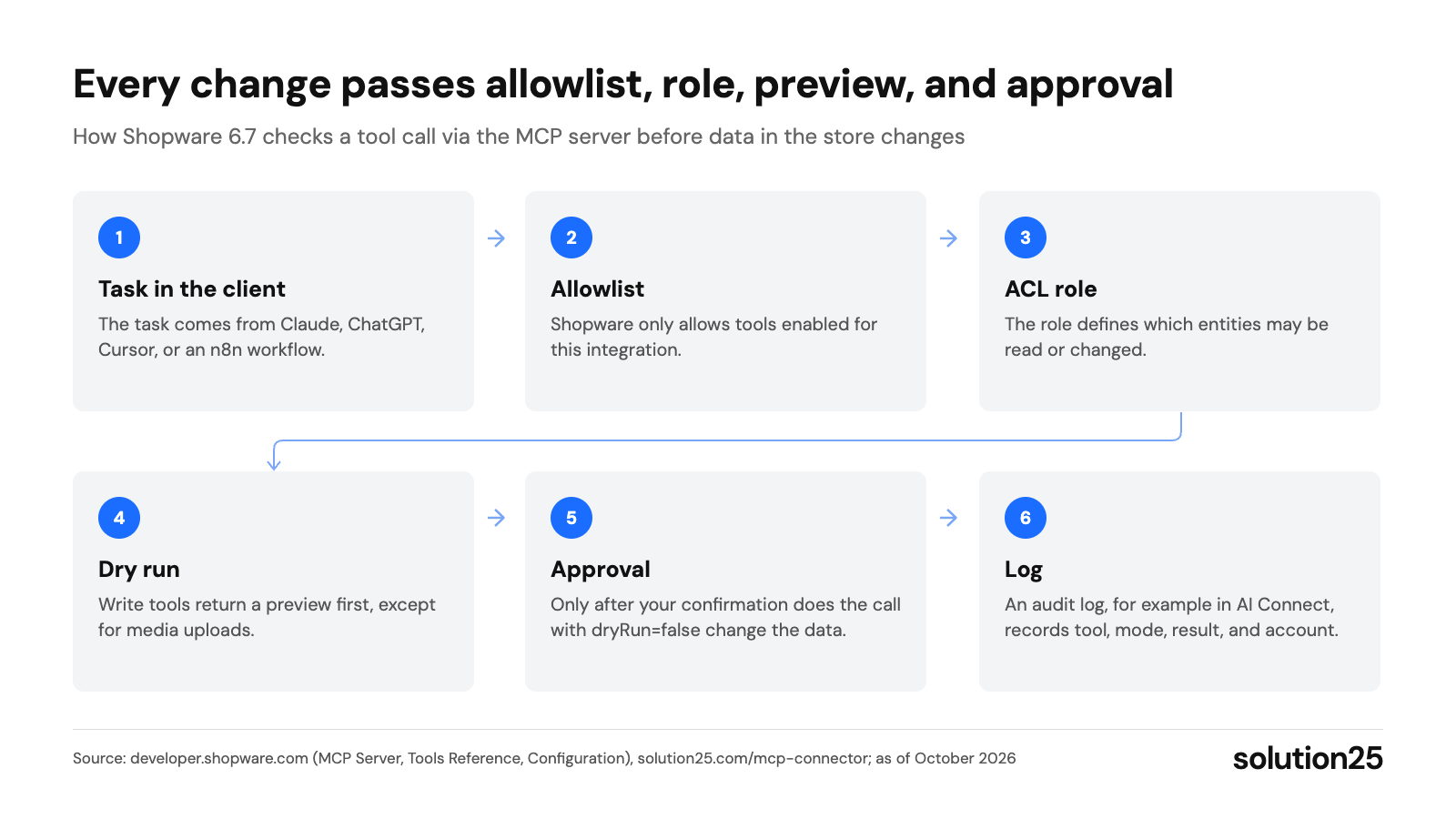
Figure: The chart shows where a tool call is stopped or traced; keeping the role and allowlist tight and not granting blanket approvals limits the model’s mistakes. Source: developer.shopware.com (MCP Server, Tools Reference, Configuration), solution25.com/mcp-connector; as of October 2026
Anything the Admin API can do can be triggered in natural language via MCP, always within the integration’s permissions. These use cases have proven themselves in projects:
The more specifically the prompt names the entity, time period, and desired output, the fewer follow-up questions come up. A collection of tested prompts per team pays off quickly.
MCP isn’t the only way to connect Shopware to AI or other systems. The table compares the five common options.
| Option | Best for | Strengths | Limits |
|---|---|---|---|
| MCP server (native in Shopware) | Interactive work in chat, analysis, maintenance with approval | Included in the core, ACL, dry run, all MCP clients | Experimental until 6.8, rate limits, business-specific tools only via extension |
| n8n | Recurring processes without humans, third-party systems | Ready-made Shopware nodes, AI agent with MCP Client Tool, self-hosting | You build approvals and error handling in the workflow |
| Admin API directly | Custom software, bulk imports, ERP integrations | Full control, Sync API, no token costs | Development required, no natural language dialog |
| Shopware Nexus | Event-driven workflows between Shopware, ERP, and CRM | Run by Shopware, triggers on entity events, quota included in the plan | Beta, no AI or MCP node, no self-hosting |
| Shopware Copilot | Getting started without configuration in the Administration | No setup, built-in approval, data in Europe according to Shopware | Only in the Administration, agentic features via Intelligence+ |
Our n8n nodes for Shopware cover products, customers, and orders, and typical workflows are shown in our article on automating Shopware 6 with n8n. Since n8n’s MCP Client Tool speaks Streamable HTTP by default from node version 1.2 (node source code), an AI agent in n8n can talk to the Shopware MCP server directly.
According to the documentation, Shopware Nexus in beta connects Microsoft Dynamics Business Central, Slack, and S3, among others, but there’s no MCP or AI node. We explain how the Admin API works directly on our Shopware Admin API page, and the AI integration platform for Shopware gives an overview of AI integrations.
claude mcp add --transport http shopware https://ihr-shop.de/api/_mcp --header "sw-access-key: …" --header "sw-secret-access-key: …". In Claude Desktop and Cursor, add the same endpoint with the type streamable-http and the two headers to the configuration file (Shopware Getting Started). In n8n, connect the AI Agent via the MCP Client Tool with header authentication.A typical setup from our consulting work, as a scenario based on experience: a merchant with around 4,000 products wants to use Claude for reports, customer service, and catalog management. Instead of one admin access point, we set up three integrations.
| Integration | Who uses it | Allowlist (short tool names) | Role permissions |
|---|---|---|---|
| Reporting | Management in Claude Desktop | schema, search, read, aggregate | Read orders and products |
| Service | Customer service team | schema, search, read, order-state | Read orders and customers, change delivery status |
| Catalog | Store manager | schema, search, read, upsert, media-upload | Read and update products, create media, no delete permissions |
Only the catalog integration gets media upload, which saves without a preview, and only service sees customer data. In our experience, setting up these three access points with training falls in the lower end of the €1,500 to €5,000 range mentioned above.
We apply the same principle outside of AI projects: for a German logistics client, we built a warehouse portal with role-based order management and integrations with SAP, HubSpot, and Shopware. There, role-based permissions ensure that sensitive information is only accessible to authorized staff, and audit logs make processes traceable.
Your tools are the audit log of an extension like AI Connect or your own logging, your AI provider’s cost overview, and in n8n, the list of executions. These benchmarks have worked well for us:
Check the numbers weekly for the first four weeks, then monthly and after every Shopware update. You should make adjustments as soon as the approval rate drops, a spot check shows a discrepancy, or a proven prompt no longer finds a matching tool after an update.
Costs arise for the AI client, for additional Shopware features, and for setup.
| Cost item | Amount | Source |
|---|---|---|
| MCP server in Shopware | €0, included in the core from 6.7.14 | Shopware documentation |
| Claude for individual users | Pro $20 per month ($17 billed annually), Max from $100, Team from $20 per user | claude.com/pricing |
| ChatGPT for individual users | Plus $20 per month, developer mode from Plus | openai.com |
| API usage, for example from n8n | Claude Sonnet 5.5: $2 per million input tokens, $10 per million output tokens; for remote MCP servers, OpenAI only charges for tokens | Anthropic, OpenAI |
| n8n Cloud | Starter €20 per month billed annually, Pro €50; self-hosted Community Edition without license costs | n8n.io/pricing |
| Shopware Intelligence+ | €19 per month, €29 for the Community Edition, for agentic Copilot features | shopware.com/de/preise |
| Setup by an agency | €1,500 to €5,000 for roles, allowlists, client configuration, audit log, and training | solution25 experience |
| Custom tools | €5,000 to €20,000 depending on the number and complexity of processes | solution25 experience |
Setup costs mainly depend on how many roles and clients you need. What Shopware agencies generally charge is covered in our article on Shopware agency pricing, and our article on Shopware pricing covers the total cost of a store.
Custom tools pay off when a process runs daily: a “Create return” tool that handles the order, refund, and inventory booking in one step with one approval saves more time than ten generic entity calls. These tools are built as a plugin or app (Shopware plugin development).
Our take: For most Shopware merchants, the native MCP server with a read-only integration is the right starting point, because roles, allowlist, and dry run are already built in and there’s no license fee. We only grant write permissions after a test run on staging, and for stores on 6.6, we recommend updating rather than a separate MCP server that becomes redundant with 6.7.
An MCP server is a program that offers an AI application tools, data, and templates via the Model Context Protocol and executes the calls that the client sends after approval. In Shopware, the MCP server is part of the store and reachable at /api/_mcp.
MCP is an open standard that connects AI applications to tools and data. A host application like Claude or ChatGPT queries a server’s tools and presents them to the language model. When the model picks a tool, the host executes the call after your approval and returns the result to the model.
The MCP project maintains reference servers like Filesystem, Git, Fetch, Memory, and Time (GitHub) as well as a public registry. In ecommerce, besides the native Shopware server, the n8n instance server and the MCP endpoint per Shopify store are relevant (Shopify).
Official SDKs are available for TypeScript, Python, PHP, Java, and Go, among others (SDK overview). You define tools with a name, description, and input schema and choose stdio or Streamable HTTP as the transport. In Shopware, you extend the existing server: plugins register tools as a Symfony service, and apps declare them in the Resources/mcp.xml file, each with ACL permissions and a dryRun parameter for approval.
As secure as their permissions and configuration. The specification describes attacks like token passthrough, prompt injection via tool results, and manipulated local servers, and it requires user approval. In Shopware, ACL roles, allowlists per integration, a dry run before every change, and rate limits come on top.
The protocol is free, and the Shopware MCP server is included in the core from version 6.7.14. Ongoing costs arise for the client, around $20 per month for Claude Pro or ChatGPT Plus, and in our experience, setup with roles, allowlists, and an audit log costs €1,500 to €5,000.
Yes, via developer mode in Plus, Pro, Business, Enterprise, and Edu. Because ChatGPT only connects via OAuth or without sign-in, you need a gateway in front of the store that handles OAuth, and the store must be publicly reachable via HTTPS.
Want to know which tasks in your store can be handled through an MCP server and which permissions they require? Get in touch and we’ll check your Shopware version, propose roles and allowlists, and set up AI Connect with approvals and an audit log. In the end, every team has its own access point that only sees and changes what its task requires.
Already running a store and want to know where it stands today first? Our free store audit shows you in two business days, as a PDF, where your store is losing revenue, from load time and SEO to visibility in AI assistants.

Besnik Bilalli is the founder and CEO of solution25, the Shopware agency based in Bremen. Before founding the agency in 2017, he built his own online store and grew it to more than 500 orders per day. Since then, he has supported merchants with Shopware projects, from the first cost estimate to ongoing operations. He’s happy to answer questions about this article personally: Get in touch.
Responsible for content and updates: Besnik Bilalli. Last updated: October 2026. Next content review: January 2027.
