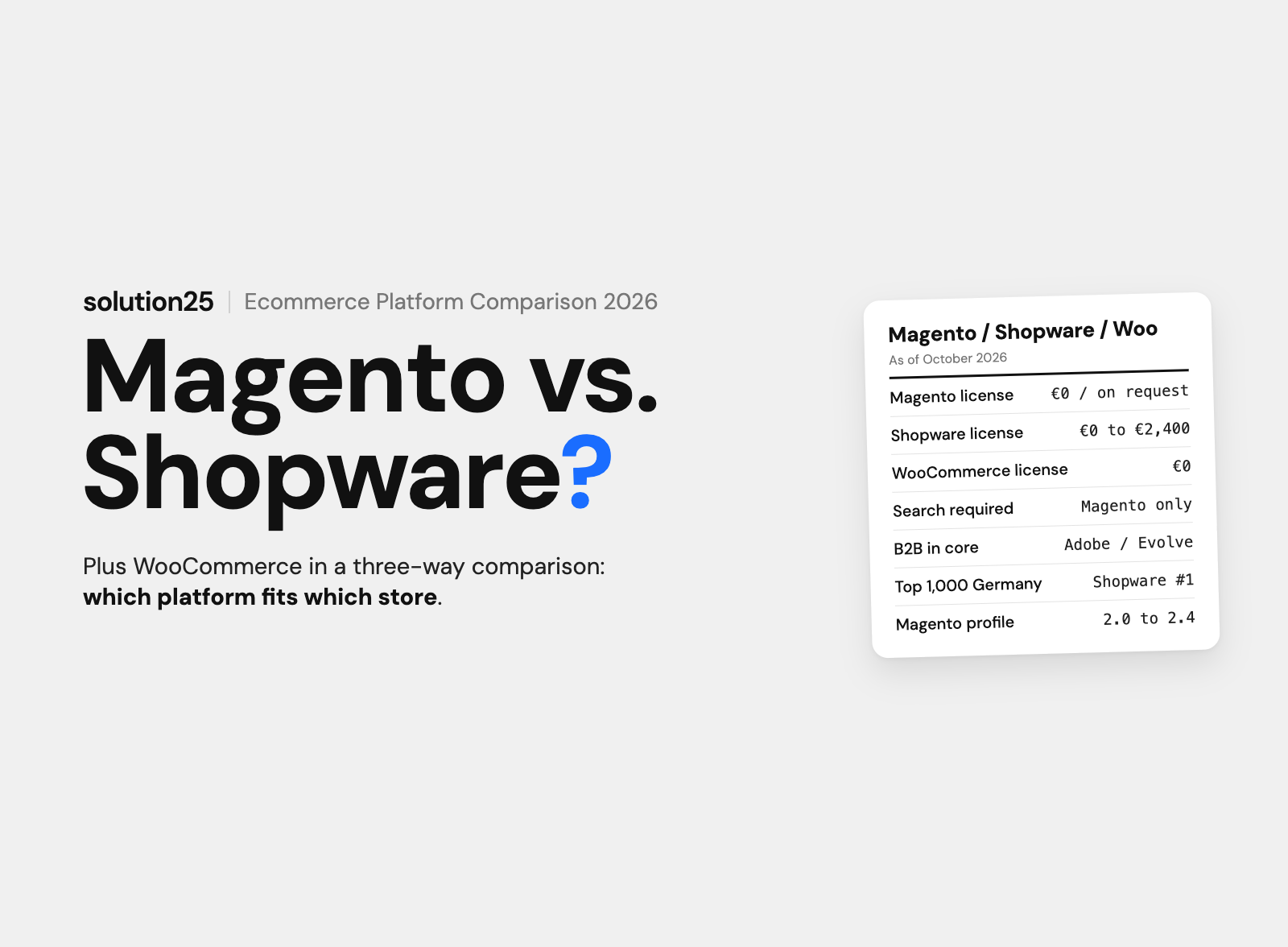

Magento Open Source, Adobe Commerce, Shopware 6, and WooCommerce compared: official pricing, technology, B2B, the agency market, and migrating from Magento to Shopware 6, from an agency that knows both sides.
For most merchants in German-speaking countries, Shopware 6 is the most cost-effective choice. The Community Edition has no license fee, Rise starts at €600 a month, Evolve with B2B features at €2,400, and its partner network in Germany is the densest of the three platforms.
Magento is only worth it in two cases: as Adobe Commerce for large enterprises with international multi-store operations and an Adobe budget, or as Magento Open Source for merchants with their own development team that can run a stack of PHP 8.5, OpenSearch, RabbitMQ, and Varnish over the long term.
WooCommerce fits small product ranges on an existing WordPress site. The plugin is free, extensions cost $29 to $299 a year according to WooCommerce, and once you have a few thousand products, B2B pricing, or an ERP integration, running it gets more expensive than a Shopware store.
Before founding solution25, we built our own online store and grew it to more than 500 orders a day. Since 2017, we’ve been delivering Shopware projects, now as a Platinum Partner, along with WooCommerce stores, and we’ve guided merchants from Magento 1 and Magento 2 to Shopware 6.
The wrong ecommerce platform gets expensive, because the costs aren’t in the license but in operations, extensions, and a later switch. This article is for executives and ecommerce leaders facing a platform decision, and for merchants considering a move away from Magento or WooCommerce.
After reading it, you’ll be able to decide which of the three platforms fits your store based on licensing, technology, B2B, security, and the agency market, and you’ll know how a migration from Magento to Shopware 6 works. All prices as of October 2026, excluding VAT.
| Criterion | Magento (Open Source / Adobe Commerce) | Shopware 6 | WooCommerce |
|---|---|---|---|
| Vendor and license model | Adobe (US), since 2018; Open Source under OSL 3.0, Adobe Commerce commercial | Shopware AG (Schöppingen); core under MIT license, Rise, Evolve, Beyond plans | Automattic (US); WordPress plugin under GPLv3 |
| License costs | Open Source €0, Adobe Commerce on request only | €0 (Community Edition), Rise from €600, Evolve from €2,400 a month, Beyond custom | €0 |
| Hosting options | Self-hosting, Adobe Commerce on Cloud (PaaS), Adobe Commerce as a Cloud Service (SaaS) | Self-hosting, PaaS, SaaS | WordPress hosting |
| Tech stack (current version) | PHP 8.5, MariaDB 12.3 or MySQL 8.4, OpenSearch 3 (required), RabbitMQ, Valkey, Varnish | PHP 8.2 or newer, MariaDB 10.11 or MySQL 8.0, OpenSearch and Redis optional | PHP 8.3 or newer, MySQL 8.0 or MariaDB 10.6, 256 MB memory limit |
| B2B | Only Adobe Commerce B2B (company accounts, shared catalogs, quotes, approvals) | B2B Components from Evolve, Store extensions for Community Edition and Rise | Only via plugins |
| Extensions | Adobe Commerce Marketplace, thousands of extensions | More than 3,100 extensions in the Shopware Store | WooCommerce Marketplace plus WordPress plugins |
| Good fit for | Large enterprises, international multi-store setups, teams with their own Magento developers | Mid-sized businesses, B2B, ERP integration, data sovereignty in Germany | Small product ranges, content sites with a store, quick launch |
The pattern runs through the entire comparison: Magento is the most powerful platform and the most expensive to run, while WooCommerce is the cheapest to start with and has the tightest limits. Shopware sits in between and covers most of the German mid-market.
Market share figures show two different worlds. Worldwide, W3Techs (as of October 28, 2026) counts WooCommerce at 47.4% of all detected ecommerce platforms, Magento at 1.6%, and Shopware at 0.2%. Among the 1,000 highest-revenue B2C stores in Germany, Shopware ranks first for the fourth year in a row with 11.5%, according to an EHI study that Shopware cites in a press release from October 2025.
Magento launched in 2008 and has belonged to Adobe since June 19, 2018. Today there are two lines: Magento Open Source, free under the Open Software License 3.0, and Adobe Commerce, the commercial edition with a B2B module, cloud hosting, and support from Adobe.
Both run on the same core of the 2.4 release line. The current version 2.4.9 was released on May 12, 2026; according to Adobe, there’s one full release a year in May and security patches at least once a year. Magento 1 has been without security updates since June 2020.
There’s also Mage-OS, a community-driven distribution based on Magento Open Source that describes itself as independent of Adobe, based on 2.4.9 as of October 2026.
Shopware 6 comes from Shopware AG in Schöppingen, Germany. The core is under the MIT license, and the paid Rise, Evolve, and Beyond plans add features and support. The current version is Shopware 6.7 (since June 17, 2025), and according to endoflife.date, the previous version 6.6 receives security updates until February 28, 2028.
You choose the hosting model yourself: self-hosting, PaaS, or SaaS. Rule Builder, Flow Builder, Shopping Experiences as a visual page builder, and Shopware Payments are already included in the Community Edition.
WooCommerce is a plugin that extends WordPress with products, cart, and checkout. It belongs to Automattic, is licensed under GPLv3, and according to the WordPress plugin directory runs on more than 7 million active installations (version 11.2.1, October 2026).
The store shares its database, theme, and update cycle with WordPress. That makes getting started easy and running it with many plugins fragile. We describe what that means in day-to-day operations under What is WooCommerce?
For all three platforms, the license is the smallest item. Implementation, hosting, extensions, and support determine the budget. Still, the official prices are worth a look, because they reveal who each platform is built for.
| Cost block | Magento | Shopware 6 | WooCommerce |
|---|---|---|---|
| License | Open Source €0; Adobe Commerce on request only, no list prices | Community Edition €0 up to €1 million GMV a year, Rise from €600, Evolve from €2,400 a month, Beyond custom | €0 |
| Hosting | From experience €200 to €2,000 a month, due to OpenSearch, queue, cache, and Varnish | €50 to €1,500 a month with self-hosting | $25 to $350 a month according to WooCommerce |
| Extensions | Marketplace extensions, usually one-time or annual; Hyvä frontend free | Store plugins as subscription licenses, €100 to €900 a month | $29 to $299 a year per extension |
| Payment processing | Depends on provider, fee per transaction | Depends on provider; Shopware Payments available on all plans, fee per transaction | WooPayments: 1.5% plus €0.25 per transaction with a European card |
| Implementation by an agency | Market estimate: rarely under €60,000, Adobe Commerce six figures | €10,000 to €250,000, depending on scope | From experience €5,000 to €30,000 |
Magento Open Source has no license fee. For Adobe Commerce, Adobe doesn’t list a number on its pricing page; every path leads to a contact form. License figures circulating in agency blogs are negotiated results from individual projects in previous years, not list prices.
The real cost driver with Magento is operations. Besides PHP and the database, the stack requires OpenSearch, RabbitMQ, Valkey, and usually Varnish. That needs more servers and more expertise than Shopware or WooCommerce hosting.
Good news for Magento store owners: according to hyva.io, the popular modern Hyvä Theme frontend is now free and replaces the slow default Luma frontend. Only the Hyvä UI component library costs a one-time €250.
The Community Edition is free. Since the fair usage policy of March 24, 2025, merchants with more than €1 million in annual GMV have to switch to a paid plan and report their GMV at least once a year. According to the pricing page, Rise starts at €600 a month, Evolve with the B2B Components at €2,400, and Beyond is priced individually; the actual price depends on GMV.
Including hosting, extensions, and maintenance, a small Shopware store comes to around €25,000 in the first year, and a mid-sized store with ERP integration to €80,000 to €120,000. The full calculation with three sample budgets is in our article on Shopware pricing.
The plugin costs nothing, and WooCommerce doesn’t take a commission. On its own pricing page, WooCommerce estimates $25 to $350 a month for hosting and $29 to $299 a year per extension. As extensions, subscriptions cost $279 a year, bookings $249, memberships $199, and product add-ons $79.
A store with ten paid extensions quickly reaches $1,000 to $2,000 a year, plus a theme and the legally required information for Germany via plugins like Germanized or German Market. If you use WooPayments, you pay 1.5% plus €0.25 per transaction with a European card in Germany, and 2% more for cards from outside Europe.
The ranges in the table are based on experience from agency projects and proposal comparisons, not list prices. Magento projects are more expensive because of the more complex stack and the custom frontend usually required. Specialized Shopware agencies in Germany charge €100 to €180 an hour, and Magento specialists are rarer and usually not cheaper.
All three platforms are written in PHP and use MySQL or MariaDB, and that’s where the similarities end. The table summarizes the official requirements of the current versions; the sources are the documentation from Adobe, Shopware, and WooCommerce.
| Component | Magento 2.4.9 | Shopware 6.7 | WooCommerce 11 |
|---|---|---|---|
| PHP | 8.5 | 8.2 or newer, 8.4 recommended | 8.3 or newer, tested up to 8.4 |
| Database | MariaDB 12.3 or MySQL 8.4 | MariaDB 10.11.6 or newer, or MySQL 8.0.22 or newer | MySQL 8.0 or MariaDB 10.6 |
| Search | OpenSearch 3, required since version 2.4 | OpenSearch or Elasticsearch, optional | MySQL search, search plugins optional |
| Cache and queue | Valkey 9, RabbitMQ 4.3, Varnish 8 | Redis or Valkey optional, queue via database or RabbitMQ | Caching plugin or host cache |
| Memory | Up to 2 GB for upgrades | memory_limit at least 512 MB | memory_limit 256 MB |
| Other requirements | Composer 2.10, nginx 1.30 | Node 20 or newer for the build | WordPress 7.0, HTTPS |
A search engine has been mandatory for Magento since version 2.4; Elasticsearch 7.17 has been out of support since January 15, 2026, and Adobe recommends switching to OpenSearch. Shared hosting isn’t an option for Magento; realistically, you need a dedicated server or a cloud environment with several services.
Running it yourself requires someone who understands indexers, cron jobs, queue consumers, and cache invalidation, in other words the background processes that prepare data and keep pages up to date. In our migration conversations, this is the most common reason mid-sized merchants leave Magento: not the software, but the operations.
With Shopware 6.7, OpenSearch and Redis are optional and only needed for large product ranges or high traffic. Specialized Shopware hosting providers in Germany offer the right environment for small stores from around €50 a month.
Which hosting model fits which store size is covered on our page on Shopware hosting.
WooCommerce runs on any decent WordPress hosting. For new installations since WooCommerce 8.2, orders are stored in their own tables (High-Performance Order Storage), while products still live in the WordPress post model with metadata.
With a few thousand products with many variants and attributes, that’s exactly what becomes a problem: filters and search get slow, and every fix is another plugin.
Shopware says it has more than 1,600 partners worldwide, concentrated in Germany, Austria, and Switzerland. Partner tiers are tied to certifications: Platinum requires 20 Shopware certifications, Gold 10. For merchants, that means agencies are comparable and switching remains possible.
Magento agencies in Germany are rarer and mostly focused on Adobe Commerce and enterprise clients; for Magento Open Source, mid-sized merchants have a harder time finding a team today than five years ago. WooCommerce service providers exist in every city, but only a few have ecommerce depth beyond the theme.
Shopware is built for German distance selling: unit prices, delivery times, the “button solution,” withdrawal, and invoice documents are part of the standard. Magento comes from the US and needs customizations by the agency or extensions for this. WooCommerce covers the mandatory information via plugins like Germanized or German Market, which have to be maintained with every WooCommerce update.
Magento offers company accounts with roles, shared catalogs with customer pricing, quote negotiation, order approvals, and quick order only as Adobe Commerce B2B. Adobe explicitly labels these features as exclusive in its documentation. Magento Open Source needs third-party extensions for them.
Shopware delivers the B2B Components from Evolve: quotes, purchase approvals, roles and permissions, shopping lists, budgets, and features for field sales. For smaller B2B stores, B2B extensions from the Store based on the Community Edition are often enough. WooCommerce only supports B2B via plugins for wholesale pricing and customer groups; approval processes and budgets are missing.
With Varnish, OpenSearch, and Hyvä, Magento is very fast, but only in that configuration. With the Luma frontend and without a full page cache (a cache for entire pages), it’s one of the slower platforms on the market. Shopware 6 comes with an HTTP cache and support for a reverse proxy page cache in front of it, and with proper hosting the standard storefront achieves good Core Web Vitals, Google’s metrics for load time, responsiveness, and layout stability. WooCommerce depends entirely on theme, plugins, and caching.
We describe which adjustments make the difference with Shopware under Shopware performance.
Decide based on product range, processes, and team, not brand name. The following profiles come from our projects in recent years.
Our take: For mid-sized merchants in German-speaking countries, we recommend Shopware 6, including when moving away from Magento, because operations and further development are more predictable on the leaner stack and agencies are easier to compare. We only recommend Magento to teams that already run the stack themselves today. WooCommerce remains the right choice as long as the store is small and WordPress is already a given.
Whether the decision holds up shows in operations. Check these metrics quarterly, and weekly for the first eight weeks after a platform switch.
| KPI | Tool | Benchmark |
|---|---|---|
| Core Web Vitals | PageSpeed Insights, Search Console | LCP (load time) up to 2.5 seconds, INP (responsiveness) up to 200 milliseconds, CLS (layout shift) up to 0.1 |
| Effort per update | Agency time records | Patch updates in hours, minor updates in a few days |
| Maintenance and further development | Accounting | 10 to 20% of the original project costs per year |
| Conversion rate | Google Analytics 4 | After a switch, at least at the level of the same period last year |
You should adjust course if updates regularly take weeks, new requirements can only be solved with more plugins, or operating costs grow faster than revenue. The benchmarks for updates and maintenance are based on experience from our projects; the Core Web Vitals thresholds come from Google.
The switch isn’t an update but a rebuild with data transfer. For this, Shopware provides the free migration assistant (version 19.0.0 from October 20, 2026). The Magento profile comes as a separate extension, also free (version 14.0.0 from October 21, 2026, compatible with Shopware 6.6 and 6.7).
According to the Shopware Store, the Magento profile supports migration from Magento 2.0 to 2.4. Support for Magento 1.9 was removed with version 11.0.0 from March 9, 2026, and a dedicated profile for Magento 2.4 was added at the same time.
If you’re still running Magento 1, you have two options: an older profile version on an older Shopware version followed by an update, or a custom import script via the Shopware Admin API. We’ve done both; with cleaned-up data, the second option is usually the cleaner one.
| Data from Magento | Transfer to Shopware 6 |
|---|---|
| Products (simple, configurable, downloadable), variants, properties, images, manufacturers, reviews, inventory, cross-selling | Automatic, according to the Shopware documentation |
| Categories, store views as sales channels | Automatic, check the sales channel domains afterward |
| Customers, addresses, customer numbers, orders | Automatic; orders with shipment in Magento count as delivered, those without as open, or they receive the status assigned in pre-mapping |
| Order status, payment methods, tax rates | Mapped via pre-mapping before the run |
| Shipping costs, payment method configuration, document and email templates | Recreate manually |
| CMS pages (legal notice, about us, landing pages), theme, templates | Rebuild in Shopping Experiences and a custom theme |
| Extensions and custom code | Can’t be migrated, replace with Store plugins or custom development |
The assistant connects to the Magento database with read access and fetches media via download or from the store directory. According to the Shopware documentation, the run can be repeated, later changes are carried over, and via checksums the assistant only transfers changed records. The Magento store keeps running unchanged until go-live.
A small Magento store with standard processes can be moved in 2 to 4 months, while a mid-sized store with ERP integration, custom modules, and multiple languages takes 4 to 8 months. The budget follows the same experience-based figures as other switches to Shopware 6: from around €20,000 for small stores, €40,000 to €120,000 for mid-sized businesses, and from €150,000 for B2B with complex integrations.
Our approach is described on our page on migrating from Magento to Shopware 6. What’s crucial for your visibility on Google is explained under SEO during platform migrations, and our pre-go-live checklist covers the final check before launch.
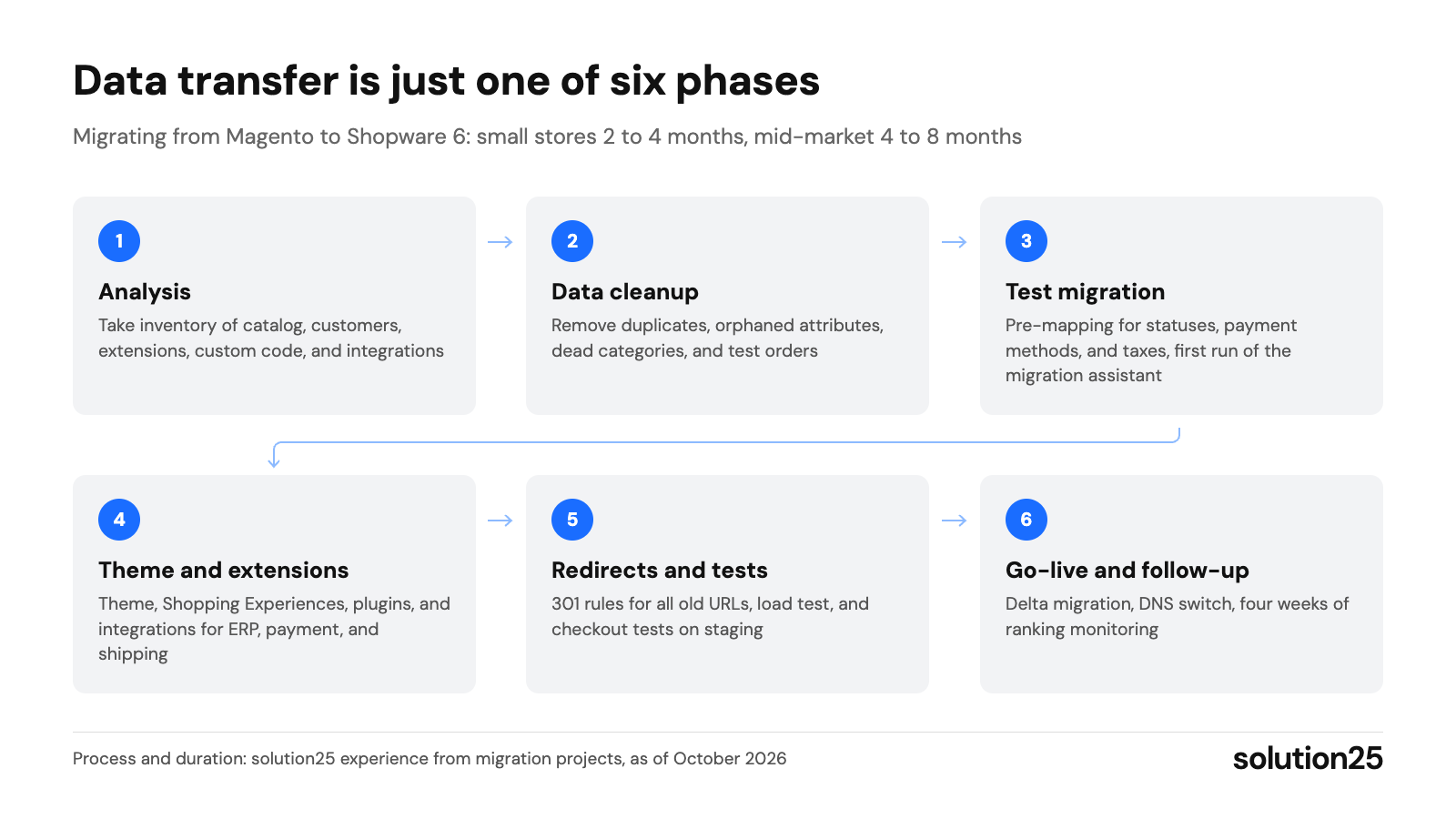
Figure: The migration assistant transfers the data in one of six phases; analysis, theme, extensions, and testing determine duration and budget. Process and duration: solution25 experience from migration projects, as of October 2026
Miniature Market, a retailer of board games, miniatures, and hobby supplies, ran a large Magento store with thousands of SKUs and ran into performance bottlenecks during demand spikes for new releases. We migrated the store to Shopware 6 and specifically replaced the weak points of the old setup.
According to the project report, the new store delivered faster search and filtering, better load times, and fewer abandoned carts, as well as fewer fulfillment errors and support tickets. For choosing a platform, the project shows that load behavior, warehouse integration, and special logic such as preorders belong in the requirements catalog before you compare platforms.
Yes, Adobe completed its acquisition of Magento on June 19, 2018. Since then, the commercial edition has been called Adobe Commerce, while the free version, Magento Open Source, remains available under the Open Software License 3.0.
Magento Open Source is free. Adobe Commerce is paid; Adobe doesn’t publish a list price, and pricing is quoted individually. In both cases, there are significant costs for hosting, development, and operations, because the stack requires OpenSearch, RabbitMQ, Valkey, and Varnish.
For the German mid-market, Shopware 6 is the obvious alternative, with a German vendor, a dense partner network, and B2B features from Evolve. For small product ranges, WooCommerce and Shopify are options, and for large enterprises SAP Commerce or Salesforce Commerce Cloud. If you want to stay with Magento, you can look into Mage-OS as a community-driven distribution.
Shopify goes live faster and is cheaper to start with; Shopware is more flexible, takes no commission on orders through third-party payment providers, and is significantly stronger in B2B. For merchants with their own processes and integrations, Shopware is usually the more cost-effective choice from the second year on.
Technically, WooCommerce can scale a long way with lots of caching, strong hosting, and extensions. Economically, that rarely pays off: once you have a few thousand products with variants, B2B pricing, or an ERP integration, plugins, maintenance, and troubleshooting cost more than a Shopware store that handles these requirements in its core.
Not anymore. In its current version 14.0.0, the Magento profile for the migration assistant supports Magento 2.0 to 2.4; support for Magento 1.9 was removed in March 2026 with version 11.0.0. Magento 1 stores are migrated via an older profile version or a custom import script via the Admin API.
Small stores with standard processes take 2 to 4 months, and mid-sized stores with ERP integration, custom modules, and multiple languages 4 to 8 months. The data transfer itself is the smallest part; most of the time goes into theme, extensions, integrations, and testing.
Send us your requirements from the first five steps via our contact page. We’ll check which platform covers them best, give you a realistic range for budget and timeline, and also tell you if a switch doesn’t make sense for you.
Already running a store, on any platform? Our free store audit shows where you’re leaving revenue on the table today and whether the problem lies in the platform or the implementation.

Besnik Bilalli is founder and CEO of solution25, the Shopware agency based in Bremen. Before founding the agency in 2017, he built his own online store and grew it to more than 500 orders a day. Since then, he has guided merchants through Shopware projects, from the first cost estimate to day-to-day operations. He’s happy to answer questions about this article personally: get in touch.
Responsible for content and updates: Besnik Bilalli. Last updated: October 2026. Next content review: January 2027.
