Logo Dark
  • E-Commerce

    See where your store can improve.

    Get Your Free Audit
    Frame 1321315514

    Shopware

    Platinum Partner, now in the US

    More
    Frame 1321315514 1

    Shopify

    Fast to launch, built to scale

    More
    Frame 1321315514 19

    Magento

    Complex catalogs and B2B

    Coming soon
    Frame 1321315514 18

    WooCommerce

    Flexible commerce for growing businesses

    Coming soon
    Frame 1321315514 2

    Migrations

    Move platforms without disrupting revenue

    More
    Frame 1321315514 3

    Integrations

    Payments, tax, fulfillment, marketing

    More
    Frame 1618873659

    Start your Shopware migration with us.

    Learn more
  • Software & AI

    See where your store can improve.

    Get Your Free Audit
    Frame 1321315514 4

    Software Development

    Platforms and portals, systems connected

    Coming soon
    Frame 1321315514 5

    App Development

    Web and mobile apps, API-first

    Coming soon
    Frame 1321315514 6

    AI Development

    Models connected, data enriched, assistants

    Coming soon
    Frame 1321315514 7

    Replatforming

    Switch platforms without losing revenue

    More
    Frame 1321315514 8

    All Integrations

    Payments, tax, fulfillment, marketing

    More
    Frame 1618873659 1

    Discover our latest Shopware plugin. FreeShip for Shopware 6

    Explore the plugin
  • Solutions

    See where your store can improve.

    Get Your Free Audit

    Further links

    Frame 1321315514 16 GitHub Arrow Up Right Frame 1321315514 17 Shopware Store Arrow Up Right
    Frame 1321315514 10

    Shopware Plugins

    Extensions built by our team

    More
    Frame 1321315514 11

    Optimizely Integrationen

    Campaigns, automation and customer engagement

    More
    Frame 1321315514 12

    Lavet

    Migration and integration platform

    More
    Frame 1321315514 13

    StatHubs

    All store metrics in one dashboard

    Coming soon
    Frame 1321315514 21

    Pathway

    By Boldest, in partnership with solution25

    Coming soon
    Frame 1321315514 9

    synsmarts

    AI-native cloud hosting, Exclusive Partner

    Coming soon
    Frame 1618873659 2

    Discover our Optimizely Campaign plugin.

    Explore the plugin
  • Company

    See where your store can improve.

    Get Your Free Audit

    About

    Events & Summit

    Resources

    Careers

    Frame 1618873659 3

    Built by people who know commerce.

    Chevron Right White
  • Contact
  • Language: EN

    Select Language

    • DE
    • EN
+1 929-264-76 02
  • DE
  • Free consultation
    1. Home /
    2. PayTrace Payment for Shopware 6
    GitHub

    PayTrace Payment for Shopware 6

    433851049 58d1ee9f 560d 43cf 8b47 C7692034a335 Scaled
    Share

    Table of content

    Free 15 min initial consultation directly with our experts.

    Free consultation +49 421 438 1919–0
    Share

    Introduction

    The PayTrace Payment Plugin is a powerful and fully integrated payment solution designed to bring secure, reliable, and efficient credit card and ACH transaction processing directly into your Shopware 6 store. Built to simplify online payments while maintaining the highest security standards, this plugin enables merchants to offer a seamless checkout experience for their customers without relying on external payment pages. With advanced tokenization technology, built-in fraud protection, and comprehensive administrative control, PayTrace empowers businesses to handle transactions safely, reduce risk, and increase overall conversion rates.

    Developed with both merchants and customers in mind, the PayTrace Payment Plugin supports a wide range of payment methods and processing features that enhance flexibility and usability. It allows for secure one-time payments as well as convenient saved-card transactions, making repeat purchases faster and more user-friendly. The plugin integrates smoothly into the native Shopware checkout process, ensuring a consistent and professional shopping experience. Additionally, merchants gain full visibility over all payment activities, with detailed transaction logs, refund capabilities, and real-time status updates available directly within the Shopware admin panel. Whether you are running a small online store or a large-scale e-commerce platform, the PayTrace Payment Plugin provides the tools needed to manage payments efficiently and with confidence. Its robust functionality, security-focused architecture, and easy configuration make it an essential addition for any Shopware 6 merchant looking to streamline payment operations and deliver a trustworthy, high-performance checkout experience.

    Key Features

    Our platform provides Secure Payment Processing, allowing businesses to accept Visa, MasterCard, AMEX, Discover, and ACH transactions with confidence. Through advanced Tokenization, customer payment details are securely stored, enabling faster and safer future purchases. The Saved Cards feature allows customers to reuse previously stored payment methods for quick repeat purchases, improving checkout convenience and user experience. With complete Admin Panel Integration, merchants can easily configure API credentials, manage transaction settings, and view detailed payment logs directly within the Shopware admin interface. The system supports the Full Transaction Lifecycle, including payments, refunds, and voids, with all actions recorded and accessible in order details. Built for global commerce, the solution offers Multi-Currency Support, making it easy to accept payments in various currencies for expanded international reach.
    Security is a top priority, and the platform fully meets PCI DSS Compliance requirements to ensure strict protection of payment processing and customer data. Thanks to Flexible Configuration, merchants can switch between sandbox or live PayTrace environments and enable or disable specific payment types per Sales Channel. The checkout process is fully Mobile & Desktop Optimized, delivering a responsive and smooth experience across all devices. Additionally, Real-Time Status Updates ensure that payment statuses are automatically reflected in Shopware orders for accurate and up-to-date transaction management.

    Compatibility

    • ✅ Shopware 6.6.x

    Get Started

    • Installation & Activation :

    GitHub
    1.Clone the plugin into your Shopware plugins directory:

    git clone https://github.com/solution25com/paytrace-payment-shopware-6-solution25.git


    Packagist

    
    composer require solution25/pay-trace


    2.Install the Plugin in Shopware 6

    • Log in to your Shopware 6 Administration panel.

    • Navigate to Extensions > My Extensions.

    • Locate the newly cloned plugin and click Install.

    3.Activate the Plugin

    • After installation, click Activate to enable the plugin.

    • In your Shopware Admin, go to Settings > System > Plugins.

    • Upload or install the “PayTrace” plugin.

    • Once installed, toggle the plugin to activate it.

    4.Verify Installation

    • After activation, you will see PayTrace in the list of installed plugin

    • The plugin name, version, and installation date should appear.

    Plugin Configuration

    After installing the plugin, you can configure your PayTrace credentials and options through the Shopware Administration panel.

    Accessing the Configuration

    Go to Settings > Extensions > PayTrace
    Select the Sales Channel you want to configure
    Set the following fields:
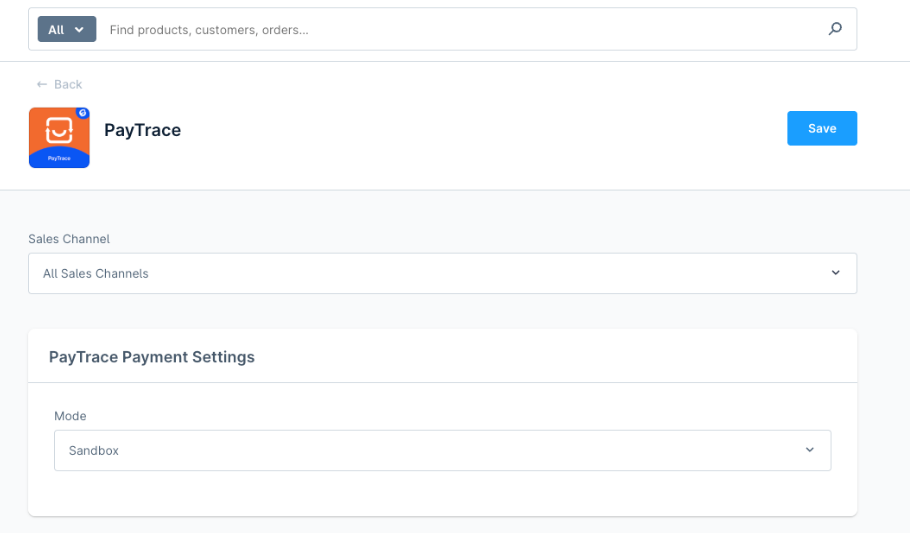
    433864311 3ba2ecce 6644 4350 8896 66c5ce219f7b

    API Credentials

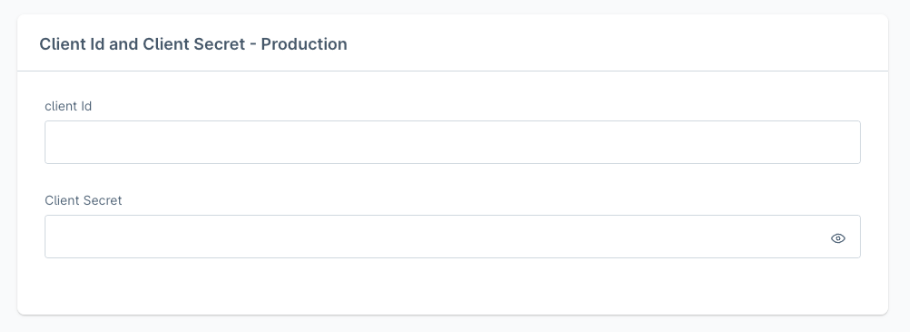
    Production

    433864789 84fa1fb5 D739 4908 9416 7261051ddabb
    • Your PayTrace production client ID

    • Your PayTrace production client secret

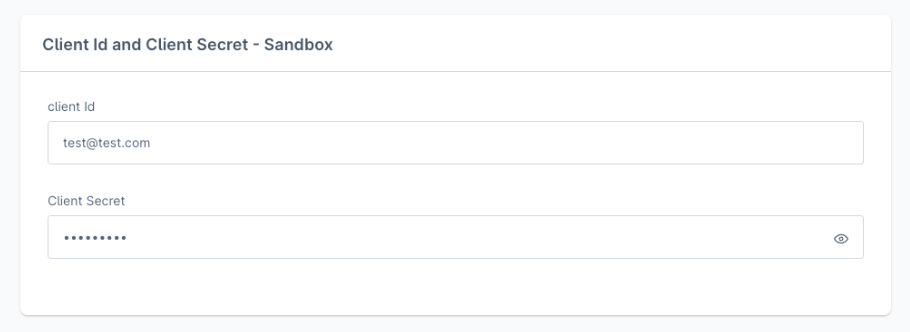
    Sandbox

    433864828 Ece709fc 3f35 4d47 B60a F92ae0fc2ebb
    • Your PayTrace sandbox client ID

    • Your PayTrace sandbox client secret

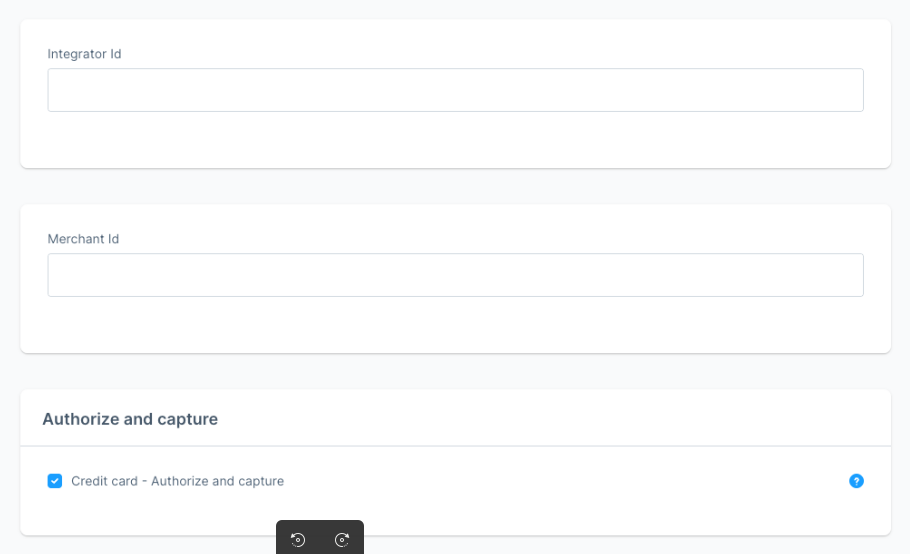
    433865315 386cb784 Efa0 4d44 Bce0 C21eec62aba0
    • If enabled, payments are captured immediately after authorization (applies to credit card transactions)

    Checkout Experience

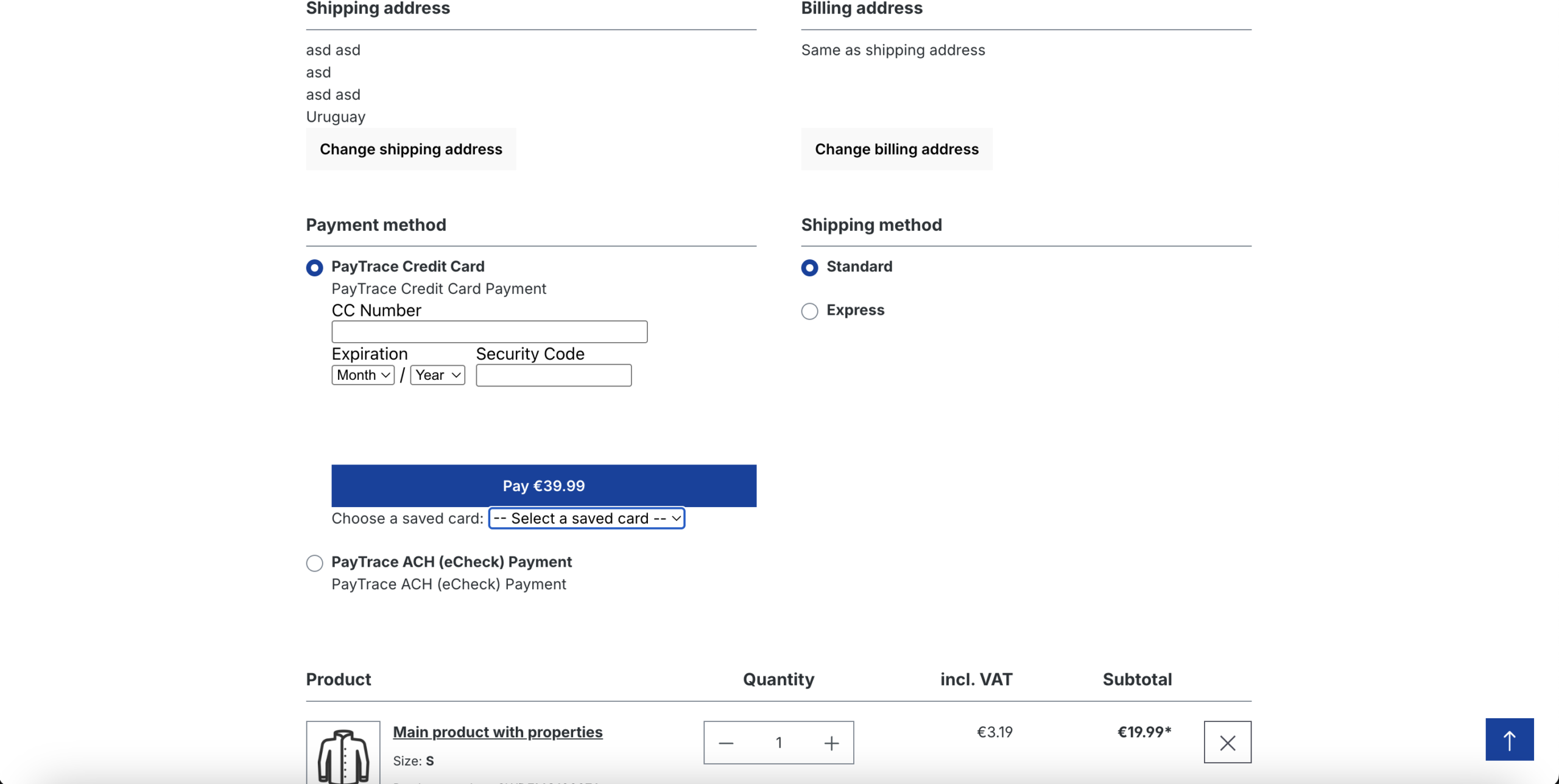
    The plugin integrates seamlessly into the Shopware 6 checkout, offering a smooth and intuitive payment process. Customers can choose between Credit Card and ACH (eCheck) payment methods provided by PayTrace, directly on the checkout page.
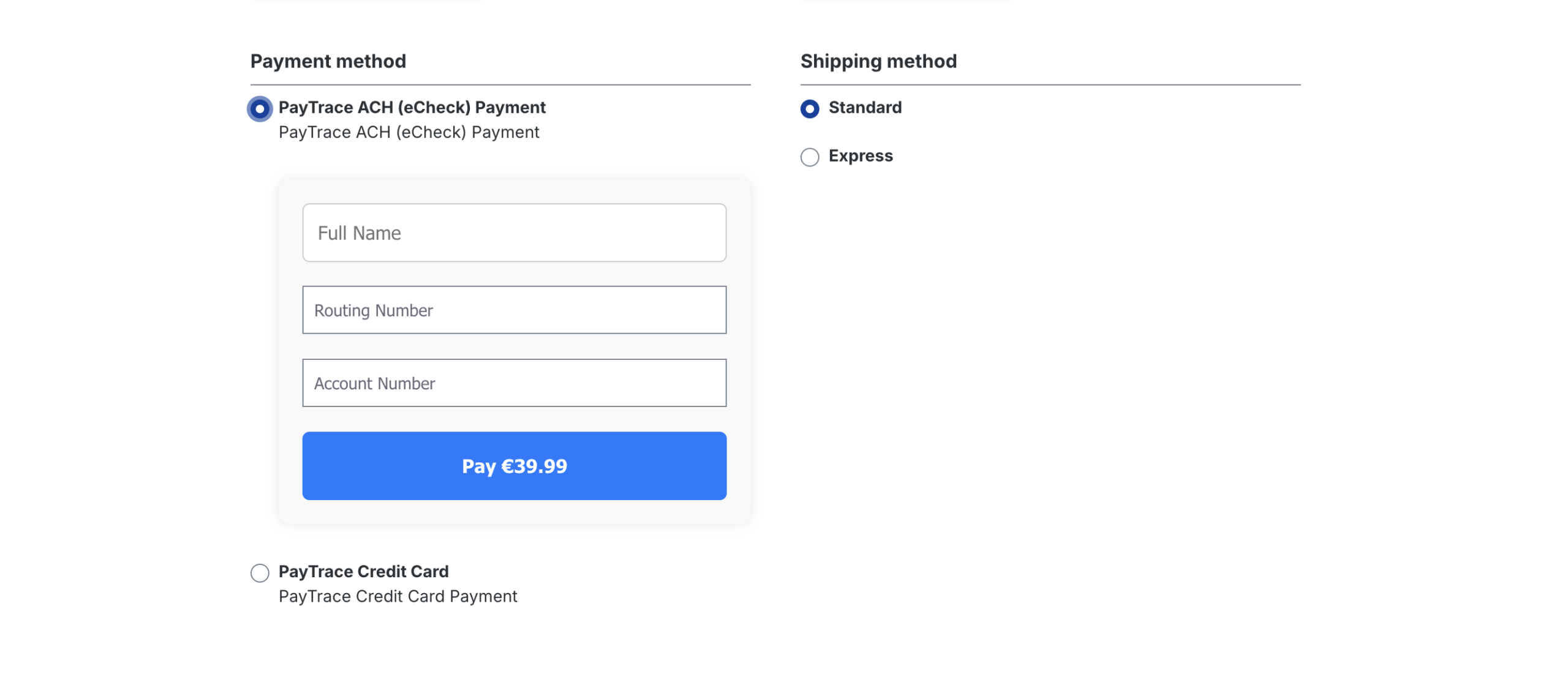
    ACH (eCheck) Payment

    433860705 2f302c33 C8ae 4066 A940 4f54984137db Scaled
    • Customers simply enter their Full Name, Routing Number, and Account Number.

    • The interface automatically updates the payment amount on the button.

    • Fully responsive and styled to match modern checkout flows.

    Add a New Card

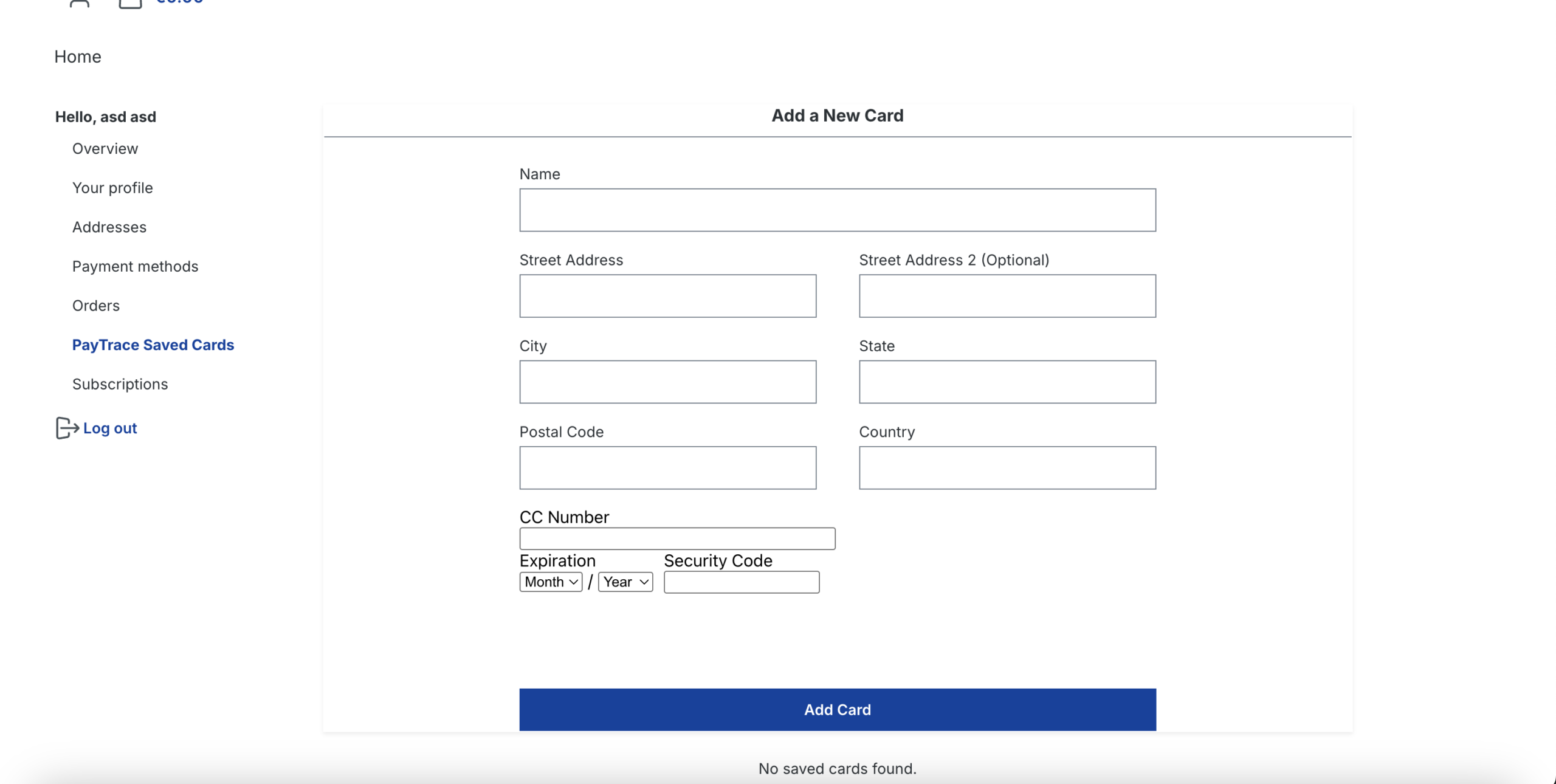
    The plugin supports storing and managing saved credit cards for faster and more convenient checkouts.
    Accessing the Saved Cards
    Users can manage their saved payment methods through their Account Dashboard by navigating to:

    
    PayTrace Saved Cards


    Adding a New Card
    Click “PayTrace Saved Cards” to open the card form. You will be prompted to enter:
    433874400 93f7a38b F6dc 482e 8dc1 772e6b29a171 Scaled
    433875846 760c3a0c A4ee 424b Bb0e C390e4486d28 Scaled

    PayTrace Plugin - API Documentation

    This document provides a comprehensive overview of the external PayTrace API endpoints that are utilized by the PayTrace Plugin for Shopware 6. It outlines how the plugin communicates securely with the PayTrace payment platform in order to deliver reliable and seamless payment functionality within the Shopware environment. These API endpoints are used internally by the plugin to perform a wide range of essential payment operations, including the tokenization of sensitive payment data, the processing of credit card transactions, the management of vaulted or stored customer payment methods, and the handling of ACH (eCheck) payments. By leveraging these endpoints, the plugin is able to securely transmit transaction information, retrieve real-time payment statuses, and maintain full transaction lifecycle support without exposing sensitive financial data.

    API Documentation

    Related topics

    • Quotes Customer Specific Pricing for Shopware 6
    • Square Payments-Shopware 6 solution25
    • Store Credit

    Our drive.
    Your growth.

    The agency for e-commerce, software and AI.

    Get free advice
    Company
    • About Us
    • Events
    • Blog
    • Careers
    Events
    • Shopware
    • Shopify
    • Integrations
    • Migration
    Legal
    • Imprint & Legal Information
    • Privacy Policy
    Location
    Bremen Marcusallee 16, 28359 Bremen 0421 438 1919-0 info@solution25.com
    Group 1321315536 1
    Group 1321315537 1

    © 2026 solution25. All rights reserved

    Linkedin Facebook Instagram