• DE
  • EN
    • +1 929-264-76 02
    • Request free audit
    • n8n-Shopware
  • Solution25 Logo Dark 1
  • Group 3
  • Shopware

    SUPPORT

    • Shopware Core Concepts
    • Who Uses Shopware?
    • Become a Good Shopware Partner
    • Shopware Hosting
    • Shopware Pre Go-Live Checklist
    • Why Shopware in 2025?

    MUST KNOW

    • B2B on Shopware
    • B2C on Shopware
    • Shopware Performance
    • Shopware Paas on Platform.sh
    • Shopware for the U.S Market
    • Shopware Seo Guide

    Start your secure migration with us.

    Solution25 6 Certified Advanced Developer
    Solution25 6 Certified Advanced Template Designer
    Solution25 6 Certified Solutions Specialist
    Solution25 6 Certified PaaS Specialist
    Migrate now!
  • Shopify

    SUPPORT

    • What is Shopify?
    • Who should use Shopify?
    • What can you do with Shopify?
    • How much does Shopify cost?
    • How do you choose your Shopify theme?

    MUST KNOW

    • Can you connect Amazon to Shopify?
    • Who Owns Shopify?
    • Shopify Disadvantages
    • Benefits of Shopify

    Migrate your store with expert Shopify support.

    Group 1321315317 Certified Advanced Developer
    Solution25 6 Certified Advanced Template Designer
    Solution25 6 Certified Solutions Specialist
    Solution25 6 Certified PaaS Specialist
    Free consultation!

    SUPPORT

    • What is Shopify?
    • Who should use Shopify?
    • What can you do with Shopify?
    • How much does Shopify cost?
    • How do you choose your Shopify theme?

    MUST KNOW

    • Can you connect Amazon to Shopify?
    • Who Owns Shopify?
    • Shopify Disadvantages
    • Benefits of Shopify

    Migrate your store with expert Shopify support.

    Group 1321315317 Certified Advanced Developer
    Solution25 6 Certified Advanced Template Designer
    Solution25 6 Certified Solutions Specialist
    Solution25 6 Certified PaaS Specialist
    Free consultation!
  • Integrations

    Integrations

    BlueSnap Logo

    Shopware 6 Blue Snap

    Cybersource Icon

    Shopware 6 Cybersource

    Solution25 Icon

    Shopware 6 Abandoned Cart Saver

    Solution25 Icon

    Shopware 6 Store Credit

    Optimizely Icon

    Shopware 5 Optimizely Campaign

    Optimizely Icon

    Shopware 6 Optimizely Campaign

    Paytrace Icon

    Shopware 6 PayTrace Payment

    Nmi Payment Icon

    Shopware 6 NMI Payment

    Maxmind Icon

    Shopware 6 MaxMind Fraud Prevention

    Solution25 Icon

    Shopware 6 Quotes & Customer-Specific Pricing

    Solution25 Icon

    Shopware 6 Subscription

    Listrak Icon

    Shopware 6 Listrak

    Solution25 Icon

    Shopware 6 Multi Channel

    Solution25 Icon

    Shopware 6 Partial Delivery

    Age Checker Icon

    Shopware 6 AgeChecker.net

    Pudo Point Icon 1

    Shopware 6 Pudo Point

    SUPPORT

    • Why API First Opens Doors?
    • Reduce the cost of ERP integrations
    • PyPal Payment Provider
    • Klaviyo Integration Guide for Shopware 6
    • Klaviyo - Email Marketing Integration

    MUST KNOW

    • Reviews.io Integration Guide for Shopware 6
    • Hubspot - Integration for Shopware 6
    • Mailchimp - Email Marketing Integration
    • Google Analytics - Integration Guide
    • Integrate Zapier with Shopware 6

    Explore secure integrations now.

    Solution25 6 Certified Advanced Developer
    Solution25 6 Certified Advanced Template Designer
    Solution25 6 Certified Solutions Specialist
    Solution25 6 Certified PaaS Specialist
    Free consultation
  • Migration

    Migration

    Shopware5 To Shopware6

    Shopware 5 to Shopware 6

    Shopify To Shopware6

    Shopify to Shopware 6

    Magento To Shopware6

    Magento to Shopware 6

    Oxid To Shopware6

    Oxid to Shopware 6

    SUPPORT

    • Migrations
    • Prep for Shopware Platform Migrations
    • Our Shopware Process
    • Painful Shopware 6 Migrations if Done Wrong

    MUST KNOW

    • Shopware Prep: Historical Order Data
    • Shopware Data Ready
    • Shopware Content Migrations
    • SEO Considerations in Platform Migrations

    Ready to migrate your shop?

    Solution25 6 Certified Advanced Developer
    Solution25 6 Certified Advanced Template Designer
    Solution25 6 Certified Solutions Specialist
    Solution25 6 Certified PaaS Specialist
    Migrate now!
  • Company

    Company

    • About Us
    • Events
    • Blogs
    • Careers
    Solution25 Company
  • Language: EN

    Select Language

    • DE
    • EN
  • Free consultation
  1. Home /
  2. Store Credit
GitHub

Store Credit

432200895 Bb12d407 D013 41dd B97e C3d08112c054
Share

Table of content

Free 15 min initial consultation directly with our experts.

Free consultation +49 421 438 1919–0
Share

Introduction

The Store Credit Plugin for Shopware 6 provides a flexible and convenient solution for managing customer returns and refunds. Instead of processing traditional refunds, store administrators can allocate store credit directly to a customer’s account. This credit can then be used for future purchases, allowing customers to continue shopping while maintaining their funds within the store ecosystem.
The plugin ensures that store credits can be applied across multiple orders until the allocated amount is fully used, giving customers maximum flexibility in how and when they redeem their credits.

Administrators have full control over issuing, tracking, and managing credits, making it easy to maintain accurate records and provide a seamless customer experience. By offering store credit instead of refunds, merchants can improve customer retention, reduce transaction fees, and encourage repeat purchases, all while streamlining the returns process. The Store Credit Plugin integrates smoothly into the Shopware environment, allowing credits to be easily applied at checkout and tracked in the admin panel for complete oversight.

Key Features

  • Store Credit Management:Admins can add, remove, and adjust store credit for customers.

  • Partial Usage: Customers can use store credit across multiple orders until exhausted.

  • Smooth Checkout Integration Customers can apply store credit at checkout alongside other payment methods.

  • Transaction History: Customers and admins can view a history of store credit transactions.

Compatibility

  • ✅ Shopware 6.6.x

Get Started

  • Installation & Activation

1.Download

  • Clone the Plugin Repository:

  • Open your terminal and run the following command in your Shopware 6 custom plugins directory (usually located at custom/plugins/):

git clone https://github.com/solution25com/store-credit-shopware-6-solution25.git

2.Install the Plugin in Shopware 6

  • Log in to your Shopware 6 Administration panel.

  • Navigate to Extensions > My Extensions.

  • Locate the newly cloned plugin and click Install.

3.Activate the Plugin

  • After installation, click Activate to enable the plugin.

  • In your Shopware Admin, go to Settings > System > Plugins.

  • Upload or install the “Store Credit” plugin.

  • Once installed, toggle the plugin to activate it.

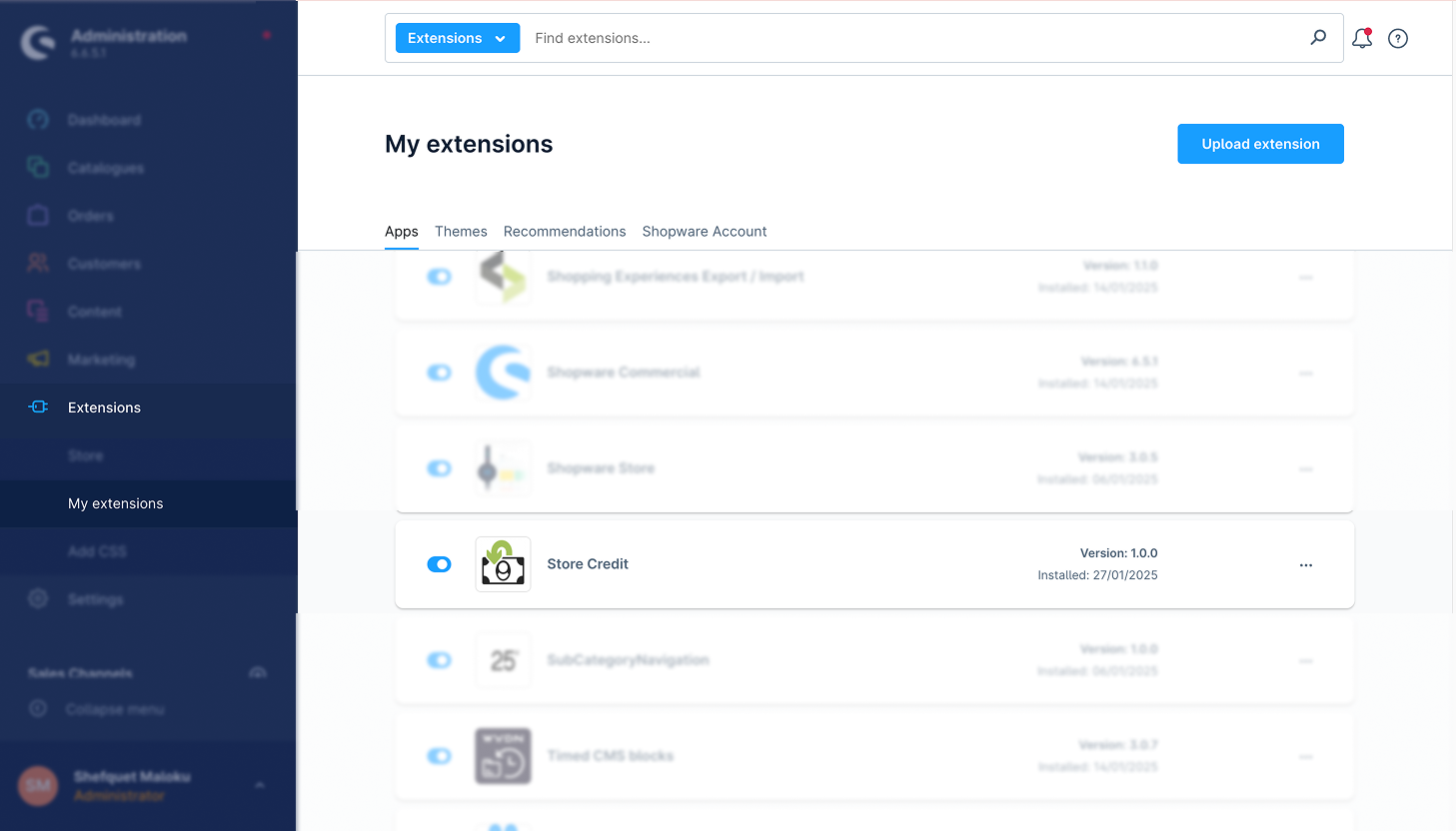
4.Verify Installation

  • After activation, you will see Store Credit in the list of installed plugins.

  • The plugin name, version, and installation date should appear as shown in the screenshot below.

432200996 Ee52304c 21f8 42a8 9f12 A90287bc1327

Plugin Configuration

1.Access Plugin Settings

  • Go to Settings > System > Plugins.

  • Locate Store Credit and click the three dots (...) icon or the plugin name to open its settings.

2.General Settings
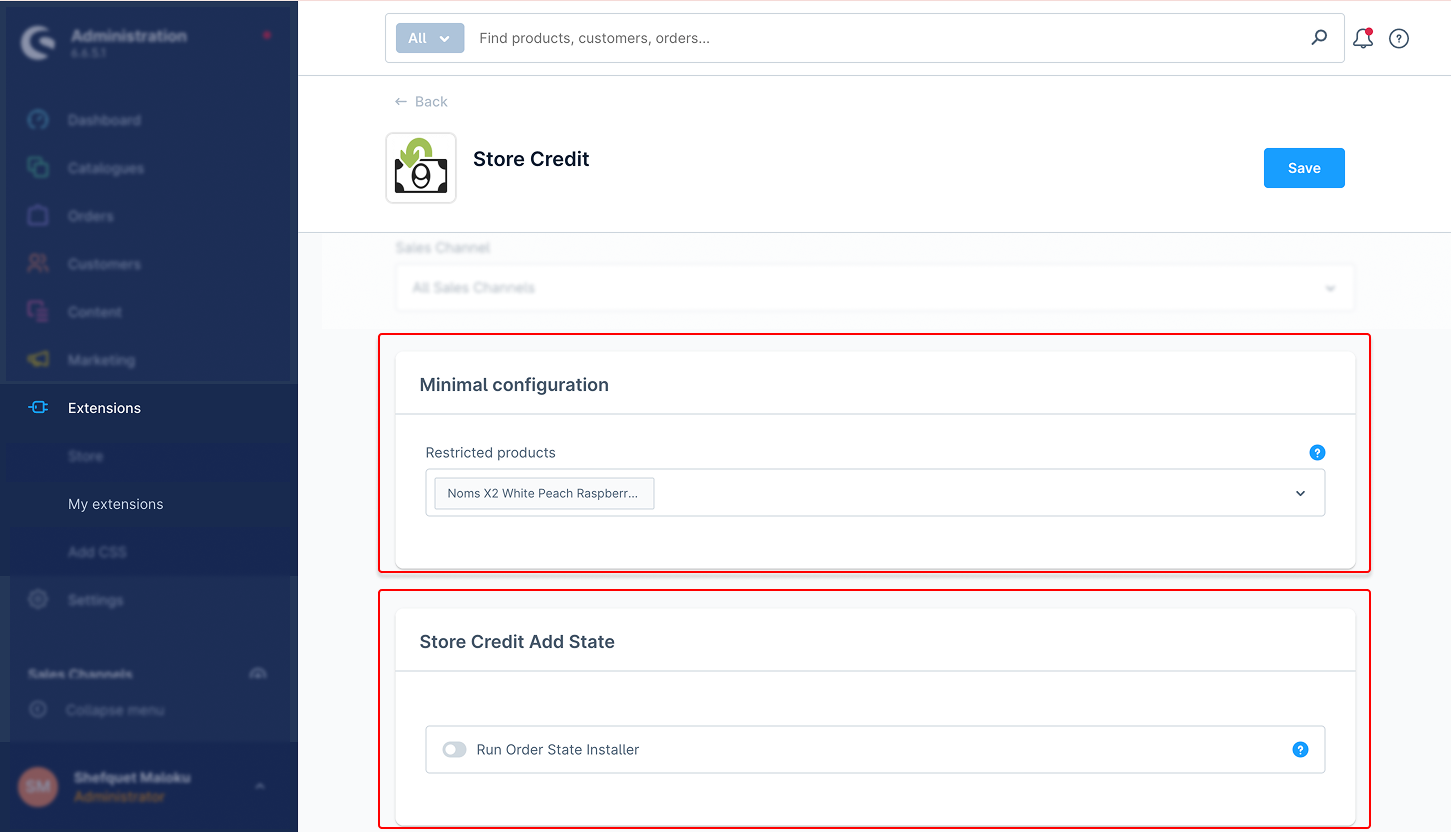
1. Minimal Configuration: After installing the Store Credit Plugin, you need to enable the Store Credit Refund Type in the configuration. Since this plugin is related to Swag Commercial, the toggle should be enabled for the Store Credit Refund Type option to activate store credit refunds.
432201195 1b9a2531 5ce2 4c69 95ff Bcf934d5375f

2. Store Credit Add State: Toggle to enable or disable the feature.
3. Post Purchase Features: Restrict store credit usage to specific products.
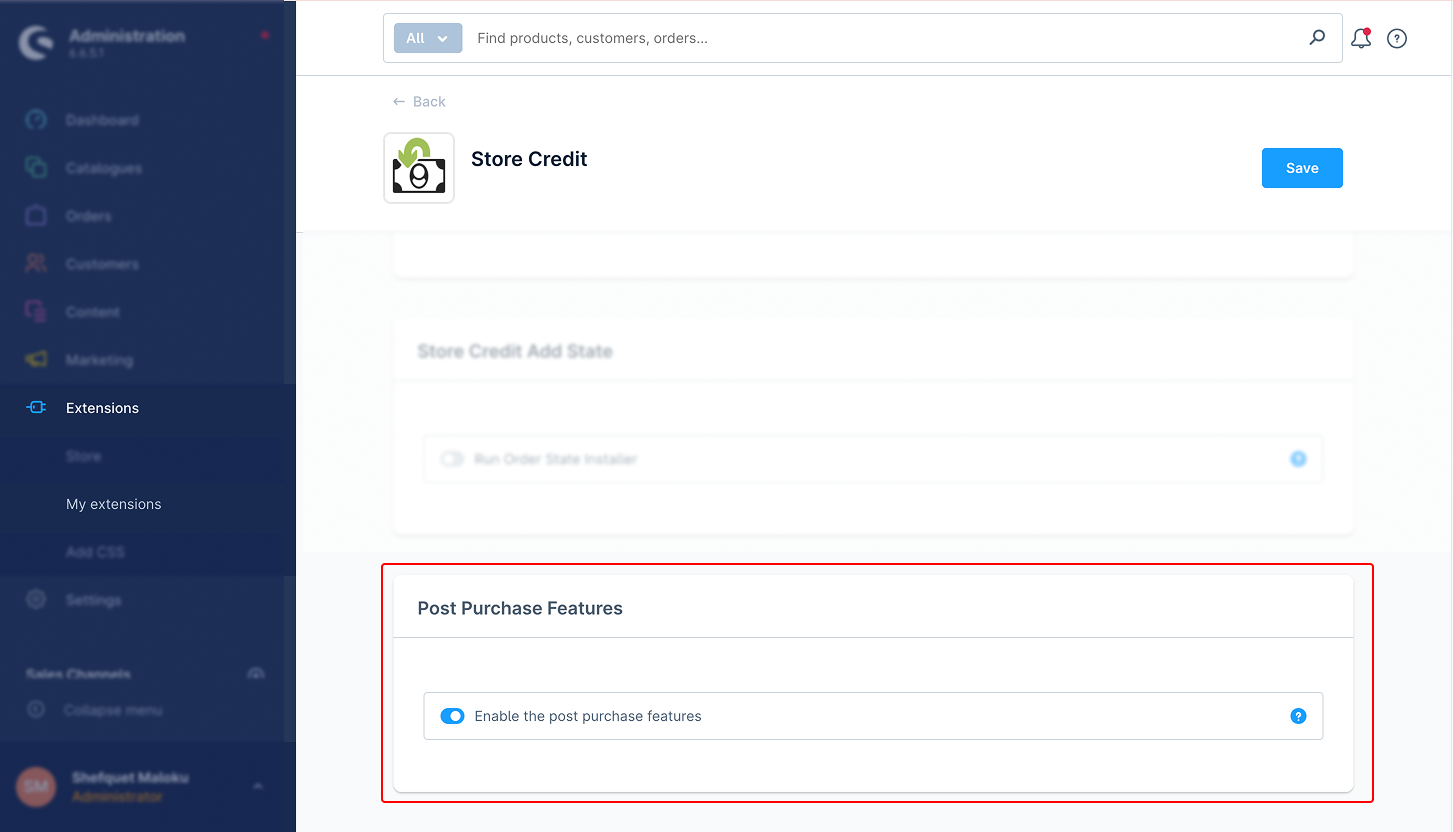
432201310 6c0da891 9f8d 4f72 Bb91 1379a1862491

How it works

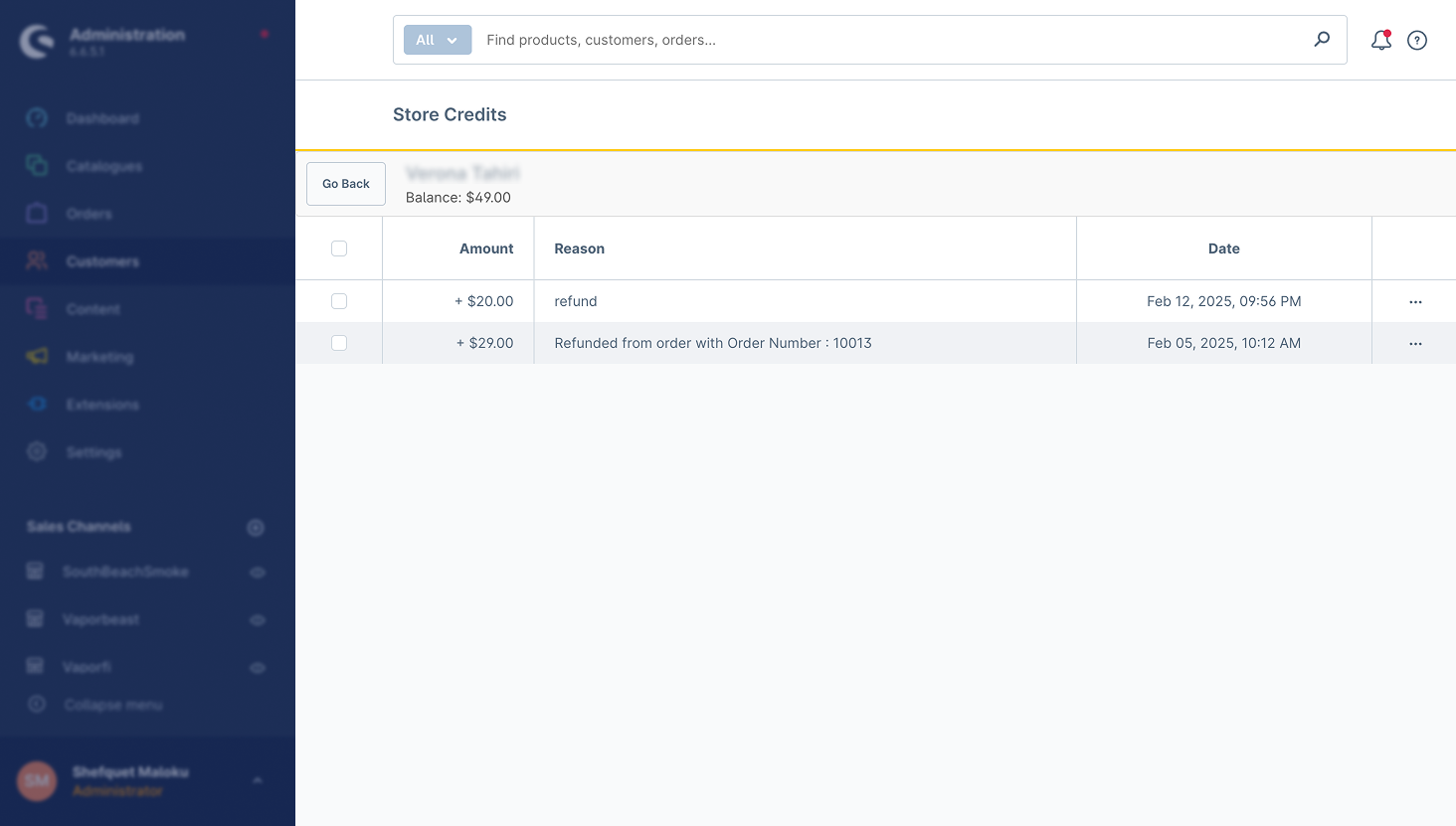
After installing and enabling the plugin in the admin panel, customers can view their available balance and transaction history in their profile account settings on the storefront.
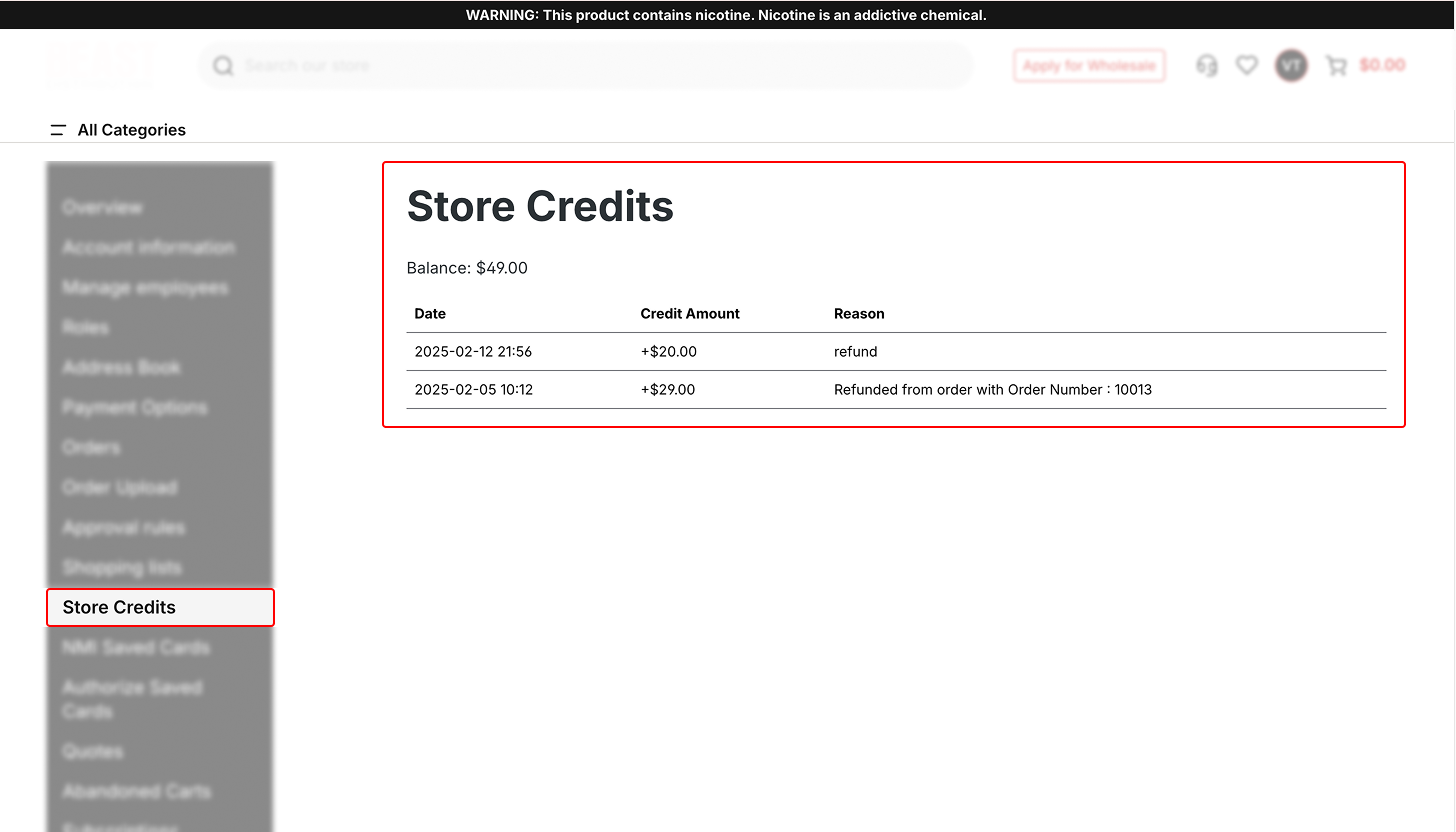
432201402 5005aaea 4109 4b3f Bff8 B1bf9b268b3c

Admins can manually add or deduct store credit from a customer’s account.
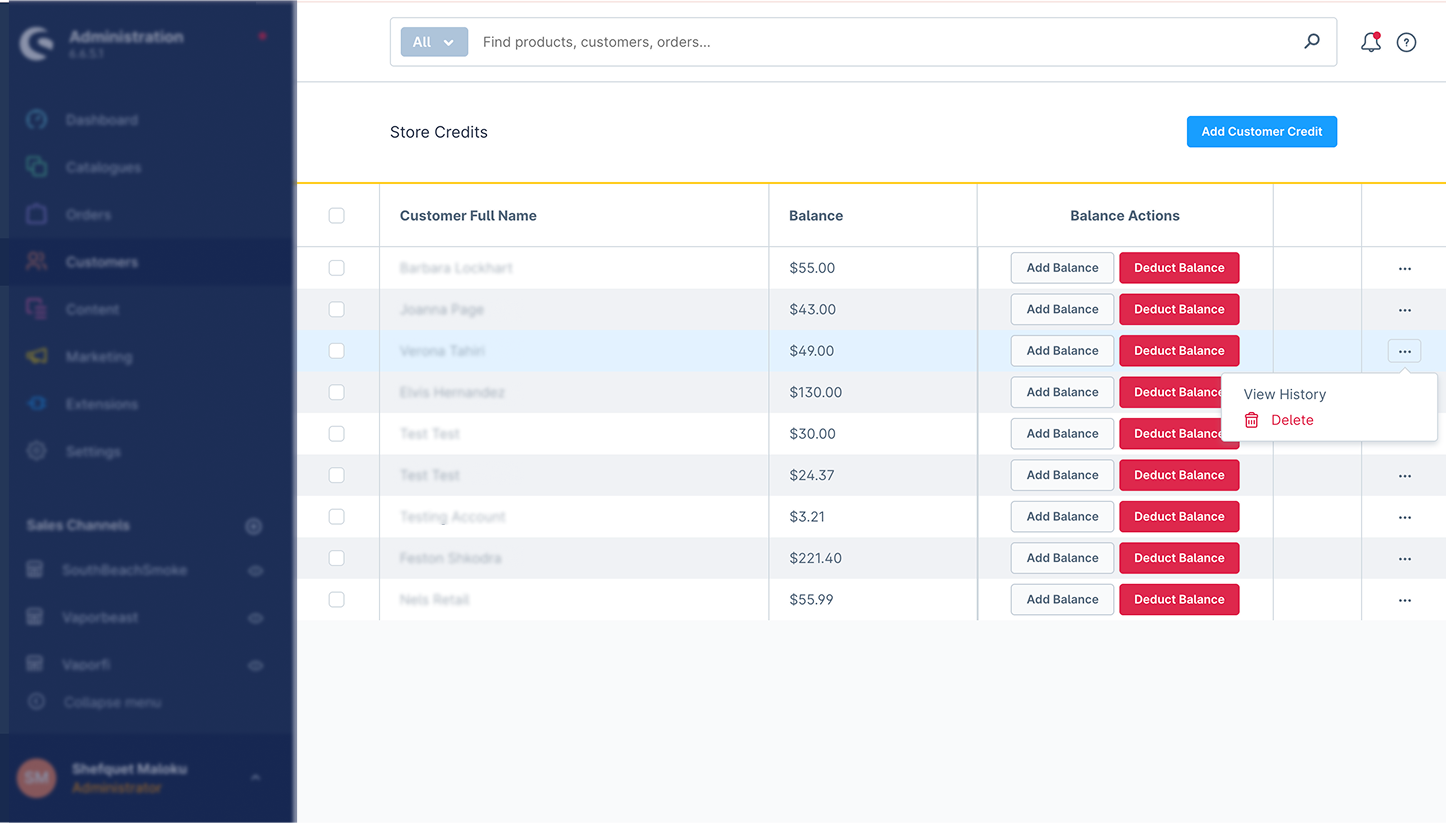
432201508 1486cb7b B82f 4817 B958 038283332661
432201532 Ec63a465 A4e7 49b5 A5e4 985c95676857

Refunds & Credit Memo Workflow

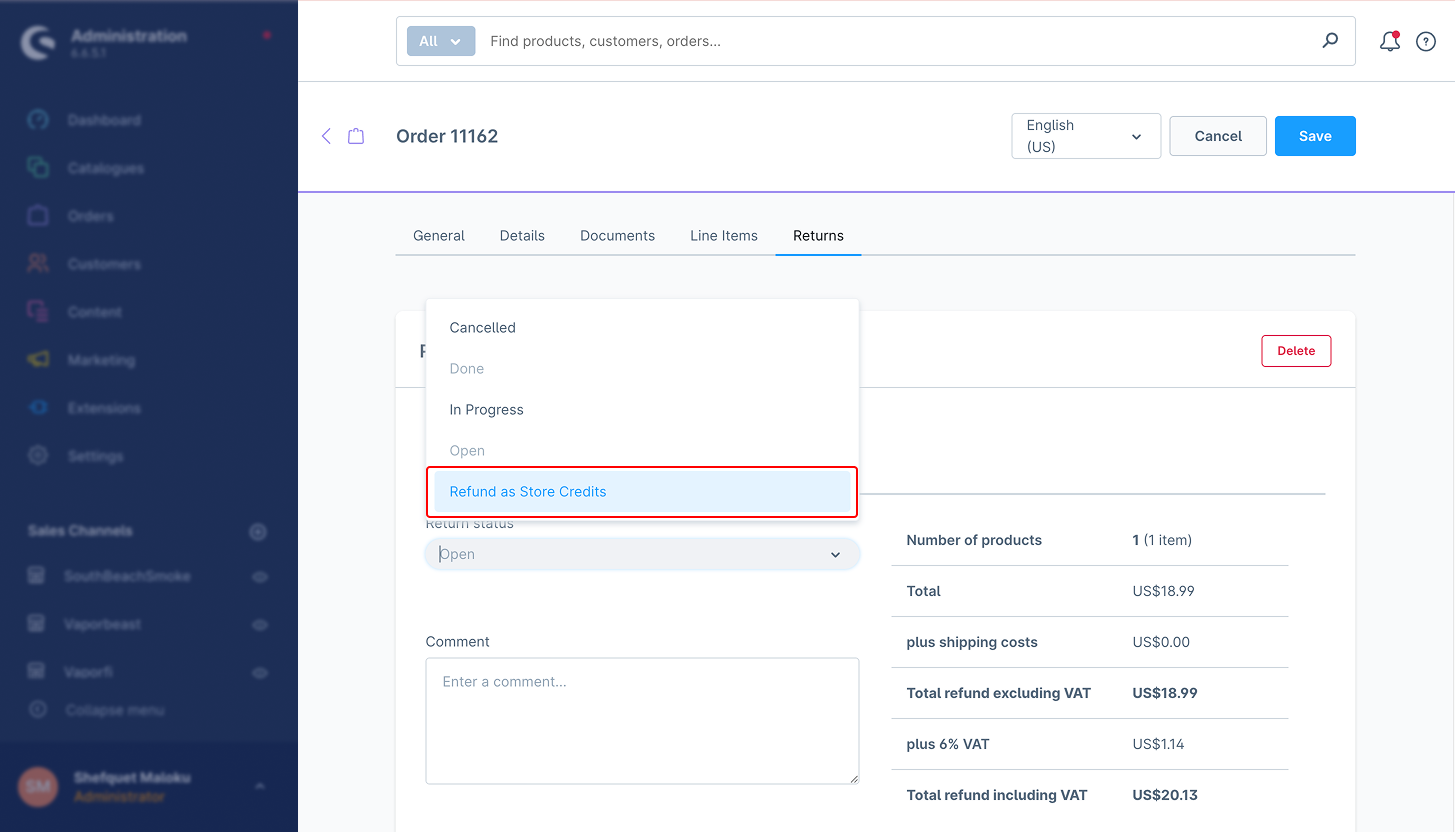
  • When processing a return, select the "Refund as Store Credit" option.

  • The refunded amount is added to the customer's store credit balance.

  • Customers can use the store credit for future purchases.

  • All transactions are logged in the store_credit_history table for tracking.

432201644 1e6d6251 8579 4d66 9dfe 466993b49583

Refunds & Store Credit Management

Partial & Full Refunds:

  • When issuing a refund, choose between a partial or full refund to store credit.

  • The refunded amount is automatically added to the customer's store credit balance.

  • The order status updates accordingly.

Project Structure

Storefront – Key Files/Folders

  • Controller Folder: Defines the store credit balance table and store credit history with API.

  • CartSubscriber.php: Checks if the user has used the store credits.

  • OrderRefundSubscriber.php: It handles the refund as store credit option.

  • CustomCheckoutController.php: Defines store credit as a payment option.

Core – Key Files/Folders:

  • Entities/StoreCredit.php: Manages store credit data model.

  • Entities/StoreCreditHistory.php: Logs store credit transactions.

Resources – Key Files/Folders:

  • services.xml: Registers services for dependency injection.

  • routes.xml: Declares API routes.

Admin Panel – Key Features:

  • View history, add, and deduct store credit in customer details.

  • Generate reports on credit usage.

API Endpoints

Get Store Credit Balance
– Path: /store-api/store-credit/balance/{customer_id}
– Method: GET
– Purpose: Fetches the current store credit balance of a customer.
– Response: Returns the available credit balance.

Add Store Credit
– Path: /store-api/store-credit/add
– Method: POST
– Request Body:
– customer_id (string, required)
– amount (float, required)
– reason (string, optional) Response: Returns updated store credit details.

Deduct Store Credit

– Path: /store-api/store-credit/deduct
– Method: POST
– Request Body:
– customer_id (string, required)
– amount (decimal, required)
– order_id (string, optional) Response: Returns updated store credit details.


– Refund to Store Credit

– Path: /store-api/store-credit/add
– Method: POST
– Request Body:
– order_id (string, required)
– amount (decimal, required) Response: Refund processed and logged in credit history.
– reason (string, optional).
Use from end-users - Checkout Integration

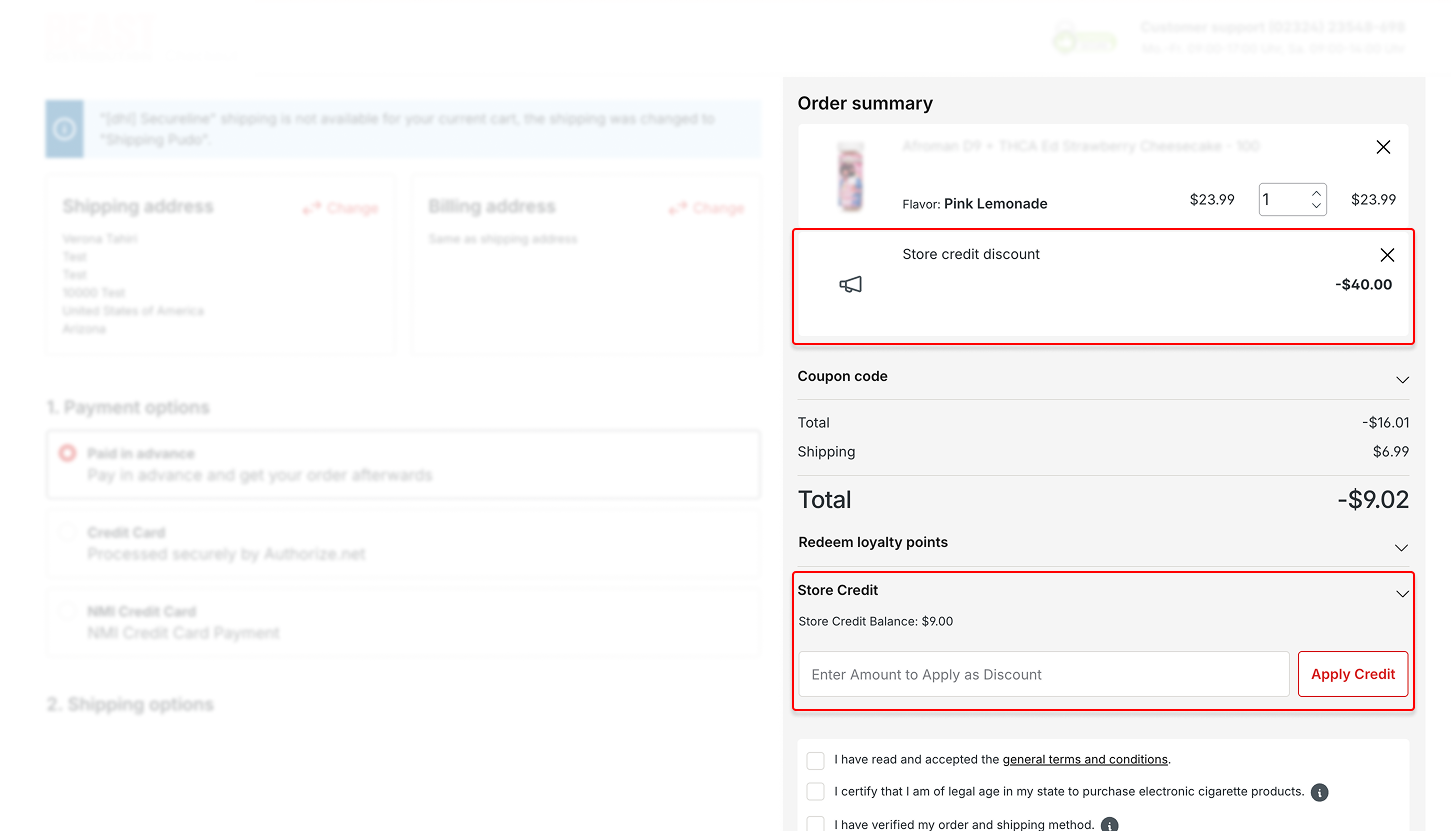
  • Customers can choose to apply store credit as payment during checkout.

432201767 02ec29e2 17b6 4f25 9b9c Fd8a387c2b7b
  • Partial and full store credit application supported.

  • Remaining balance is paid via an alternative payment method.

  • When an admin creates an order he can use the store credits of the customer he chooses, first you add the product in admin order creation, then you add another line item as credit and you use the specific name “Store credit discount“.

Store Credit Plugin - API Documentation

This document describes the API endpoints provided by the Store Credit Plugin for Shopware 6. These endpoints allow authorized users to manage store credits for customers and apply store credits during checkout.

Add Store Credit

Endpoint

POST /api/store-credit/add

Description

Adds a store credit amount to a specific customer’s balance. This can optionally be linked to an order and currency.

Request Headers

Authorization: Bearer 
Content-Type: application/json

Example Request Body

{
  "customerId": "3c2a178f96b7345ad27051c34609e52",
  "amount": 50.0,
  "reason": "Manual admin adjustment"
}

Successful Response

{
  "success": true,
  "historyId": "f84b5a7a4fce4a1db9d693c8be304a1e"
}

Example Error Response

{
  "success": false,
  "message": "Customer ID is missing."
}

Deduct Store Credit

Endpoint

POST /api/store-credit/deduct

Description

Deducts a store credit amount from a customer’s balance. The deduction can include a reason for logging purposes.

Request Headers

Authorization: Bearer 
Content-Type: application/json

Example Request Body

{
  "customerId": "3c2a178f96b7345ad27051c34609e52",
  "amount": 20.0,
  "reason": "Refund adjustment"
}

Successful Response

{
  "success": true,
  "historyId": "a9d2554b0ce847cd82f3ac9bd1c0aa2f"
}

Example Error Response

{
  "success": false,
  "message": "Amount exceeds the maximum allowed credit for order."
}

Get Store Credit Balance

Endpoint

Description

Retrieves the current store credit balance for a customer.

Request Headers

Authorization: Bearer 

Example Request

GET /api/store-credit/balance?customerId=3c2a178f96b7345ad27051c309e52

Successful Response

{
  "success": true,
  "balance": 80.0,
  "currencyId": "b7d2554b0ce847cd82f3ac9bd1c0dfca"
}

Example Error Response

{
  "success": false,
  "message": "Customer not found."
}

Authentication Note

These endpoints are protected and require a Bearer token obtained through the Shopware Admin API.

Best Practices

1. Enable Store Credit Refunds
Ensure the Store Credit Refund Type option is activated in Settings > System > Plugins.
Allows refunds to be issued as store credit instead of cash.

2.Set Per-Order Credit Limits

Define a maximum limit for store credit usage per order (e.g., 50 euros).
Helps control how much credit can be used during checkout.

3. Monitor Store Credit Transactions

Regularly check the store credit transaction logs to track customer usage.
This helps to avoid errors and discrepancies.

4.Inform Customers About Their Credit
Make sure customers can see their available store credit balance in their account.
Send notifications when store credit is added or used.

5. Test Before Going Live
Test different scenarios, such as refunds, partial payments, and store credit applications during checkout.
Ensure everything functions properly before launching.
6.Use API to Customize for Your Needs
Use API endpoints to customize store credit rules and integrate with other store functions.
This allows for flexibility in how store credit is applied.

7. Restrict Store Credit for Certain Products

If necessary, restrict store credit usage for specific products or sales channels.
This ensures store credit is used where appropriate.

Troubleshooting

1.Store credit is not appearing at checkout

Ensure the Store Credit Refund Type is activated in the plugin settings.
Check if the customer has enough store credit in their account.

2.Refunds not issued as store credit

Verify that the refund method is set to Store Credit when processing returns.
Check for conflicts with other refund-related plugins.
3.Customer’s store credit balance is not updating
Ensure scheduled tasks are running with the following commands:

bin/console scheduled-task:register
bin/console scheduled-task:run
bin/console messenger:consume

Verify the store credit history is being logged in the database.

4.Admins cannot modify store credit

Ensure the admin has the necessary permissions to edit customer store credit.
Double-check that API calls for store credit adjustments are functioning.

5.Orders not using store credit during checkout

Ensure there is no restriction on store credit for the selected products.
Verify that the credit amount is within the allowed per-order limit.

FAQ

1.Can I restrict store credit usage to specific products?

Yes, you can restrict store credit usage for specific products or categories through the Post Purchase Features.

2.How do I add store credit to a customer’s account?

Admins can add store credit manually through the Customer Details section in the admin panel.

3.Can store credit expire?

Currently, the plugin does not support automatic expiration of store credit, but this feature can be customized.

4.Can customers see their store credit balance?

Yes, customers can view their available balance and transaction history in their account settings

Wiki Documentation

Read more about the plugin configuration on our Wiki

  • Email: info@solution25.com

    US: +1 929-264-76 02

    42nd St Suite 1201, New York, NY 10165

  • © 2026 solution25 - All rights Reserved.

    • Company
      • About Us
      • Events
      • Blog
      • Careers
    • Events
      • Shopware
      • Shopify
      • Integrations
      • Migration
    • Legal
      • Imprint & Legal Information
      • Privacy Policy
    • Social
      • Linkedin
      • Facebook
      • Instagram
    80+ Certificates
    Group
    Group 1
    Group 2